ENGLISH
BLACKSTONEPRODUCTS.COM/SUPPORT
OWNER’S MANUAL | ASSEMBLY GUIDE MODEL:
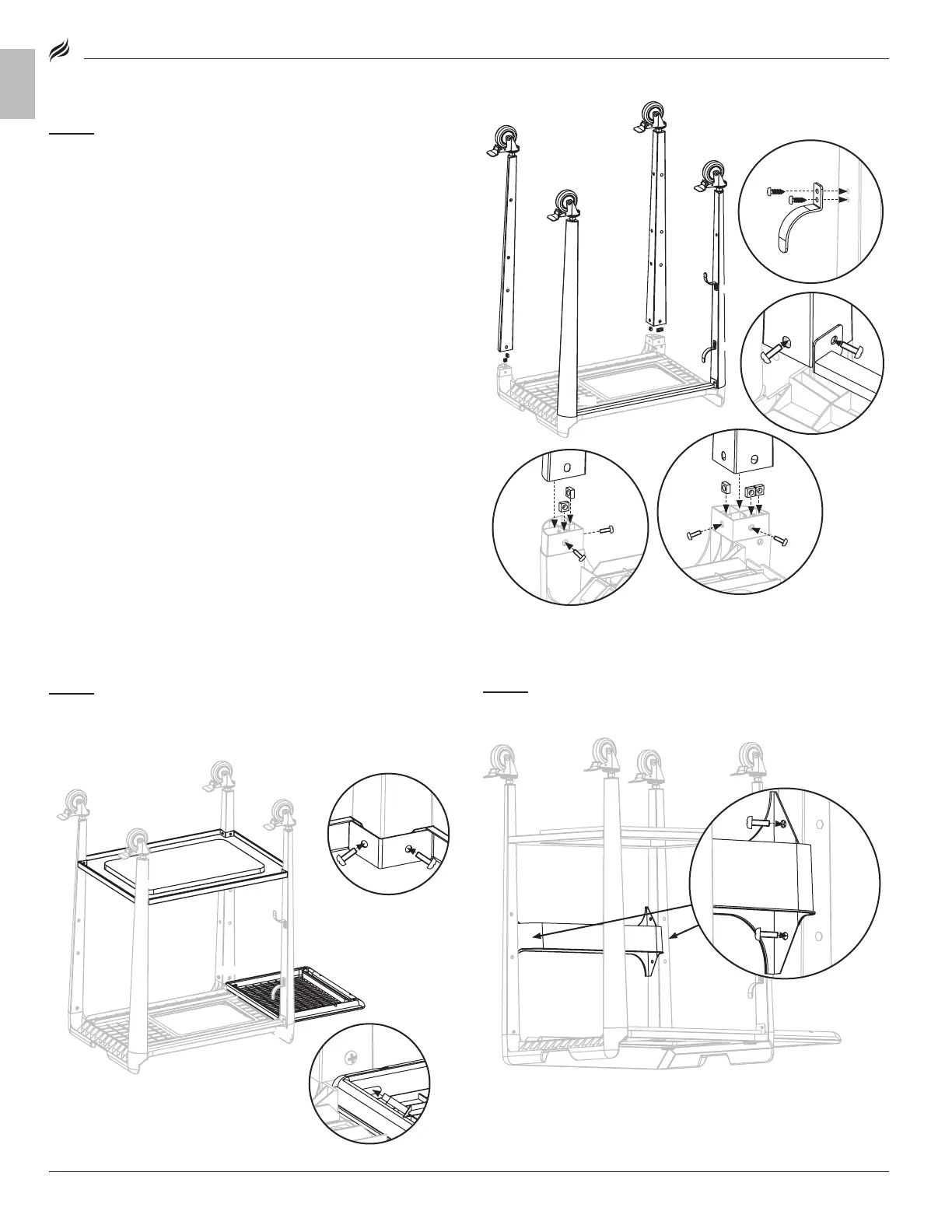
STEP 02
❶ ❶
Use four (4) self tapping screws to attach the two (2)
power cord brackets to the rear right leg.
❷ ❷
Slide the two (2) rear legs into place, and use (4) M6x12 screws to
attach the legs and the rear leg brace to the tabel top.
❸ ❸
For the front right leg, set three (3) M6 nuts in the table top leg
post, slide the leg into place, and use (2) M6x12 screws to secure.
❹ ❹
For the front left leg, set two (2) M6 nuts in the table top leg post,
slide the leg into place, and use (2) M6x12 screws to secure.
STEP 03
❶ ❶
Use eight (8) M6x12 screws to attach the bottom shelf
to the legs.
❷ ❷
Use two (2) step bolts to attach the side shelf to the left legs.
STEP 04
Use four (4) M6x12 screws to attach the accessory shelf to
the front legs. Set the cart on its feet.
❶
❶
❸
❹
❷
❷
❷
❷
❶
❶
❶
❶







 To Next Page