PS4101 CARD READER POS AND POWER CONNECTIONS
PRINTED DECEMBER 5, 2012
4
PS4101 CARD READER POS AND POWER CONNECTIONS
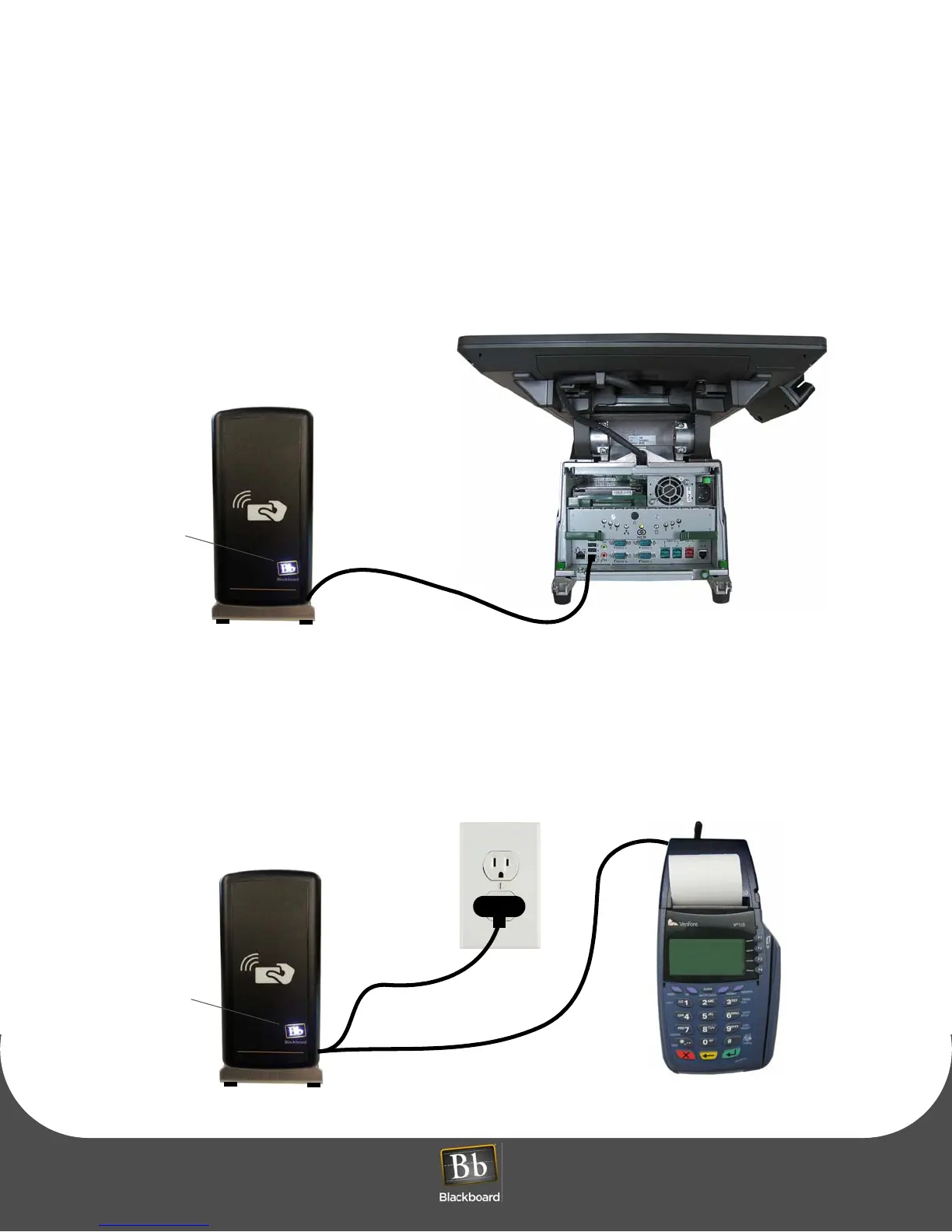
The PS4101-USB reader includes a single USB cable that provides data transfer and supplies power to
the reader through the USB port on the POS.
1 Connect the USB cable to an available port on the POS.
A lit Bb logo determines that power is applied to the reader.
Figure 1-3 PS4101-USB Reader Connection
The PS4101-SERIAL reader includes two cables and a USB power pack. The serial cable provides data
transfer, the USB cable provides power when connected to the power pack and an electrical outlet.
1 Connect the serial cable to the RS232 port on the POS.
2 Connect the USB cable to the power pack, and then plug the power pack onto an electrical outlet or A/C power strip.
A lit Bb logo determines that power is applied to the reader.
Figure 1-4 PS4101-SERIAL Reader Connection
NCR POS 70XRT
USB CABLE
Bb Logo
Verifone Vx610 Terminal
USB Cable &
Power Pack
Serial Cable
Bb Logo



 To Next Page