B LACKBOARD PS4101 CARD READER INSTALLATION GUIDE
D OCUMENT 1430 REV 01
PRINTED D ECEMBER 5, 2012 3
PS4101 CARD READER STAND INSTALLATION
To install the PS4101 Card Reader stand:
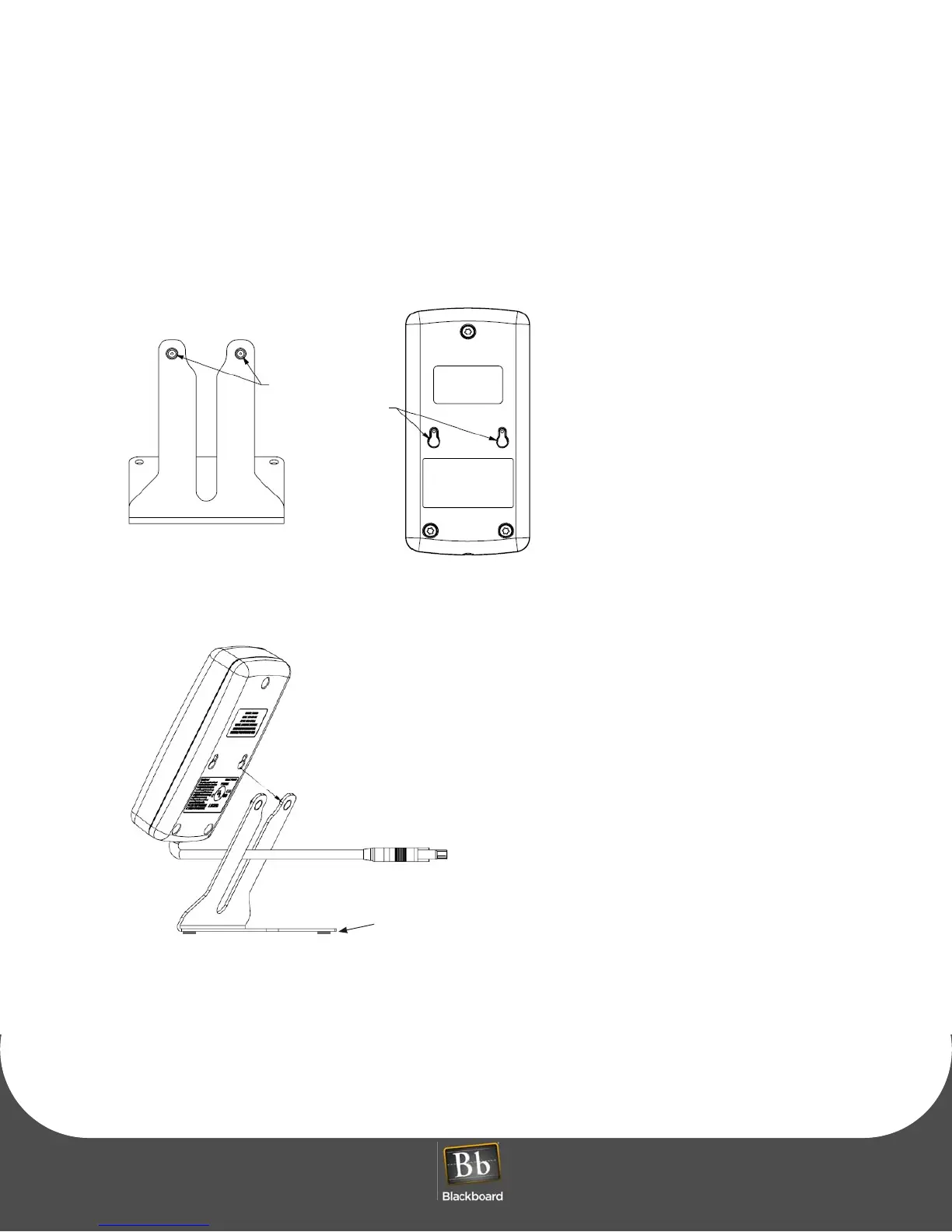
1 Locate the Key Hole Pins on the stand, and the Keyholes on the back of the reader.
Figure 1-1 Key Hole Pins and Keyholes
2 Align the reader keyholes with the stand key pins, and then push in the direction shown.
Figure 1-2 Reader and Stand Alignment
3 Push down to lock.
4 Optionally Install the rubber feet provided in the hardware kit to each corner of the reader stand
bottom.
The rubber feet are self-adhesive.
Position the feet, and then press down firmly.
Keyhole Pins
Large Keyhole
Align large holes with pins, and
then push in the direction shown.
2. & 3.
4.
Optionally install
rubber feet



 To Next Page