7
3
SP-01
SP-01
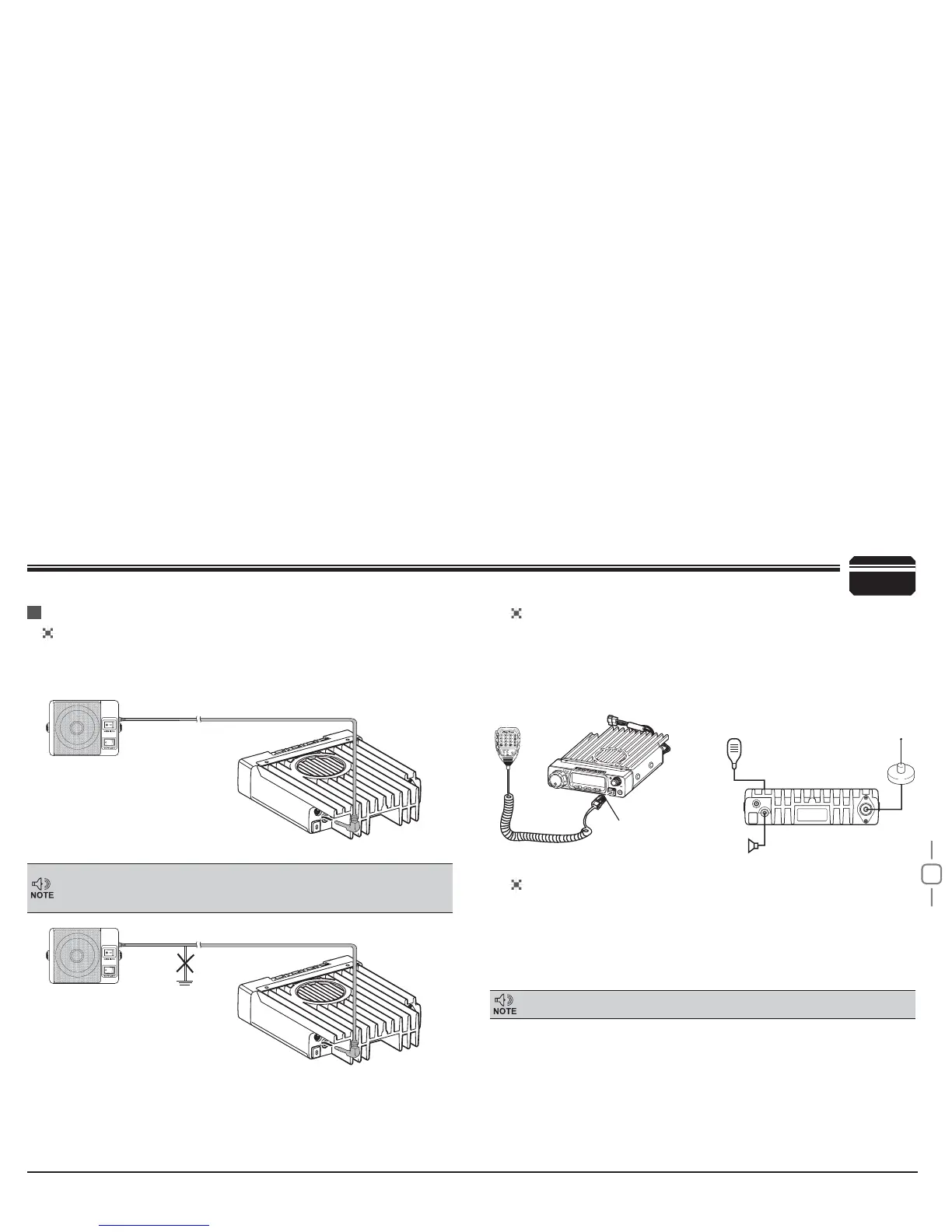
Ground
Microphone
connector
Microphone [QHM-03]
Antenna
[QCA-01]
External speaker [SP-01]
Error
Initial Installation
External Speaker
Microphone
PC Connecting
If you plan to use an external speaker, choose a speaker with an
LPSHGDQFHRIȍ7KHH[WHUQDOVSHDNHUMDFNDFFHSWVDPP
mono (2-conductor) plug.
For voice communications, connect a microphone equipped with
an 8-pin modular plug into the modular socket on the front of the
PDLQXQLW3UHVV¿UPO\RQWKHSOXJXQWLOWKHORFNLQJWDEFOLFNV$WWDFK
the supplied microphone hanger in an appropriate location using the
screws included in the screw set.
To utilize the optional BLACKBOXSetup software, you must
first connect the transceiver to your PC then using an optional
programming cable PC50 (via Data socket ).
Please use BLACKBOXSetup software for programming.
External speaker adopt double port BTL, please care about the connecting
way. The speaker can not connect with the ground, otherwise the speaker
will be fault. The wrong connecting way as the following picture.
Ask your dealer about purchasing a Programming Cable PC50.
Accessories Connections


 To Next Page