33
12
Programming Software Installing and Starting (in windows XP system)
Double click ”BLACKBOXSetup“, then follow the installing instruction.
7KLVVRIWZDUHKDVSURGXFWLGHQWLI\V\VWHPVRZKHQ¿UVWO\LQVWDOOLQJWKHVRIWZDUH\RXKDYHWRFRQQHFWWKHSURGXFWVRWKHUZLVH\RXFDQQRWVWDUWWKHVRIWZDUH
Install USB Cable Driver Programme
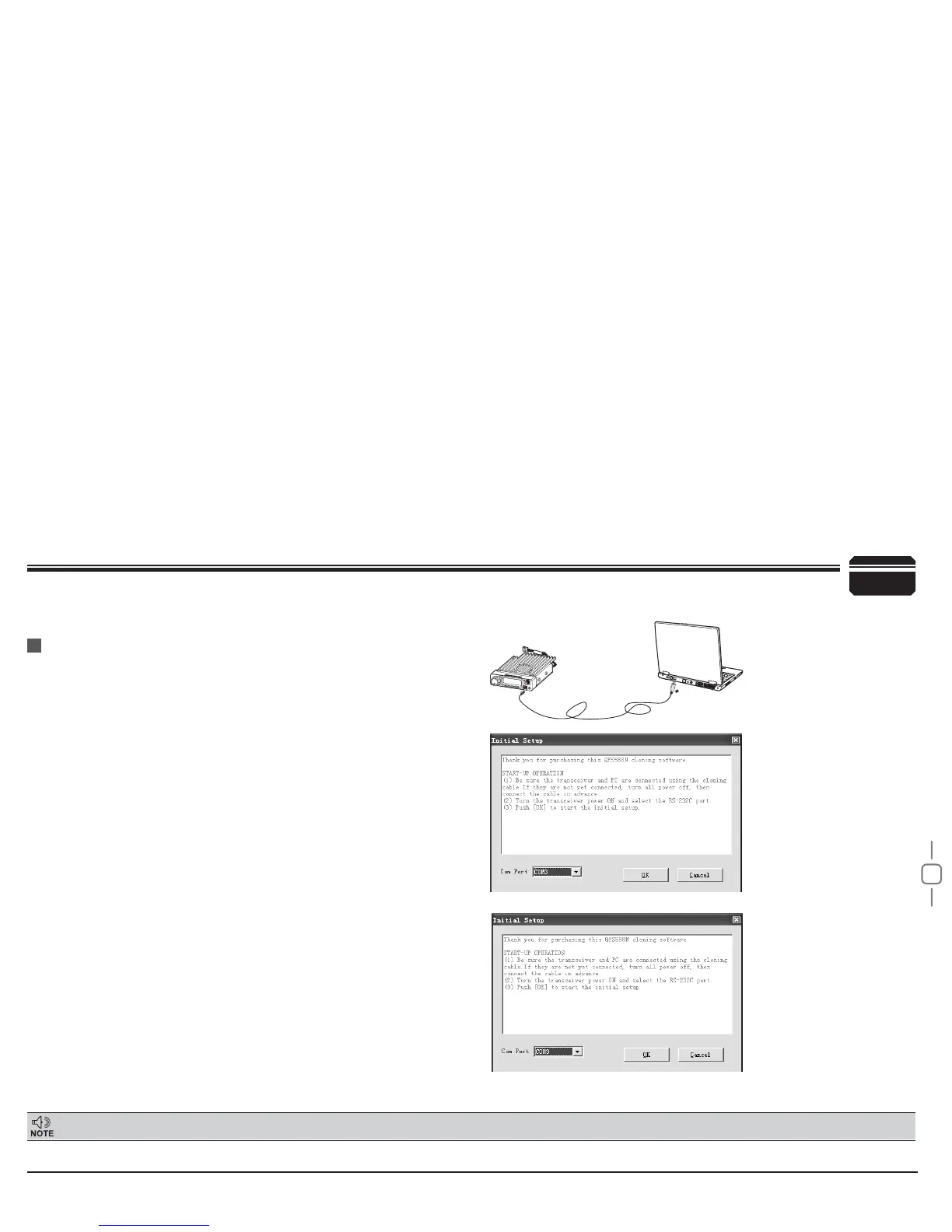
(As pic 1)
(As pic 2)
(As pic 3)
Click start menu in computer, under “ALL PROGRAMS” menu,
1.
choose and click “USB To Com port” in BLACKBOXSetup program,
install “USB To Com port” driver by indication.
Connect the optional PC50 USB Programming cable to USB port in
2.
PC with transceiver.(As pic 1)
Double click
3.
BLACKBOXSetup shortcut or click BLACKBOXSetup
in procedure index of start menu, choose serial com port as
indicated then click OK to start programming software. (As pic 2)
According to instruction,select correct"COM Port"(As pic 3),then
4.
click "OK" to start programming software.
1RWH
Even in same computer,the selective COM Port is different
when USB cable connects with different USB port.
You shall install software before connecting the USB cable line. Switch
on transceiver before writing frequency.You had better not switch on or
off the power supply of transceiver when it is connected with computer,
otherwise, it will make transceiver unable to read or write frequency. In
this case, you have to turn off programming software, pull out USB cable.
then reinsert USB cable and open software, then rechoose COM Port,
it will turn into normal operation. Therefore, please connect transceiver
with computer after switching on the transceiver. Don't restart transceiver
power when it is connected with computer.


 To Next Page