Need help?
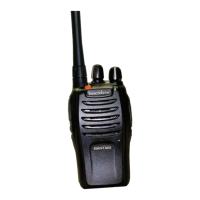
Do you have a question about the Blackbox GO! and is the answer not in the manual?
Instructions on how to charge the Li-Ion battery for optimal performance before first use.
Steps to properly insert and remove the battery from the radio.
Procedure for attaching and detaching the radio antenna.
Guide to attaching the belt clip securely to the radio.
How to power on the handheld radio using the volume/power knob.
Method for choosing a desired channel using the channel selector knob.
Details the physical controls of the radio, including buttons, knobs, speaker, and microphone.
Explanation of how programmable buttons can be set for various functions and their usage.
Information on the Push-To-Talk button's function, activation, and behavior during calls.
Guide to understanding the radio's operational status through LED indicators and prompt tones.
Details the meaning of different LED colors and states for radio operations.
Explanation of various audible tones that indicate radio status and responses.
Explains how to select a channel group (zone) on the radio.
Guides on selecting specific channels or IDs for communication.
Instructions on how to receive and reply to group, private, and general calls.
Details on how to start group, private, or general calls using the radio.
Explains the direct mode operation using two time slots for efficient frequency usage.
How to create scan lists and perform scanning for active channels.
Guide to sending pre-programmed short messages to specific IDs.
Instructions on adjusting the radio's transmit power level for communication range.
Procedure for activating or deactivating the hands-free voice-activated transmission.
How to activate the talk around function for direct communication without a repeater.
 General
| Brand | Blackbox |
|---|---|
| Model | GO! |
| Category | Two-Way Radio |
| Language | English |

 To Next Page