SD Activity Icons
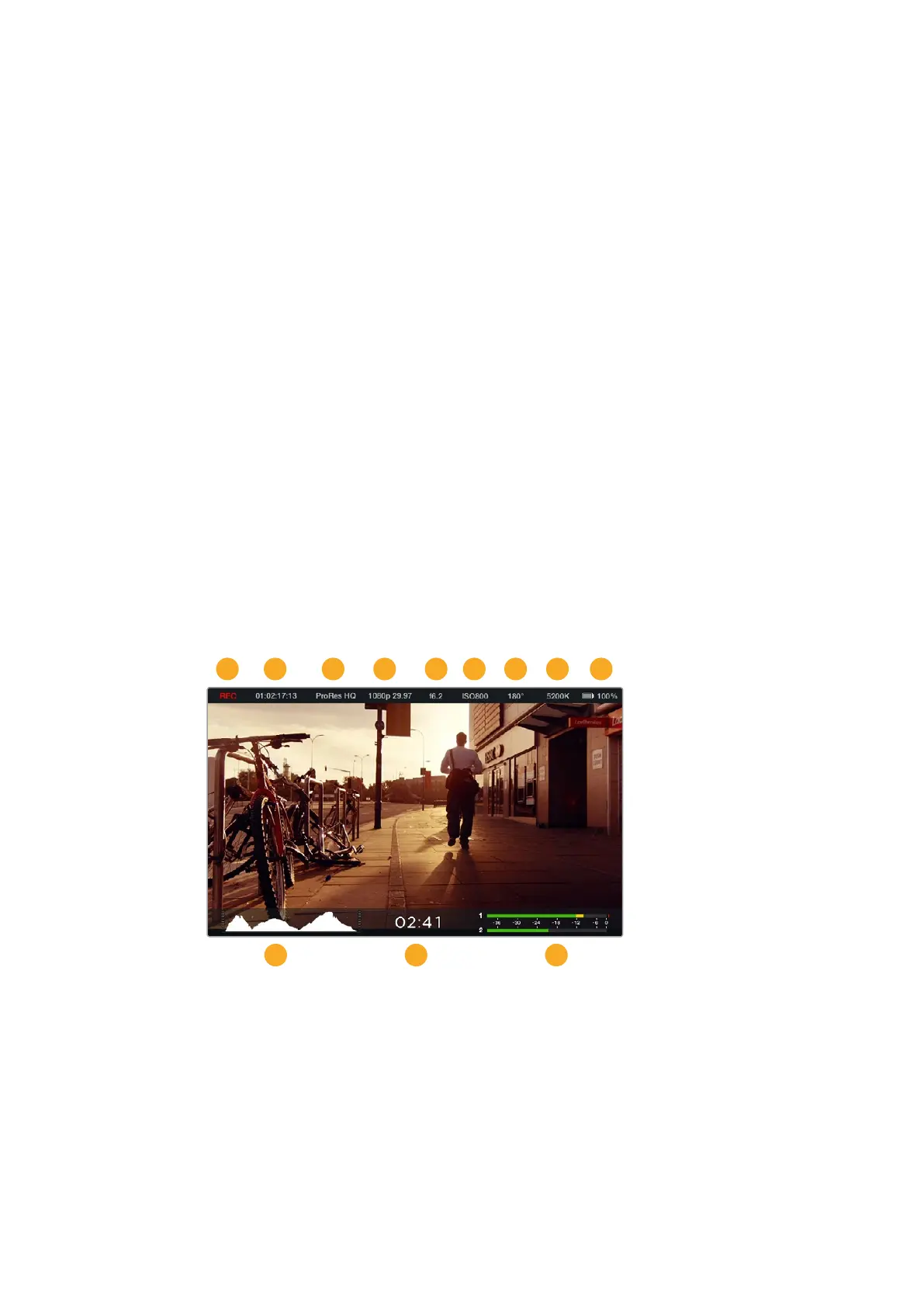
The status strip displays important information showing the state of the inserted media.
Moving Dots When you see the moving dots, the camera is checking and
preparing the media.
No Card This means no media is detected or present in the camera.
Ready Ready to record.
Red Icon Recording.
Flashing Red Icon Dropped frames were detected.
Card Full Appears when SD card is full.
Playback mode Displays play, fast forward and reverse icons.
Timecode Displays the duration of clips during recording and playback
from your SD card.
Additionally, the following information is displayed along the bottom of the screen.
Histogram If this setting is enabled in ‘main’ menu, the histogram shows
the distribution of luminance in your video
Time remaining Displays the remaining recording time available with the
current settings.
Audio meters If this setting is enabled in the ‘monitoring’ menu, the peak
audio meters display peak audio levels.
1 Media and Recording Status
2 Timecode
3 Recording Format
4 Video Format/Frame Rate
5 F-Stop
6 ISO Setting
7 Shutter Angle
8 White Balance
9 Battery Life Indicator
10 Histogram
11 Time remaining
12 Audio meters
1 2
10 11 12
3 4 5 6 7 8 9
36Menu Settings












 To Next Page