EasyManua.ls Logo

Black+Decker FEJ520JF - User Manual

Black+Decker FEJ520JF
12 pages
Print Icon
To Next Page IconTo Next Page
Loading...
www.blackanddecker.co.nz
www.blackanddecker.com.au
FEJ520JF
FEJ520JFS
Question and Answer IconNeed help?

Do you have a question about the Black+Decker FEJ520JF and is the answer not in the manual?

Summary

Intended Use

Safety Instructions

General Safety Warnings

Read all safety warnings and instructions before operating. Failure may result in shock, fire, or injury.

Usage Guidelines

Use only as described in this manual. Other operations may cause personal injury.

Manual Retention

Keep this manual for future reference to ensure safe operation and maintenance.

Using Your Appliance

Prohibited Material Pickup

Avoid picking up liquids or flammable materials to prevent fire hazards.

Water Hazard Warning

Do not operate the appliance near water or immerse it to prevent electrical hazards.

Charger Disconnection

Disconnect charger by pulling the plug, not the lead, to prevent damage and hazards.

Child and User Capabilities

Appliance usable by children 8+ and persons with reduced capabilities under supervision.

Inspection and Repairs

Pre-Use Inspection

Inspect appliance for damaged or defective parts before each use to ensure safe operation.

Prohibition of Damaged Use

Do not use the appliance if any part is damaged or defective to prevent injury.

Authorized Repair Service

Have damaged parts repaired or replaced by an authorized agent to maintain safety.

Charger Lead Maintenance

Regularly check the charger lead for damage and replace if defective for safety.

Unauthorized Part Replacement

Only replace parts specified in this manual. Do not attempt unauthorized repairs.

Additional Safety Instructions

Post-Use Storage

Unplug charger before cleaning. Store appliance dry. Keep away from children.

Residual Risks Awareness

Residual risks exist from misuse, prolonged use, etc. Be aware of potential hazards.

Electrical Safety

Charger Symbols Explained

Explanation of symbols found on the charger, including double insulation and transformer details.

Mandatory Manual Reading

Mandatory reading of the entire manual before operating the appliance.

Double Insulation and Power Supply

The tool is double insulated, requiring no earth wire. Check power supply voltage matches rating plate.

Transformer Safety Features

Details the transformer's safety features, isolating mains supply from output.

Charger Overheating Protection

Charger shuts off at high temperatures. Base needs repair if inoperable due to heat.

Indoor Use Only

The charging base is designed and intended for indoor use only.

Appliance Labels

Appliance Symbol Identification

Explains symbols found on the appliance, including the date code.

Charger Compatibility

Specifies that only charger S010Q 23 should be used with this appliance.

Features

Feature Overview

Lists the features included in the tool, which may vary.

Using the Appliance

Power Control

Operates in slow speed, low power, or BOOST mode. Press button to turn on/off.

Crevice Tool Operation

Extend crevice tool until it clicks. Fit brush for dusting. Retract using release button.

Floor Extension Tube Fitting

Slide nozzle into extension tube until it clicks. Includes flip down brush for hard-to-reach areas.

Floor Head Assembly

Slide extension tube onto floor head until it clicks for proper assembly.

Floor Sense Feature

Appliance senses thick pile carpet and auto-adjusts to BOOST mode for better cleaning.

Beater Bar Maintenance

Depress release button to remove beater bar. End pieces are removable for clearing debris.

Charging Procedure

Appliance can be charged as a single unit or while attached to the floor extension.

Wall Mounting Instructions

Attach wall mount to wall for convenient storage. Ensure fixing is suitable for wall type and weight.

Multi LED Display Indicators

Filter Sensor Alert

Red filter LED illuminates when the filter is blocked and requires cleaning.

Charging Status Display

Battery icon illuminates when charging. LED display shows charge status.

Boost Mode Indicator

Indicator illuminates when the appliance is in BOOST mode for higher power operation.

Cleaning the Filters

Dust Bowl Release

Press the dust bowl release button to begin filter cleaning process.

Dust Bowl Ejection

Eject the dust bowl from the appliance to access the filters.

Filter Assembly Removal

Lift the filter assembly using the metal handle from the dust bowl.

Dust Bowl Emptying

Empty remaining dust from the dust bowl by shaking it over a dustbin.

Filter Removal

Remove the filter (21) from the pre-filter (20) for cleaning.

Final Dust Bowl Emptying

Ensure all remaining dust is emptied from the dust bowl.

Dust Bowl Washing

Wash the dust bowl with warm soapy water to clean it.

Filter Washing

Wash the filters thoroughly with warm soapy water.

Filter Drying

Ensure all filters are completely dry before refitting them onto the appliance.

Filter Refitting

Refit the cleaned and dried filters back onto the appliance.

Dust Bowl Closure

Close the dust bowl, ensuring the release latch clicks securely into place.

Safety Before Maintenance

Always unplug the appliance before performing any maintenance or cleaning tasks.

External Cleaning

Wipe the appliance periodically with a damp cloth; avoid abrasive cleaners.

Cleaning Agent Restrictions

Avoid abrasive/solvent cleaners and immersing the appliance in water for safe maintenance.

Maintenance

Appliance Design for Longevity

The appliance is designed for long-term operation with minimal maintenance requirements.

Pre-Maintenance Precautions

Run battery down, switch off. Unplug charger. Clean ventilation slots and motor housing.

Replacing the Filters

Filter Replacement Schedule

Replace filters every 6-9 months or when worn/damaged. Use specific part numbers.

Fragrance Filter Option

Pre-scented filters are available for a pleasant odour. Dispose of used filters at recycling centres.

Handling Fragrance Filters

Handle fragrance filters with care, wash skin after contact, wear protection, seek medical advice if needed.

Filter Fitting Procedure

Remove old filters as described and fit new filters as described for proper function.

Protecting the Environment

Separate Collection of Products

Products and batteries marked with the symbol must not be disposed of with household waste.

Recycling of Materials

Recycle electrical products and batteries according to local provisions for resource conservation.

Technical Data

Summary

Intended Use

Safety Instructions

General Safety Warnings

Read all safety warnings and instructions before operating. Failure may result in shock, fire, or injury.

Usage Guidelines

Use only as described in this manual. Other operations may cause personal injury.

Manual Retention

Keep this manual for future reference to ensure safe operation and maintenance.

Using Your Appliance

Prohibited Material Pickup

Avoid picking up liquids or flammable materials to prevent fire hazards.

Water Hazard Warning

Do not operate the appliance near water or immerse it to prevent electrical hazards.

Charger Disconnection

Disconnect charger by pulling the plug, not the lead, to prevent damage and hazards.

Child and User Capabilities

Appliance usable by children 8+ and persons with reduced capabilities under supervision.

Inspection and Repairs

Pre-Use Inspection

Inspect appliance for damaged or defective parts before each use to ensure safe operation.

Prohibition of Damaged Use

Do not use the appliance if any part is damaged or defective to prevent injury.

Authorized Repair Service

Have damaged parts repaired or replaced by an authorized agent to maintain safety.

Charger Lead Maintenance

Regularly check the charger lead for damage and replace if defective for safety.

Unauthorized Part Replacement

Only replace parts specified in this manual. Do not attempt unauthorized repairs.

Additional Safety Instructions

Post-Use Storage

Unplug charger before cleaning. Store appliance dry. Keep away from children.

Residual Risks Awareness

Residual risks exist from misuse, prolonged use, etc. Be aware of potential hazards.

Electrical Safety

Charger Symbols Explained

Explanation of symbols found on the charger, including double insulation and transformer details.

Mandatory Manual Reading

Mandatory reading of the entire manual before operating the appliance.

Double Insulation and Power Supply

The tool is double insulated, requiring no earth wire. Check power supply voltage matches rating plate.

Transformer Safety Features

Details the transformer's safety features, isolating mains supply from output.

Charger Overheating Protection

Charger shuts off at high temperatures. Base needs repair if inoperable due to heat.

Indoor Use Only

The charging base is designed and intended for indoor use only.

Appliance Labels

Appliance Symbol Identification

Explains symbols found on the appliance, including the date code.

Charger Compatibility

Specifies that only charger S010Q 23 should be used with this appliance.

Features

Feature Overview

Lists the features included in the tool, which may vary.

Using the Appliance

Power Control

Operates in slow speed, low power, or BOOST mode. Press button to turn on/off.

Crevice Tool Operation

Extend crevice tool until it clicks. Fit brush for dusting. Retract using release button.

Floor Extension Tube Fitting

Slide nozzle into extension tube until it clicks. Includes flip down brush for hard-to-reach areas.

Floor Head Assembly

Slide extension tube onto floor head until it clicks for proper assembly.

Floor Sense Feature

Appliance senses thick pile carpet and auto-adjusts to BOOST mode for better cleaning.

Beater Bar Maintenance

Depress release button to remove beater bar. End pieces are removable for clearing debris.

Charging Procedure

Appliance can be charged as a single unit or while attached to the floor extension.

Wall Mounting Instructions

Attach wall mount to wall for convenient storage. Ensure fixing is suitable for wall type and weight.

Multi LED Display Indicators

Filter Sensor Alert

Red filter LED illuminates when the filter is blocked and requires cleaning.

Charging Status Display

Battery icon illuminates when charging. LED display shows charge status.

Boost Mode Indicator

Indicator illuminates when the appliance is in BOOST mode for higher power operation.

Cleaning the Filters

Dust Bowl Release

Press the dust bowl release button to begin filter cleaning process.

Dust Bowl Ejection

Eject the dust bowl from the appliance to access the filters.

Filter Assembly Removal

Lift the filter assembly using the metal handle from the dust bowl.

Dust Bowl Emptying

Empty remaining dust from the dust bowl by shaking it over a dustbin.

Filter Removal

Remove the filter (21) from the pre-filter (20) for cleaning.

Final Dust Bowl Emptying

Ensure all remaining dust is emptied from the dust bowl.

Dust Bowl Washing

Wash the dust bowl with warm soapy water to clean it.

Filter Washing

Wash the filters thoroughly with warm soapy water.

Filter Drying

Ensure all filters are completely dry before refitting them onto the appliance.

Filter Refitting

Refit the cleaned and dried filters back onto the appliance.

Dust Bowl Closure

Close the dust bowl, ensuring the release latch clicks securely into place.

Safety Before Maintenance

Always unplug the appliance before performing any maintenance or cleaning tasks.

External Cleaning

Wipe the appliance periodically with a damp cloth; avoid abrasive cleaners.

Cleaning Agent Restrictions

Avoid abrasive/solvent cleaners and immersing the appliance in water for safe maintenance.

Maintenance

Appliance Design for Longevity

The appliance is designed for long-term operation with minimal maintenance requirements.

Pre-Maintenance Precautions

Run battery down, switch off. Unplug charger. Clean ventilation slots and motor housing.

Replacing the Filters

Filter Replacement Schedule

Replace filters every 6-9 months or when worn/damaged. Use specific part numbers.

Fragrance Filter Option

Pre-scented filters are available for a pleasant odour. Dispose of used filters at recycling centres.

Handling Fragrance Filters

Handle fragrance filters with care, wash skin after contact, wear protection, seek medical advice if needed.

Filter Fitting Procedure

Remove old filters as described and fit new filters as described for proper function.

Protecting the Environment

Separate Collection of Products

Products and batteries marked with the symbol must not be disposed of with household waste.

Recycling of Materials

Recycle electrical products and batteries according to local provisions for resource conservation.

Technical Data

Overview

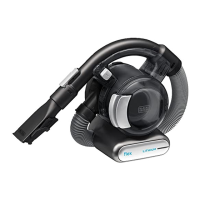
This document provides instructions for the BLACK+DECKER FEJ520JF and FEJ520JFS Dustbuster® hand-held vacuum cleaners, designed for household vacuum cleaning purposes. It covers safety guidelines, operational procedures, and maintenance tips to ensure safe and effective use of the appliance.

Function Description

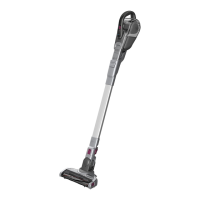
The BLACK+DECKER Dustbuster® is a versatile hand-held vacuum cleaner designed for general household cleaning tasks. It features a powerful motor and a range of attachments to tackle various cleaning challenges, from quick spills to more extensive floor cleaning. The appliance is equipped with a rechargeable battery, offering cordless convenience. Its design allows for both handheld use and conversion into a stick vacuum with the floor extension tube and head, making it adaptable to different cleaning needs. The vacuum also incorporates a "smart tech" multi-LED display that provides visual feedback on the appliance's status, including charging, filter condition, and BOOST mode activation.

Usage Features

Switching On and Off: The appliance operates with a simple on/off power switch. A single press turns the unit on in a low power mode, which conserves battery life. Pressing the button again activates BOOST mode for increased cleaning performance. A third press turns the product off.

Pull Out Crevice Tool: For reaching tight spaces and corners, the vacuum includes a pull-out crevice tool. To use it, extend the tool until it clicks into place. A push-in brush can be fitted onto the crevice tool for dusting and upholstery cleaning. To retract the crevice tool, press the release button, allowing it to return to its normal position.

Floor Extension Tube: The floor extension tube transforms the hand-held unit into a stick vacuum. The nozzle of the hand-held unit slides into the floor extension tube until an audible 'click' confirms it's securely in place. The tube also features a flip-down brush, which is useful for cleaning difficult-to-reach areas on floors.

Floor Head: The floor head attaches to the end of the floor extension tube, again with an audible 'click' to ensure a secure connection. This attachment is designed for efficient floor cleaning.

Floor Sense Feature: A unique floor sensing feature allows the appliance to automatically adjust its cleaning mode. When it detects thick pile carpet, it switches from low speed to BOOST mode to provide greater cleaning performance without manual intervention.

Charging: The appliance can be charged either as a single hand-held unit or while attached to the floor extension. To charge, the charger is placed into the charging port, and then plugged into an electrical outlet. The LED charging indicator will illuminate to show that charging is in progress. The multi-LED display provides detailed information on the battery's state of charge, filter status, and BOOST mode activation. The battery icon illuminates when charging is required, and the LED display indicates the current charge level.

Wall Mounting: For convenient storage, a wall bracket is provided. The wall mount can be attached to a wall, ensuring the fixing method is suitable for the wall type and the weight of the appliance. When mounting, ensure the location is within reach of an electrical outlet for charging the vacuum while it's on the bracket.

Multi LED Display: The multi-LED display offers crucial feedback:

  • Filter Sensor (A): A red filter LED illuminates in the handle when the filter is blocked and requires cleaning.
  • LED Charging Display (B): The battery icon illuminates when charging is needed, and the LED display shows the battery's state of charge.
  • BOOST Mode (C): This illuminates when the appliance is operating at higher power in BOOST mode.

Maintenance Features

Cleaning the Filters: Regular filter cleaning is essential for maintaining optimal performance. The process involves:

  1. Pressing the dust bowl release button to eject the dust bowl.
  2. Lifting the filter assembly from the dust bowl using its metal handle.
  3. Emptying the dust bowl by shaking it over a dustbin.
  4. Removing the filter from the pre-filter.
  5. Emptying any remaining dust from the dust bowl.
  6. Rinsing the dust bowl with warm soapy water.
  7. Washing the filters with warm soapy water.
  8. Ensuring all filters are completely dry before reassembly.
  9. Refitting the filters onto the appliance.
  10. Closing the dust bowl, making sure the release latch clicks into place. For the FEJ520JFS unit, the pre-filter is impregnated with a fragrance to release a pleasant odor during use.

Replacing the Filters: Filters should be replaced every 6 to 9 months, or sooner if they appear worn or damaged. Replacement filters are available from BLACK+DECKER dealers. Pre-scented filters are also available. Worn-out filters should be disposed of at a local recycling center. The replacement process involves removing the old filters as described in the cleaning section and fitting new ones.

Removing and Clearing Hair from the Beater Bars: To maintain the effectiveness of the floor head, hair and debris should be regularly cleared from the beater bars.

  1. Depress the beater bar unit release button.
  2. The beater bar can then be removed.
  3. The end pieces of the beater bar are also removable, allowing for thorough cleaning of any accumulated hair or debris.

General Maintenance:

  • Wipe the appliance with a damp cloth from time to time. Avoid abrasive or solvent-based cleaners, and never immerse the appliance in water.
  • Before performing any maintenance on cordless appliances, ensure the battery is completely run down if it's integral, and then switch off the unit.
  • Unplug the charger before cleaning it. The charger itself requires no maintenance beyond regular cleaning.
  • Regularly clean the ventilation slots in the appliance and charger using a soft brush or dry cloth.
  • Regularly clean the motor housing with a damp cloth, avoiding abrasive or solvent-based cleaners.

Safety Precautions: Always read the manual carefully before operating the appliance. Do not use the appliance to pick up liquids or flammable materials. Avoid using it near water or immersing it. Never pull the charger lead to disconnect it; keep the lead away from heat, oil, and sharp edges. If any part is damaged or defective, do not use the appliance and have it repaired by an authorized agent. Regularly check the charger lead for damage. The appliance/battery must be charged in a well-ventilated area. Children aged 8 and above, and persons with reduced capabilities, can use the appliance under supervision and after understanding the hazards involved. Children should not play with the appliance or perform cleaning and user maintenance without supervision.

Black+Decker FEJ520JF Specifications

General IconGeneral
ModelFEJ520JF
TypeCordless Stick Vacuum
Power SourceBattery
Battery TypeLithium-ion
Charging Time4 hours
Runtime20 minutes
Cord LengthCordless
Included AccessoriesCrevice Tool, Brush Tool

Related product manuals