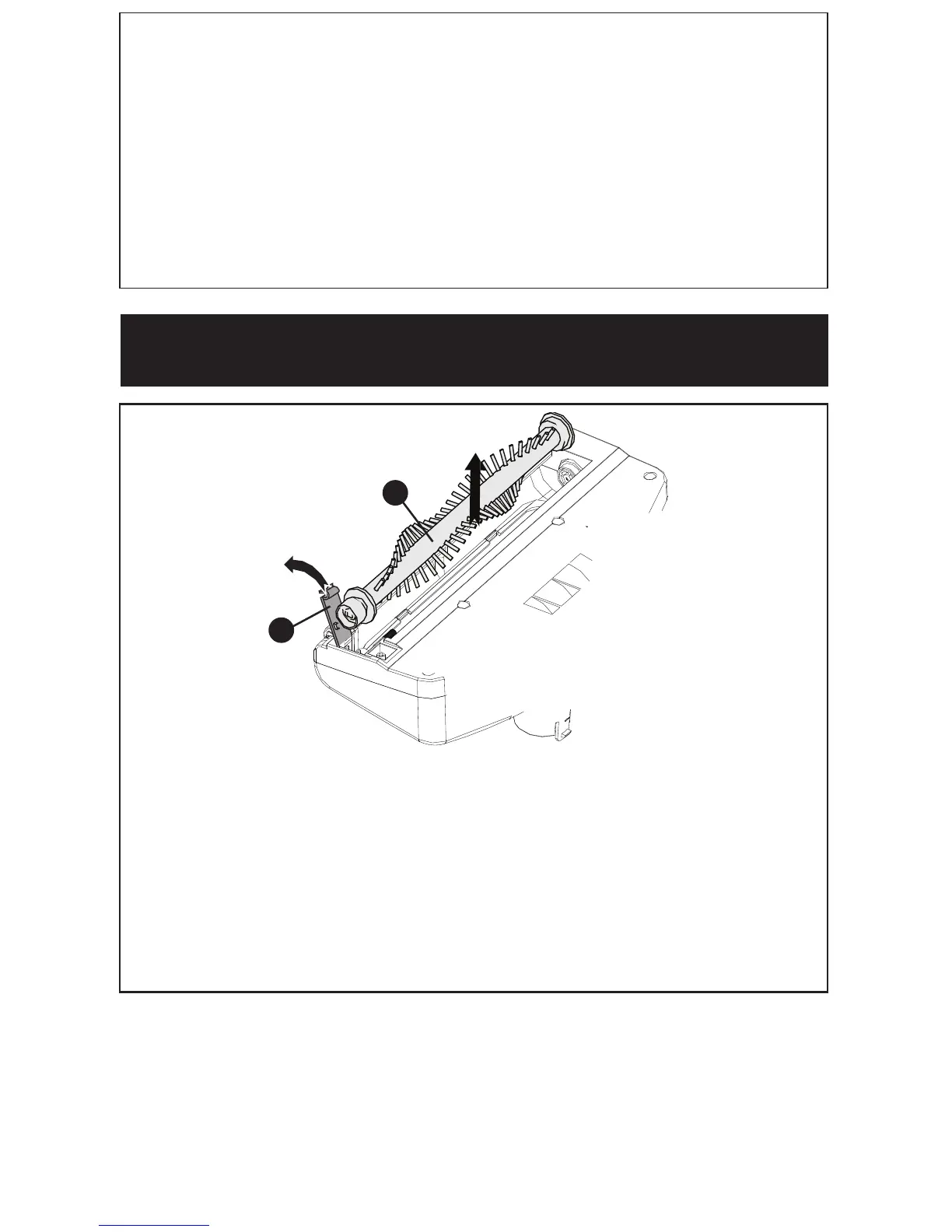
REMOVING ROTARY BRUSH
• Pinch and lift the plastic tab on the pivoting clip (17) away from the floor head.
• Lift the rotary brush (18) out of the floor head.
• Replace power brush, and pivoting clip before using vacuum.
18
17
• Press the dust bowl release button (8) located above the dust bowl (6) and
remove the dust bowl.
• Lift the filter assembly (14) from the dust bowl (6).
• Rotate filter (15) counterclockwise to unlock and remove from the pre filter (16).
CAUTION: Do not turn appliance on when dust bowl is removed.
• In order to keep the suction force optimized, the dust container and filters must
be cleaned regularly.
• Reassemble after parts have completely dried.
Replacing the filter
Replacement filter: SVF11. The filters should be replaced every 6 to 9 months
and
whenever worn or damaged. Replacement filters are available from
BLACK+DECKER.



 To Next Page