22
REMOVING FOOD
Unlocking the Lid
1. When finished cooking, turn off the heat.
2. Do not remove the pressure regulator valve until you are sure that the
pressure is released completely. Refer to RELEASING STEAM section,
page 21.
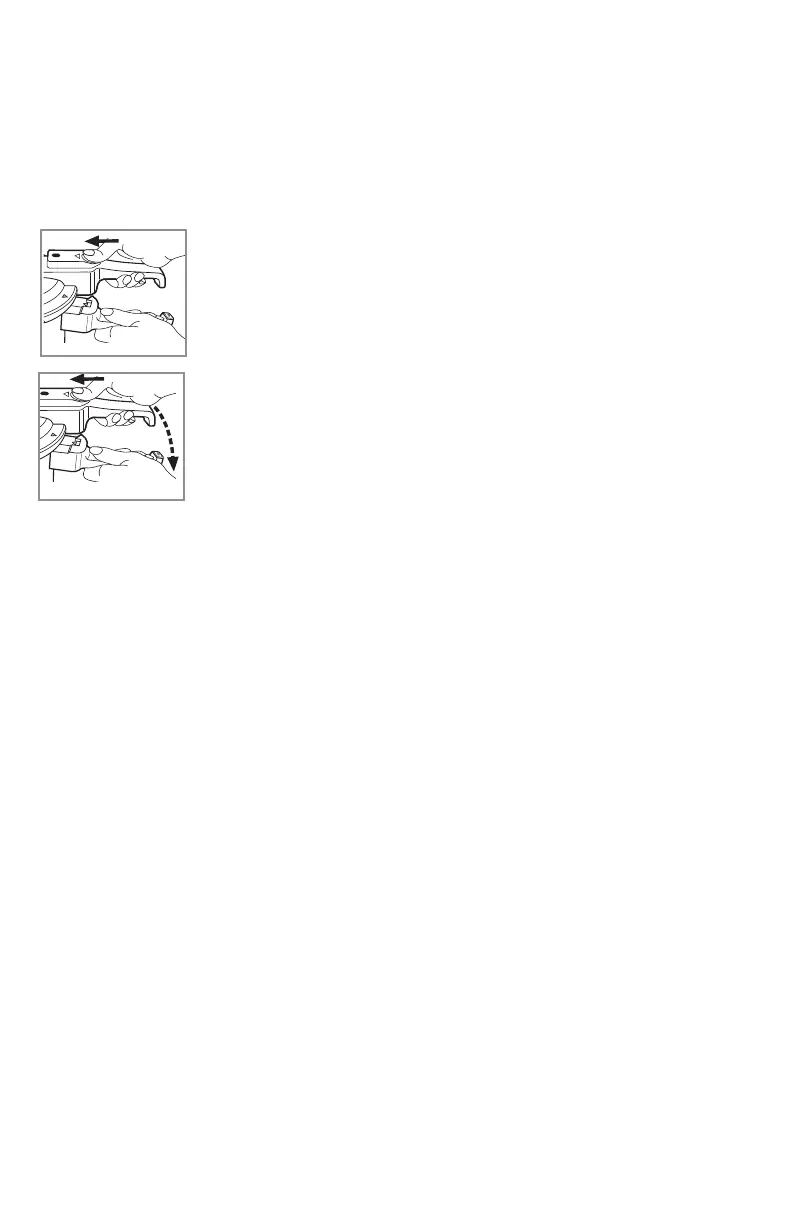
3. Unlock the lid:
a. Place your thumb on the thumb rest of the locking latch
and push latch forward (G).
b. While holding the latch forward, turn the lid
counterclockwise until the arrows on the lid aligns with the
arrow on the pot (H).
c. Gently, lift the lid to open.
Important: Never use force to open the lid and never open
when there is pressure.
Tip: If you cannot open the lid, check the locking pin on the handle latch to
make sure it is fully down. If not, you must wait until all the steam is released.
G
H
Care and Cleaning
This product contains no user serviceable parts. Refer service to qualified
service personnel.
CLEANING
Important: Make sure the unit has cooled completely before cleaning.
Inside Surface
1. Clean the inside of the pot with a small amount of water immediately after
removing the food.
2. Rub with a steel pad and detergent to remove spots or food that is stuck.
Outside Surface
1. Do not leave the cooker soaking as well as placing it in the dishwasher as
it may harm the finish of your cooker.
2. You can clean the bottom of the cooker with a steel pad, water and
detergent.
Lid
• Always remove the sealing ring and the pressure regulator valve. Wash
the lid, the sealing ring and pressure regulator valve by hand.


 To Next Page