EasyManua.ls Logo

Blackview BV6000 - Charging; Battery Charging Procedure; Home Screen; Accessing and Customizing

Blackview BV6000
4 pages
Print Icon
To Next Page IconTo Next Page
To Previous Page IconTo Previous Page
Loading...
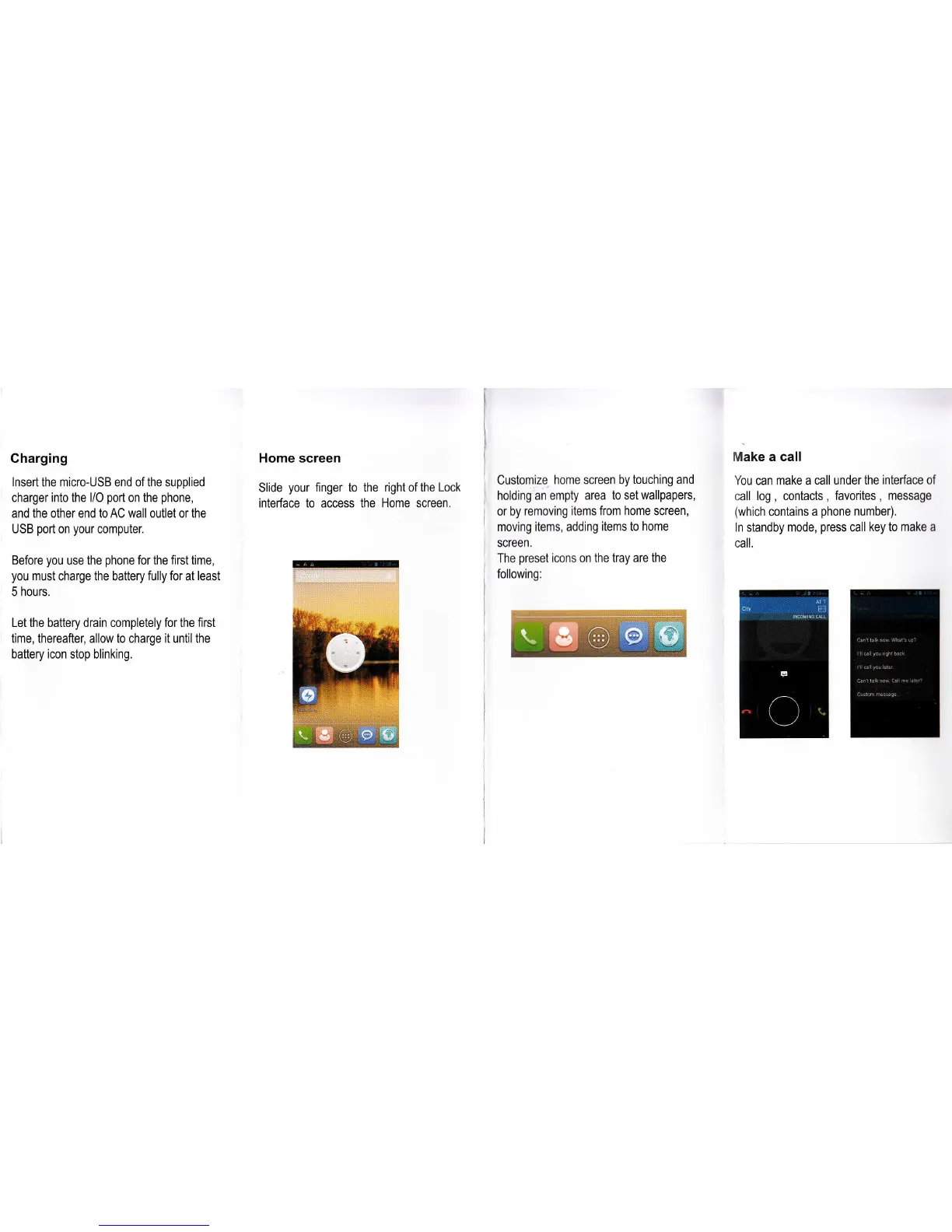
Charging
lnsert the micro-USB end of the supplied
charger into the l/O
port
on the
phone,
and the
other
end to AC wall outlet or the
USB
port
on
your
computer.
Before
you
use the
phone
for
the
first time,
you
must charge the battery
fully for
at
least
5 hours.
Let the battery drain completely for the first
time, thereafter, allow to charge it until the
battery icon
stop blinking.
Home
screen
Slide
your
finger to the
interface to access
the
right of the Lock
Home screen.
Customize
home screen by
touching and
holding an empty area
to set wallpapers,
or by
removing items
from home screen,
moving
items, adding
items to home
screen,
The
preset
icons on the
tray are the
following:
Make a call
You can make a
call under the interface of
call
log
,
contacts
,
favorites
,
message
(which
contains
a
phone
number).
ln standby
mode,
press
call
key to make
a
call.
HT

Related product manuals