
 Need help?
Do you have a question about the Blackview BV6000S and is the answer not in the manual?
Explains the function of each physical key on the phone.
Provides a guide to understanding the status bar icons.
Learn how to power the phone on and off.
Configure the phone for file transfer as a USB disk.
Connect to wireless networks for internet access.
Pair and use Bluetooth devices for wireless communication.
Utilize NFC for short-range wireless communication.
Manage Wi-Fi, Bluetooth, and mobile network settings.
Manage accounts, screen lock, encryption, and device security.
Configure phone system features and preferences.
Format phone and restore to factory state.
Configure accessibility functions like TalkBack.
Configure calls, messages, and data connectivity.
Adjust volume, ringtones, and notification sounds.
Configure brightness, wallpaper, and screen timeout.
Show notifications on the lock screen.
Quickly enable/disable common phone features.
Customize the phone's background wallpaper.
Personalize the phone's look and feel.
Manage application placement and removal.
Learn how to make and manage phone calls.
Manage contacts, import/export, and search.
Compose and send SMS and MMS messages.
Access the internet via WAP and WWW pages.
Send and receive emails on your phone.
View and manage photos and pictures.
Use the clock for time display and setting alarms.
Utilize camera, music player, video player, and FM radio.
Use pre-installed apps like Calculator, Calendar, Maps.
Troubleshoot issues with the phone not powering on.
Address problems with weak signal reception in certain areas.
Resolve issues with echoes or noises during calls.
Troubleshoot issues preventing the battery from charging.
Resolve issues with incorrect PIN entry leading to lock.
Address problems related to SIM card detection or damage.
Resolve issues with music files not appearing in the player.
Follow regulations for safe phone carrying and usage.
Information on RF transmission and device interference.
Safety precautions for using the phone on aircraft.
Maintain distance from pacemakers to avoid interference.
Potential interference of mobile phones with hearing aids.
Consult manufacturers for RF shielding of medical devices.
Comply with traffic regulations and airbag safety while driving.
Avoid using phone in areas with explosion risks.
Safe handling, charging, and storage of the battery.
Specific warnings about battery heating, contact, and leakage.
Keep phone out of reach of small children.
Device compliance with FCC Rules and modification warnings.
Government requirements for radio wave exposure and scientific evaluation.
USA SAR limits, tested values, and body-worn requirements.
Maintain minimum separation distance for body-worn operations.
 General
| Body Dimensions | 152.3 x 81 x 16.6 mm (6.00 x 3.19 x 0.65 in) |
|---|---|
| SIM | Dual SIM (Nano-SIM, dual stand-by) |
| Protection | IP68 dust/water resistant (up to 1.5m for 30 min) |
| Type | Li-Ion 4500 mAh, non-removable |
| Resolution | 720 x 1280 pixels, 16:9 ratio (~312 ppi density) |
| OS | Android 6.0 (Marshmallow) |
| CPU | Quad-core 1.5 GHz Cortex-A53 |
| GPU | Mali-T720MP2 |
| Card slot | microSDXC (dedicated slot) |
| Video | 1080p@30fps |
| Loudspeaker | Yes |
| 3.5mm jack | Yes |
| WLAN | Wi-Fi 802.11 b/g/n, Wi-Fi Direct, hotspot |
| Bluetooth | 4.0, A2DP |
| GPS | Yes, with A-GPS |
| NFC | No |
| Radio | FM radio |
| USB | microUSB 2.0 |
| Network | GSM / HSPA / LTE |
| Build | Glass front (Gorilla Glass 3) |
| Features | LED flash, HDR |
| Selfie camera | 5 MP |
| Sensors | Accelerometer, proximity |
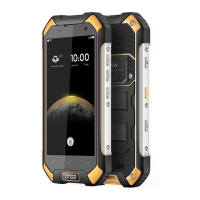
| Colors | Black, Orange |
| Main Camera | 13 MP, f/2.0, 27mm (wide), 1/3", 1.12µm, PDAF |

 To Next Page