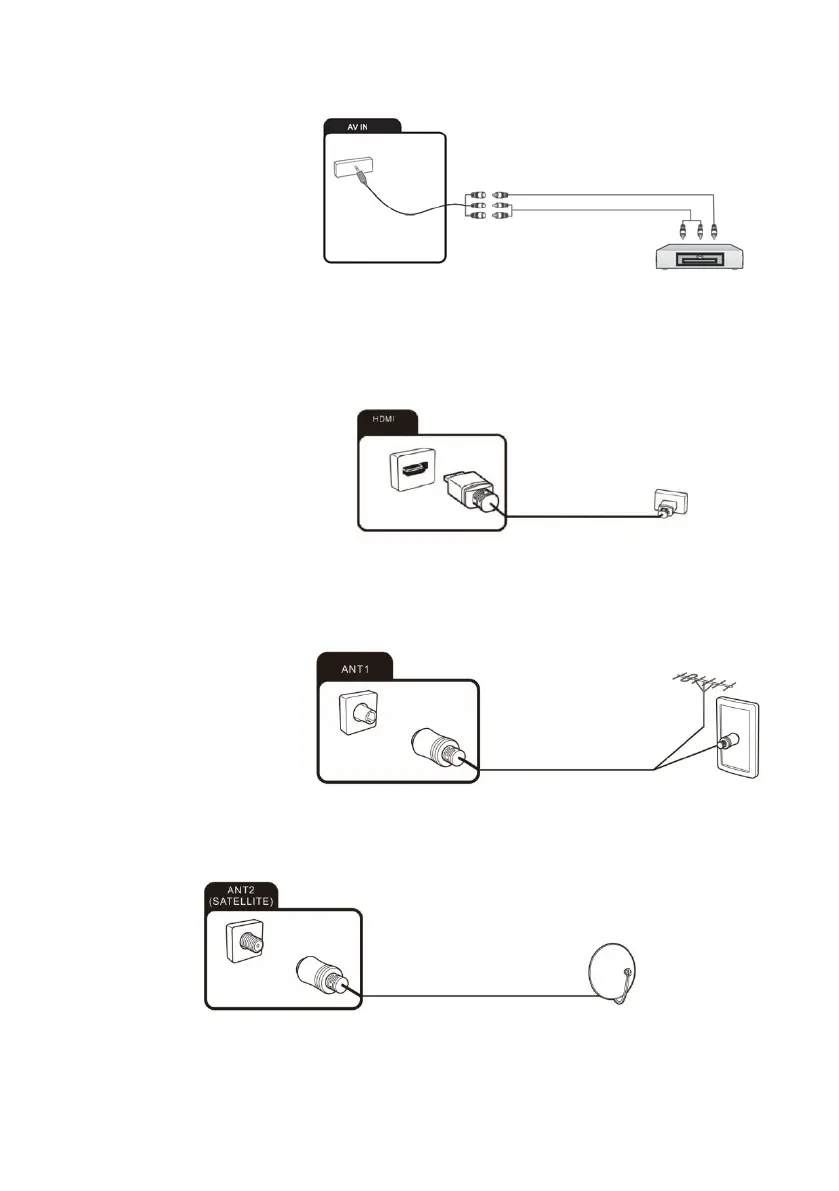
Connecting an external device with AV output
Connect external devices
via the AV IN jack directly to
TV by using a Mini AV
cable.
In order to play the audio and
video signal fed in from the
external device on the TV,
select the signal source “AV”.
Connecting external equipment with HDMI interface
HDMI is the abbreviation for "High D efinition Multimedia" and allows the digital
transmission of both audio video signals over the same cable.
In order to play the audio and video
signal fed in from the external device
on the TV, select the signal source
as appropriate.
Connecting the TV
antenna or cable TV
You can connect the cable
from your indoor or outdoor
antenna or cable TV to the
antenna socket.
Connecting the satellite antenna
You can connect the cable from your satellite antenna to the ANT 2 SATELLITE socket.
To switch to satellite reception, select signal source “DTV”.



 To Next Page