Controls and connections
Caution: Before connecting or disconnecting any cables, switch off all related
devices (also the TV). Otherwise you could damage the devices.
Back
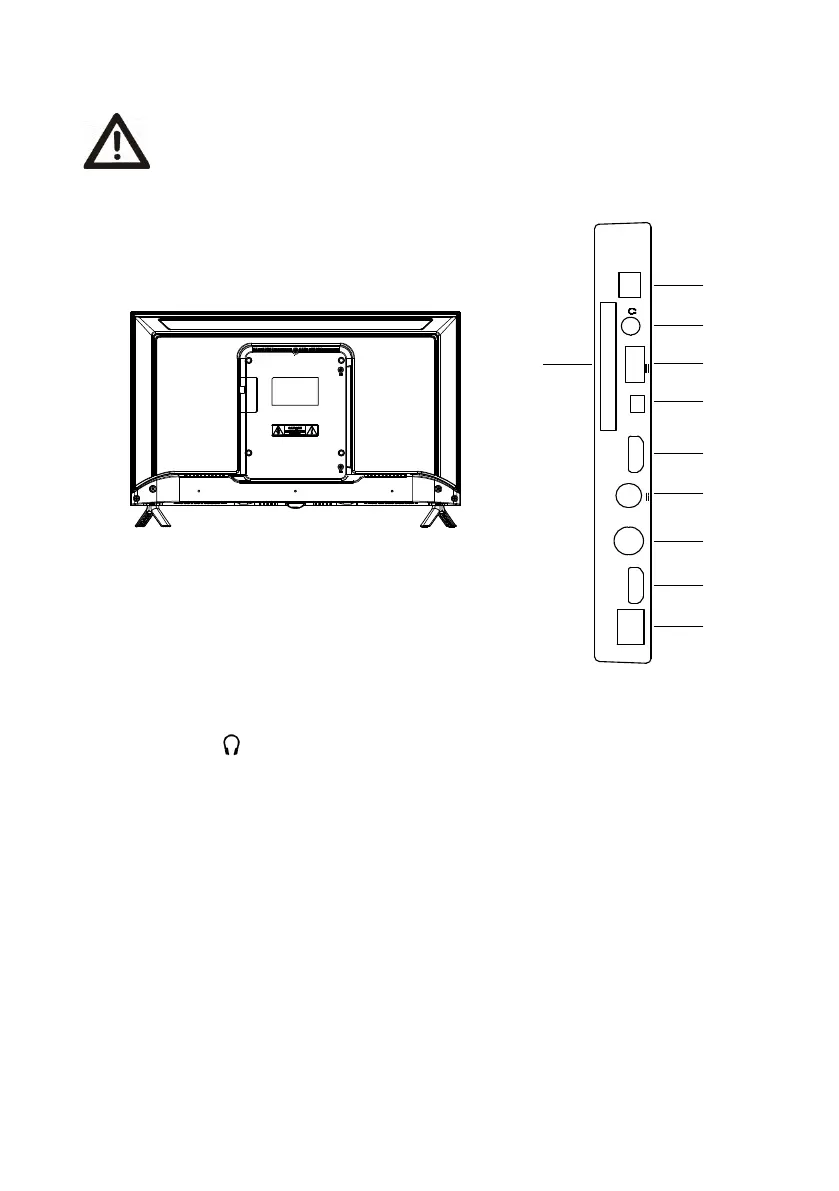
1、DIGITAL AUDIO OUT: Connect to an external digital audio device.
2、Headphone out : Earphones/headphones jack.
3、Common Interface slot.
4、USB2.0: USB port. Connector a USB Storage device for multimedia file playback.
5、AV IN: AV audio/video signal input.
6、HDMI1/HDMI2: HDMI (High-Definition Multimedia Interface) input.
(HDMI1 supports ARC function)
7、ANT2:Connection for satellite antenna (ANT 2) (SATELLITE)
8、ANT1:For connection of the external antenna.
9、LAN: Local area network (LAN) port. Connect a LAN cable to this port to connect to the
Network.
ANT1
DIGITAL
AUDIO OUT
13/18V 400mA
ANT2
(SATELLITE)
USB2.0
(5V 500mA)
LAN
COMMON
INTERFACE
AV
HDMI1
HDMI2
1
2
3
4
5
6
7
6
8
9



 To Next Page