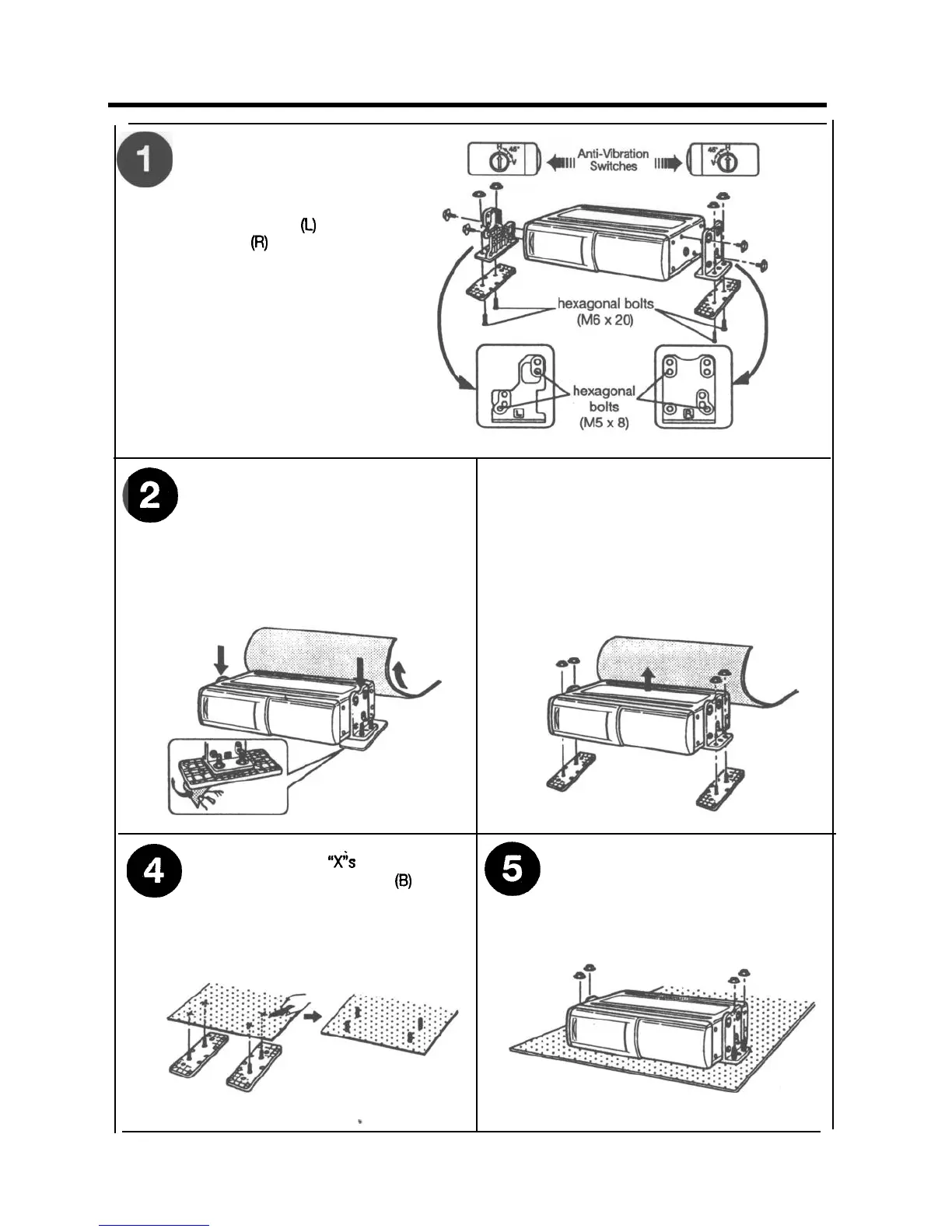
Horizontal Installation
l
Confirm that Anti-Vibration
Switches on both left and
right sides are set to
position H.
l
Attach bracket
(L)
and
bracket
(Ft)
using the
hexagonal bolts (M5 x 8).
l
Attach brackets (L) and (R)
to their respective
brackets (B) using the
hexagonal bolts (M6 x 20)
and the hexagonal nuts
(M6).
0
l
Pull back the carpet and determine
where to attach the unit.
l
Stick the supplied double-sided tape
0
.
Remove the hexagonal nuts and
take off the changer.
to the bottom of the brackets (B) and
peel off the paper backing.
l
Affix the unit to the floor by pressing
in place.
CD
A
l
Using a knife, cut
“x”s
in the carpet
directly above the brackets
(6)
bolts.
l
Once more, use the hexagonal nuts
l
Return the carpet to its original
Q
to attach the changer on top of the
carpet.
position allowing the bolts to
protrude through.
8


 To Next Page