
 Need help?
Do you have a question about the Blaupunkt New York 830 and is the answer not in the manual?
This document describes the Blaupunkt New York 830/835 multimedia navigation system, a car sound system designed for installation in a vehicle with a 12V system voltage and a DIN slot. It provides detailed instructions on its operation, features, and maintenance.
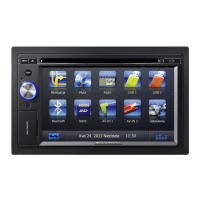
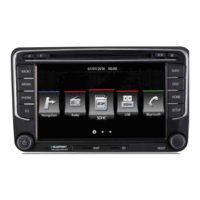
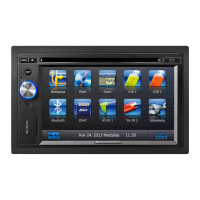
The device features a touchscreen user interface (12) for intuitive control. The main menu, accessed via the MENU button (2), displays various sources and operating modes, including Navigation, Disc, Radio, USB 1, USB 2, Bluetooth, SDHC, AV-IN 1, AV-IN 2, and Settings. The rotary/pushbutton (5) serves multiple functions: a short press switches the device on, a long press switches it off, and turning it adjusts the volume. A short press during operation mutes the audio source. The device also includes an infrared receiver (6) for remote control operation.
The New York 830/835 supports a wide range of audio and media sources. It can play audio DVDs/CDs (CDDA), DVD/CD-R/RWs with audio, MP3, or WMA files, as well as MP3 or WMA files from USB data carriers and SDHC cards. For DVD/CD playback, discs are inserted into the DVD/CD drive (14) with the printed side up. The drive automatically draws in the disc, and playback starts in DVD/CD or MP3 mode. To eject a disc, the Eject button (1) is pressed.
Two USB ports are available: USB1 (11) at the front, under a cover (8), and USB2 as a socket on a cable at the rear. SDHC cards can be inserted into the SD card reader (9), also located under the front cover. The device automatically switches to the respective mode (USB or SDHC) when a data carrier is inserted, and playback begins with the first recognized media file. The system also supports iPod® and iPhone® models via USB, allowing audio playback and control from the car sound system.
For video playback, the device can display movies and images from DVDs/VCDs/CDs, USB data carriers, and SDHC cards on its integrated monitor or a connected external monitor (Rear Seat Entertainment - RSE). For safety, video playback on the integrated monitor is only permitted when the vehicle is stationary and the handbrake is applied. The "BRAKE" cable must be connected to the vehicle's handbrake connection.
The audio playback interface allows users to navigate through folders and titles, with options for repeat functions (current track, folder, or all tracks) and random track play (MIX function). The playback menu also provides controls for fast searching, interrupting playback, and displaying an equalizer.
In radio mode, users can select different memory banks and wavebands. Up to 6 stations can be stored in each memory bank. Stations can be tuned manually by incrementing the frequency or by direct entry using a numeric keypad. The Travelstore function automatically searches for and stores the 6 strongest FM stations in the region. The scan function plays all receivable stations of the current waveband for a few seconds.
The device supports RDS (Radio Data System) functions, including displaying station names, synchronizing time signals, and optimizing radio reception with the HICUT function. The REG (regional programmes) function ensures that the system changes only to alternate frequencies broadcasting the same regional program. The AF (alternative frequencies) function automatically tunes into the best receivable frequency for the currently set station. The seek tuning sensitivity can be adjusted to find either strong or weaker stations. Traffic information priority can be switched on, allowing traffic reports to be automatically switched through, even if the system is not in radio mode, with adjustable minimum volume.
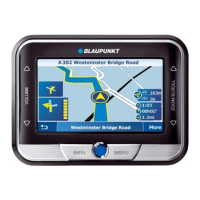
The navigation system uses software and map data stored on a MicroSD card (13). The device is delivered with the MicroSD card pre-inserted. Users can download the latest map data free of charge within 30 days of the first GPS positioning from www.naviextras.com.
To start navigation, the Navigation button is pressed from the main menu. The first-time setup wizard guides users through language selection, time format, units, and route settings. Destinations can be entered by address or as Points of Interest (POIs) from the database. Route options, such as vehicle type and route planning method (quick, short, dynamic), can be defined and adjusted. Map settings allow customization of view mode (2D or 3D), viewing angle, colors, and the display of buildings and POIs.
The Bluetooth® function allows registration of cell phones and media playback devices. When a cell phone is registered, the hands-free function enables phone calls, with access to dialled numbers and the phone book. If the connected Bluetooth® device supports A2DP and AVRCP, music can be played via the New York unit with playback control. During a call, music playback is interrupted and resumes after the call.
Bluetooth settings include switching Bluetooth on/off, "Auto Connect" for automatic connection to known devices, "Auto Answer" for incoming calls, defining a pairing code, and "Phone book sync" for synchronizing the phone book.
The device features two external AV inputs for audio and video playback: AV-IN 1 (10) at the front under the cover, and AV-IN 2 as a cinch socket on a rear cable.
The Rear Seat Entertainment (RSE) feature allows connecting two external monitors and audio outputs for the rear area of the vehicle. A different program can be displayed on external monitors than on the device, enabling viewing of images and movies on external monitors while driving. Audio playback for RSE is established via Rear Out R and Rear Out L sockets.
Sound settings include volume distribution (fader/balance) and an equalizer. The equalizer menu allows adjustment of Bass, Mid, and Treble levels, as well as the frequency of LPF, MPF, and HPF filters. Preset equalizer settings are also available.
General settings include radio region, background light off timer, dimmer mode, beep confirmation, wallpaper selection, touchscreen calibration, steering wheel control (SWC) configuration, and theft protection (code query and security code change). Time settings allow setting the date, clock mode (12/24-h), and time. DVD settings include setting a password for parental controls and defining the rating level for movies. Volume settings allow adjusting minimum volume levels for all sources.
For cleaning, only a dry or slightly moistened cloth should be used. Solvents, cleaning agents, and dashboard sprays are not recommended as they can damage the surface. The device contains a Class 1 laser, so it should not be modified or opened.
The manual emphasizes road safety, advising users to operate the device only when it does not distract from driving. Navigation recommendations should be followed only if they do not violate traffic regulations. Listening at a moderate volume is recommended to protect hearing and hear warning signals. The device is intended for installation in a vehicle with 12V system voltage and must be installed in a DIN slot. Repairs and installation should be performed by a specialist. The transport securing screws must be removed before startup. The device is protected against theft with a four-digit code number.
 General
| Resolution | 800 x 480 pixels |
|---|---|
| GPS Navigation | Yes |
| Bluetooth | Yes |
| FM Radio | Yes |
| MicroSD Slot | Yes |
| SD Card Slot | Yes |
| Touchscreen | Yes |
| Video Playback | Yes |
| Audio Playback | Yes |
| Steering Wheel Control | Yes |
| Rear View Camera Input | Yes |
| USB Port | Yes |
| Operating System | Windows CE |


 To Next Page