EasyManua.ls Logo

Blink XT2 - User Manual

Blink XT2
10 pages
Print Icon
To Next Page IconTo Next Page
Loading...
What's the Difference Between Blink XT and
XT2
There are a few subtle differences between the Blink XT and XT2 camera. We will cover those
differences in this article.
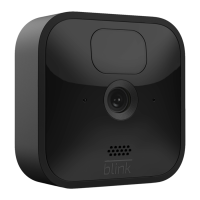
First and most important is the speaker in the bottom. You’ll see 15 small holes on the bottom of
the camera. This is where the sound comes out when you’re talking to someone you see on
camera. This speaker is what enables the XT2 to have two-way audio.
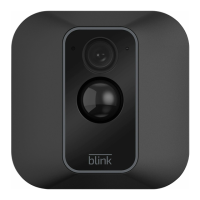
The next difference is on the front of the camera. The blink logo on the bottom and the outline of
the center plastic is a light shade of grey on the new XT2.

Other manuals for Blink XT2

Question and Answer IconNeed help?

Do you have a question about the Blink XT2 and is the answer not in the manual?

Summary

Blink XT vs XT2 Camera Differences

Two-Way Audio Speaker

XT2 features a speaker on the bottom for two-way audio communication.

Front Panel Aesthetics

XT2 has a light grey Blink logo and center plastic outline on the front.

Back Panel Identification

XT2 model is identified by an "XT2" logo on the rear battery cover.

Blink XT2 Camera Mounting Guide

Included Mounting Components

Package contains mount, riser, and screws for installation.

Mount Riser Purpose

Extends camera position, allowing for greater flexibility in placement.

Optimal Placement Strategy

Use Live View to confirm signal and view, consider horizontal motion detection.

Mounting Procedure

Attach mount with screws, then secure the camera to the mount.

Adjusting Camera Angle

Rotate the mounted camera to achieve the desired viewing perspective.

Utilizing Blink XT2 Two-Way Audio

Accessing Live View

Navigate to and activate the Live View for your camera in the app.

Engaging and Using the Talk Button

Press and hold the "Talk" button; speak after a brief pause and release when done.

Live View Session Management

Live View sessions have a 5-minute limit; re-initiate as necessary.

Summary

Blink XT vs XT2 Camera Differences

Two-Way Audio Speaker

XT2 features a speaker on the bottom for two-way audio communication.

Front Panel Aesthetics

XT2 has a light grey Blink logo and center plastic outline on the front.

Back Panel Identification

XT2 model is identified by an "XT2" logo on the rear battery cover.

Blink XT2 Camera Mounting Guide

Included Mounting Components

Package contains mount, riser, and screws for installation.

Mount Riser Purpose

Extends camera position, allowing for greater flexibility in placement.

Optimal Placement Strategy

Use Live View to confirm signal and view, consider horizontal motion detection.

Mounting Procedure

Attach mount with screws, then secure the camera to the mount.

Adjusting Camera Angle

Rotate the mounted camera to achieve the desired viewing perspective.

Utilizing Blink XT2 Two-Way Audio

Accessing Live View

Navigate to and activate the Live View for your camera in the app.

Engaging and Using the Talk Button

Press and hold the "Talk" button; speak after a brief pause and release when done.

Live View Session Management

Live View sessions have a 5-minute limit; re-initiate as necessary.

Blink XT2 Specifications

General IconGeneral
Resolution1080p HD
Field of View110 degrees
AudioTwo-way audio
Smart Home IntegrationAmazon Alexa
StorageCloud storage
Local StorageNo
Night VisionInfrared night vision
Battery LifeUp to 2 years
Weather ResistanceIP65-rated
ConnectivityWi-Fi (2.4 GHz)
TypeWireless
Motion DetectionYes, customizable zones
Dimensions71 x 71 x 34 mm

Videos

How to reset Blink cameras? Reset Blink XT2, Blink Mini in Minutes

How To Fix Black and White Video | Amazon Blink XT2