3
Before operating your laser projector, please read the “Before you Begin” section and “Notice” section
of this user guide.
SETTING UP THE BLISSLIGHTS TRIO
1. Connect the light xture to the provided UL/CUL power supply.
2. Connect the power supply into an available standard electrical outlet.
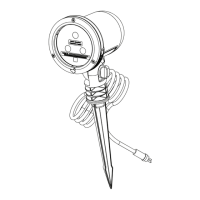
3. Attach the stake to the xture head by twisting the xture clockwise. Remove the
stake by twisting the xture counter-clockwise.
4. Stake the light into the desired location by holding the top of the stake and gently
pushing the stake into the ground. Do not push the xture into the ground by pushing
down on the lamp head.
5. Adjust the angle of the projected light by turning the thumbscrew attached to the side
of the xture.
6. Use the included remote control to change the settings of the light output (pg 4).
7. To turn o the light, use the provided remote or remove the power plug from the outlet.
OPERATING THE BLISSLIGHTS TRIO
Once the laser projector is plugged in, it will enter the default mode with the lasers on and
the automatic timer in 6 hour on and 18 hour o mode. Use the included remote control to
change these settings. This product includes a front lens heater that will melt away snow
that is covering the light face.
OPERATING THE TIMER
This light has a built-in timer that is designed to automatically shut o after 6 hours of
operation. It will go into sleep mode for 18 hours and resume its operation thereafter. The
timer will turn on once the light is plugged in. To disable the timer, press the timer button
on the remote. The lasers will blink twice to signal that the timer is o and that the lasers
will remain on. To turn the timer back on at the desired time, press the timer button again.
The lasers will then blink three times to signal that the timer is on.
OPERATING THE REMOTE CONTROL
Use the included infrared remote control to operate the light’s features. Infrared signal does
not go through solid objects, such as windows, walls, trees, shrubs, etc. Make sure there
is a clear line of sight between you and the xture. Point the remote control at the FACE
of the light xture, where the receiver is located. The remote operates up to 15’ (4.6 m) of
unobstructed distance away from the face of the xture.


 To Next Page