4
Remote FCC Compliance:
This device complies with Part 15 of FCC Rules. Operation is subject to the following two conditions:
1. this device may not cause harmful interference, and 2. this device must accept any interference
received, including interference that may cause undesired operation.
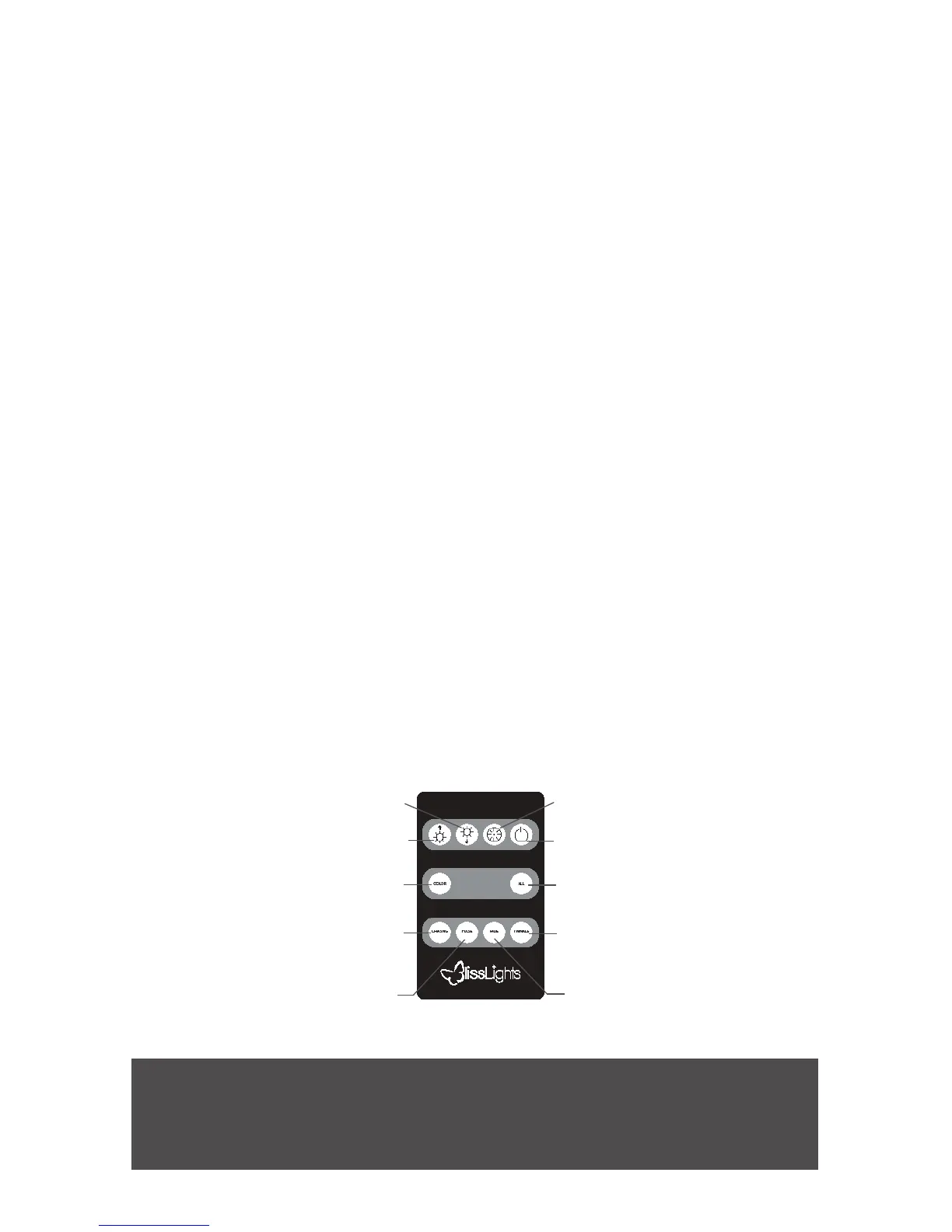
• Power: Press to put the device in standby mode. Before entering standby mode, the
device will save all current settings so that when the Power button is pressed again,
the device will resume with the last mode before entering standby. This is the same
behavior as unplugging the device. Whenever the device is unplugged or put into
standby mode, all current settings are saved and will resume when the device is
restarted.
• Timer: Press to turn the internal 6/18 timer on or o.
• Intensity+/-:Press the increase and decrease intensity buttons to change the intensity
of all lasers that are currently on. There are ve preset settings for intensity ranging
from dimmest to brightest. The increase and decrease buttons only aect the intensity
of the lasers while in the Color or All mode. The lasers will blink once they reach the
highest or lowest intensity setting.
• Color:Press the color button to cycle through all combinations of the available laser
colors.
• All:Press to turn on all available colors simultaneously (red, green and blue).
• Chasing: This mode makes each available laser color blink in sequence. Each push of
the button cycles the eect through one of three dierent speeds: fast, medium and
slow.
• Pulse:This mode pulses in and out in a smooth transition through all available color
options. Each push of the button cycles the eect through one of three dierent
speeds: fast, medium and slow.
• Fade:This mode cycles through each available color option in a fading transition.
Each push of the button cycles the eect through one of three dierent speeds: fast,
medium and slow.
• Twinkle: This mode creates a twinkle eect. Each push of the button cycles the eect
through one of three dierent speeds: fast, medium and slow.
REMOTE CONTROL FUNCTIONS
POWERON/OFF
TIMERON/OFF
TWINKLE
ALL
FADE
RAISEINTENSITY
LOWERINTENSITY
PULSE
CHASING
COLOR


 To Next Page