38 39
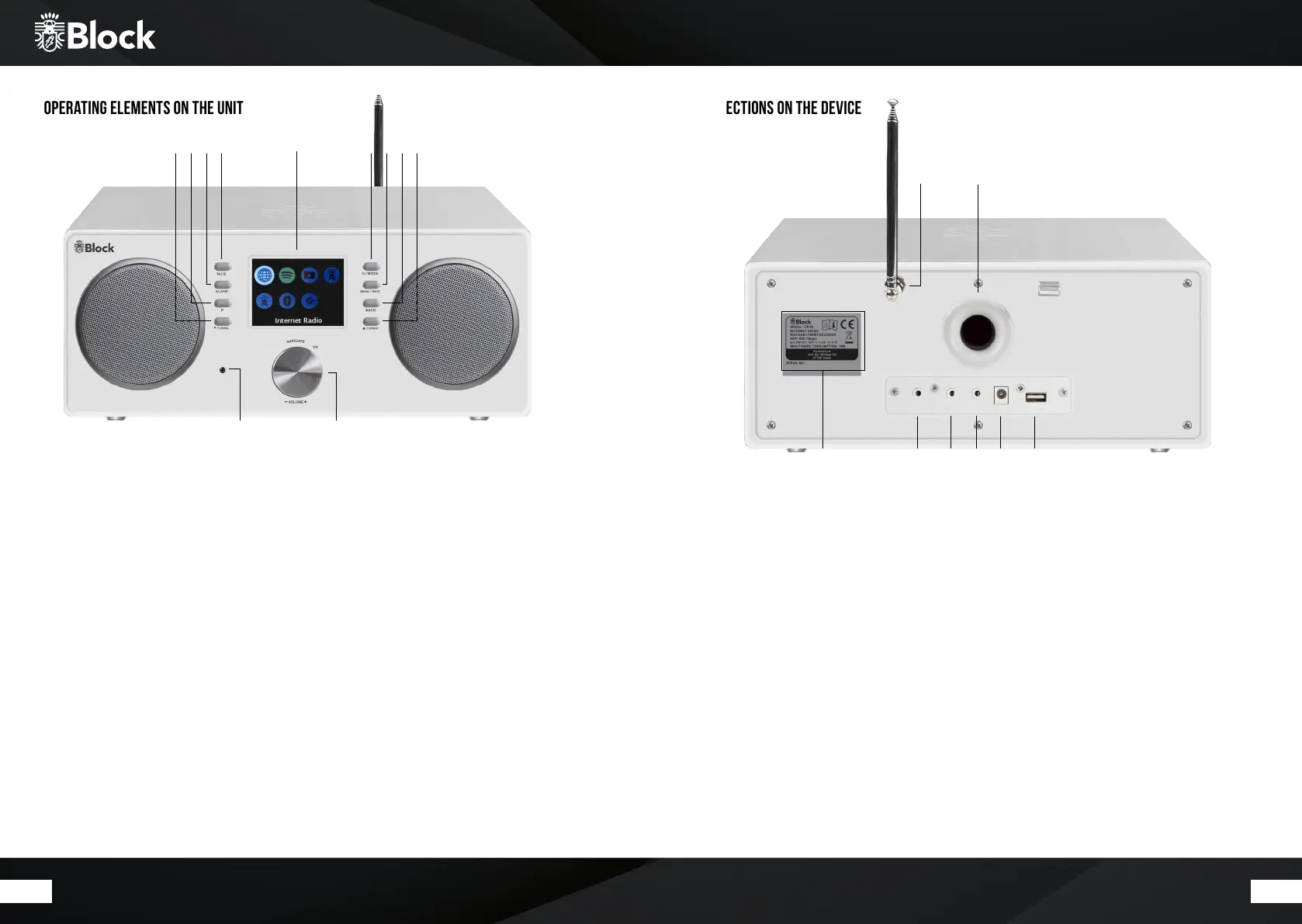
Operating elements on the unit
1. Infrared sensor for remote control.
2. Colour display.
3. Multifunction knob: Turn the knob to the le/right to increase / decrease the volume. In the menu mode,
the individual points are selected by turning and activated by pressing the multifunction rotary knob.
4. „Mute“ button: Pressing this button sets the volume of the unit to „0“. Press the button again to restore the
previous volume.
5. „Alarm“ button: Pressing this button sets the alarm function of the CR-20.
6. „P“ button: short pressure to display the list of stored transmitters. Long pressure saves transmitter to
selected memory locations.
7. „Tuning-▼“ button: on the radio mode, the unit automatically searches for the previous station by pressing the
button.
8. „Standby / Mode“ button: a short pressure switches the display to overview mode. You can now select the
music source using the multifunction knob or the arrow buttons on the remote control. Press and hold the
button to enter the network Standby mode.
9. „Menu / Info“ button: press once or several times to show additional information on the music source on
the display, if there is any. Press and hold the button to show the menu.
10. „Back“ button: press this button to return to the previous menu item or to exit the menu.
11. Taste „Tuning+▲“: on the radio mode, the unit automatically searches for the next station by pressing the
button.
Connections on the device
1. Model designation, technical data, serial number, warnings and disposal instructions.
2. 3,5mm AUX
3. 3,5mm AUX-OUT
4. 3,5 Headphone jack
6. USB connection.
5. Power supply for the supplied external power adapter. The power supply cable must not show any damage or
defects, use only the supplied one.
7. FM and DAB + telescopic antenna (mounted).
8. Bass reflex ports for integrated speakers.
1
31
2 9
6
8
7
114 10
5
7 8
21 3 4 5 6



 To Next Page