36
4
1717 89
5 1113 1215 10
2
6
16
14
3
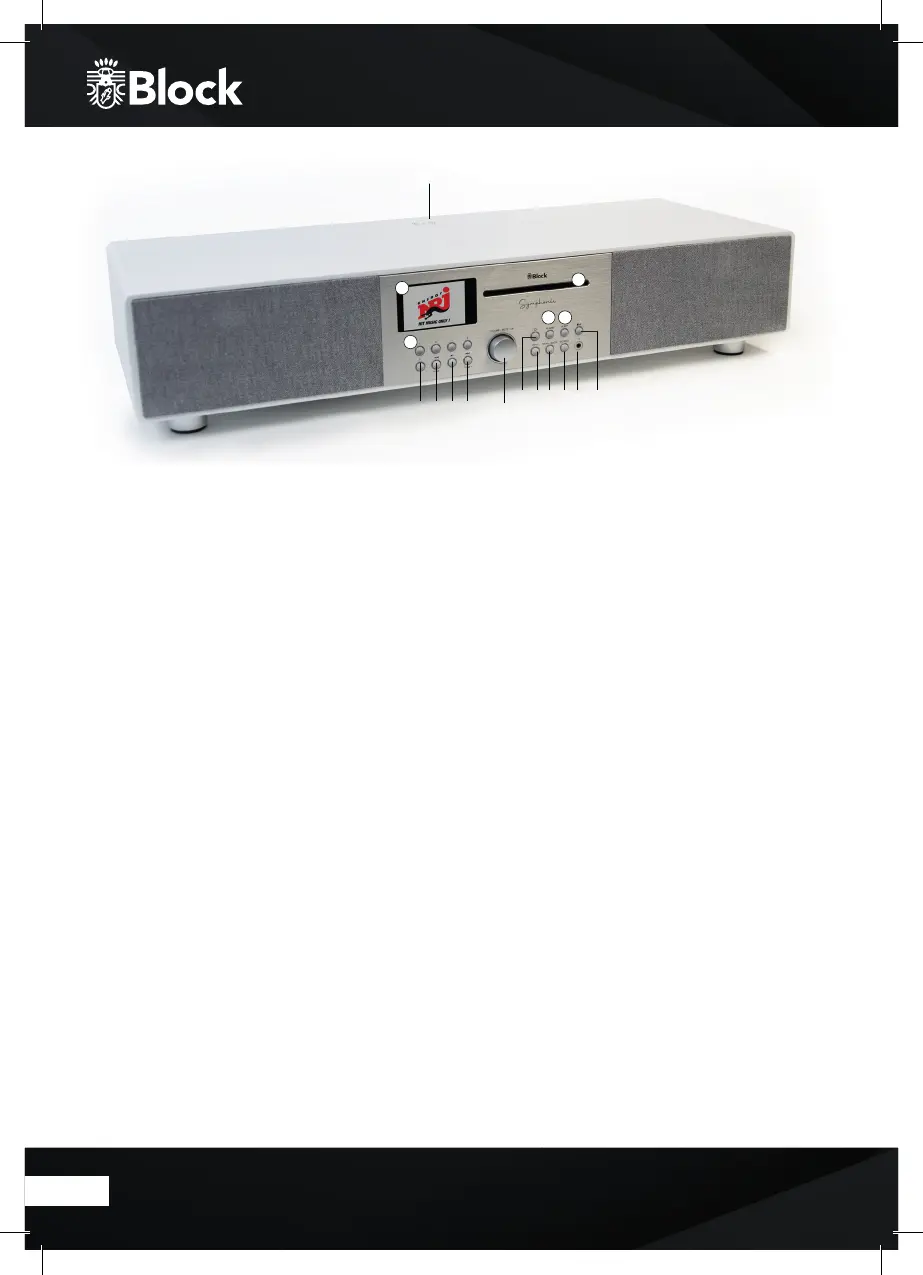
Operating elements on the unit
1. Navigate knob: Turning it le / right increases or decreases the volume. Menu items can be selected by turning
and activated by pressing the multifunction rotary knob.
2. CD tray. By inserting a CD the device will start.
3. Colour display.
4. Wireless charging platform: Place your mobile phone on the marked area for charging.
5. „Standby / Mode“ button: A short press switches the display to overview mode. You can now select the
music source using the multifunction knob or the arrow buttons on the remote control. A long press switches the
device into Standby mode.
6. „Alarm“ button: Press once: Alarm 1 is activated.
Press twice: Alarm 2 is activated and alarm is deactivated. Press 3x: Alarm 1 & 2 are activated.
Press 4x: Alarm 1 & 2 are deactivated. These functions are only supported in standby.
7. „Backward“ button: In the radio mode, the unit automatically searches for the previous station by pressing the
button. In CD and music player mode, the unit switches to the previous title.
8. „Forward“ button: In the radio mode, the unit automatically searches for the next station by pressing the
button. In CD and music player mode, the unit switches to the next track.
9. “Play/Pause”: Press the button to pause the music, press it again to continue to play.
10. „Stop and CD“ button: Press the button for eject the CD. Press for a long time the unit stops playing the music.
11. „Menu and Back“ button: Press the button to show the menu. Press this button to return to the previous menu
item or to exit the menu.
12. 3.5 mm headphone connection jack.
13. Info: Additional information about the music source is displayed (if available)
14.
„Sleep“ button: Standby mode aer the choosen time.
15.
„Source“ button: by pressing this button repeatedly the devices will be connected in a sequence to its sources.
16. Storage station 1-4
17.
„P“ button: Recalls or saves pre-set radio station in radio mode


 To Next Page