18 / EN
Fully Automatic Coffee Machine / User Manual
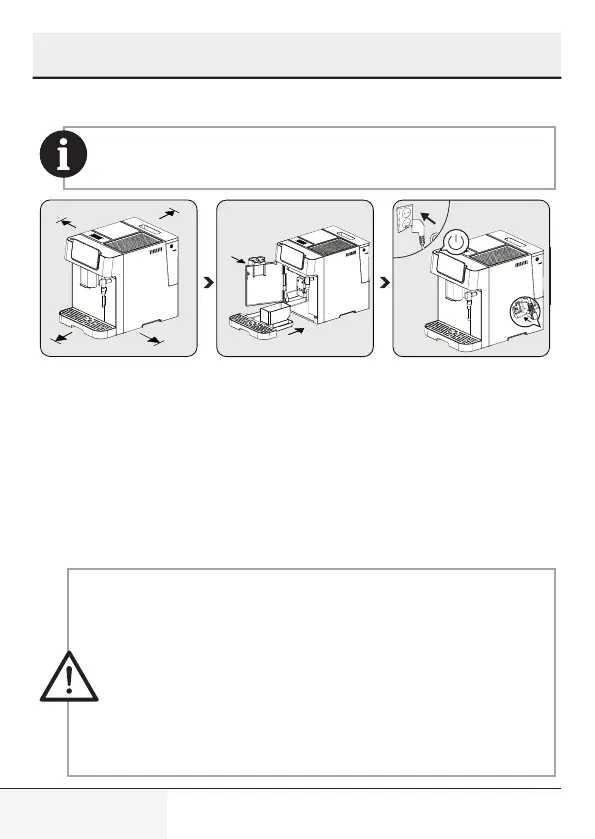
4.1 Installation
Remove any protective films, stickers and any other packaging
material from the appliance.
150mm
150mm
150mm
.
150mm
2
1
3
1
2
Choose a safe and stable
surface with an easily reac-
hable power supply and al-
low the minimum distance
from the sides of the mac-
hines.
Insert the drip tray. Make
sure it is inserted correctly
and close the front cover.
Unwind and straighten the
power cord and insert the
plug into the socket located
under the machine. Insert the
other end of the power cord
into a wall socket with the
suitable power voltage. Press
the on/off button to turn on
the machine.
4.2 Filling the water tank
About the protect program: If the water tank is not fully placed
into the machine, a protection mode will be activated 15
seconds into the brewing process. The hot water button will
light up on the control panel.
1. Make sure that the water tank is fully inserted into the
machine.
2. Press the hot water button. After the hot water is dispensed,
the machine will be in idle.
4 Preparation



 To Next Page