15
Dryer / User Manual
Down Wear
You can dry your clothes such as coats and jackets
with feathers and fibers which have a label that can be
dried in the dryer. Please dry inside out.
- 800 165
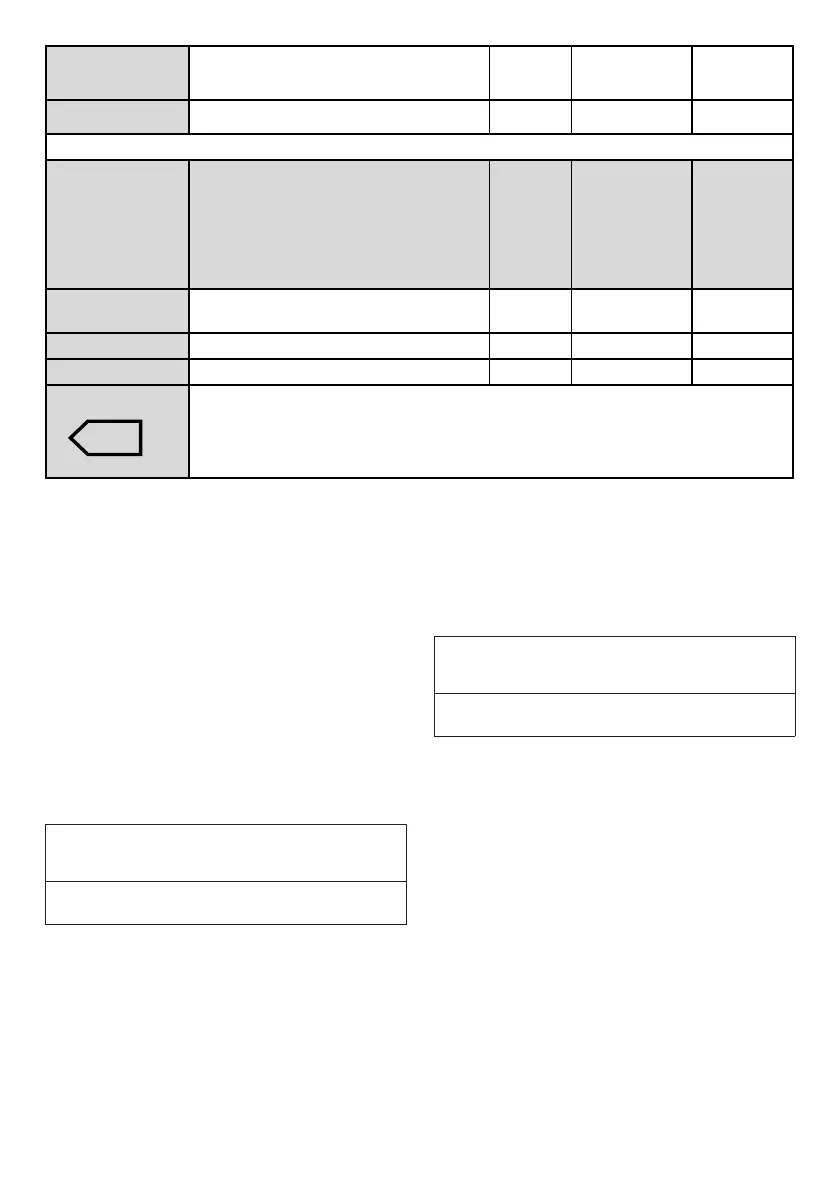
Express Use this program to have 2 shirts ready for ironing. 0,5 1200 30
Energy consumption values
Programmes Capacity (kg)
Spin speed in
washing machine
(rpm)
Approximate
amount of remaining
humidity
Energy consumption
value kWh
Cottons Eco * 7 1000 60% 1,72
Cottons Iron dry 7 1000 60% 1,30
Synthetics cupboard dry 4 800 40% 0,59
"Cottons Eco programme" used at full and partial load is the standard drying programme to which
the information in the label and the fiche relates, that this programme is suitable for drying normal
wet Cottons laundry and that it is the most efficient programme in terms of energy consumption for
Cottons.
* : Energy Label standard program (EN 61121) All values in the table are determined according
to EN 61121 standard. Consumption values may vary from the values in the chart depending on
laundry type, wringing speed, ambient conditions and voltage levels.
5.5 Auxiliary functions
Buzzer / time
Drying machine makes an audible warning
when the program is completed. If you don’t
want the machine to make an audible warning,
press the “Buzzer / Time” button. When you
press the Buzzer/Time button, a light will
illuminate and no audible warning will be made
when the program ends.
C
NOTE
• You can select this function before or
after the program starts.
Buzzer/Time button is used to adjust program
duration while the Rack/Time programs are
selected.
Drying Level
Drying Level button is used for adjusting to
desired dryness level. Program duration may
change depending on the selection.
C
NOTE
• You can activate this function only prior
to start of program.
End time
You can delay the end time of the program up
to 24 hours with End time function.
1. Open the loading door and place the
laundry.
2. Select the drying program.
3. Press the End Time selection button and
set the delay time you wish. End Time
LED will illuminate. (When pressed and
hold the button, End Time proceeds non-
stop).
4. Press the Start / Stand-by button. End
Time countdown starts. “:” Separator in
the middle of displayed delay time flashes.



 To Next Page