7 8
Charge the battery
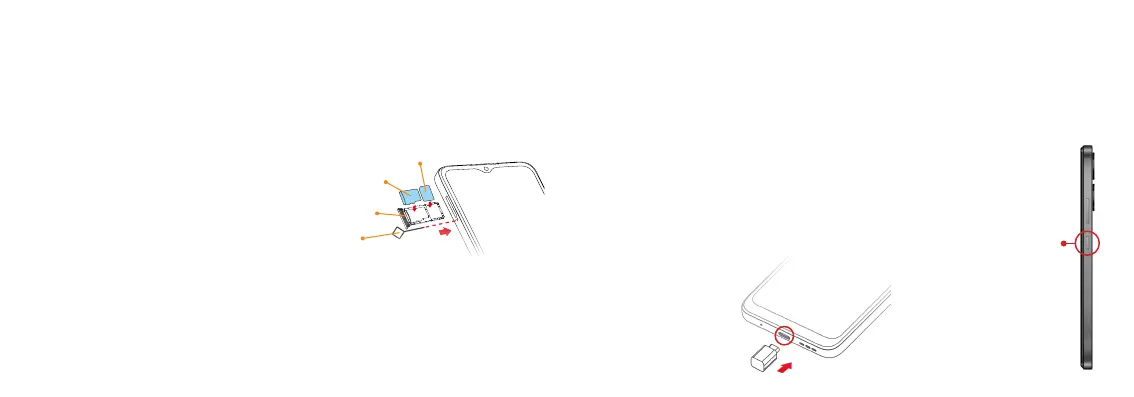
1. Connect one end of the data cable to the USB port located on the
bottom of your phone.
2. Connect the other end to the power adapter.
3. Connect the power adapter to an electrical outlet to fully charge your
phone.
Power On and Off
Long press the Power key to switch on the phone.
To turn off the phone, press the Power key and the
Volume up key at the same time, and tap Power Off on
the screen that displayed.
Setting up your phone
Install a Nano SIM/microSD card
Note: Please contact your cellular phone service provider directly to
obtain your SIM card if your card is not preinstalled.
1. Insert the included SIM tray pin into
the tray slot and remove the SIM tray.
2. Place the Nano SIM card and microSD
card (not included) with metal
contacts facing down into the tray.
3. Gently slide the SIM tray back into
the slot.
Warning: Please keep the SIM card out of the reach of children.
The SIM card and its contact are easily damaged due to scratching or
bending. Please use caution when carrying, installing, or taking out the
SIM card.
Power
key
microSD
SIM tray
Nano SIM
Pin



 To Next Page