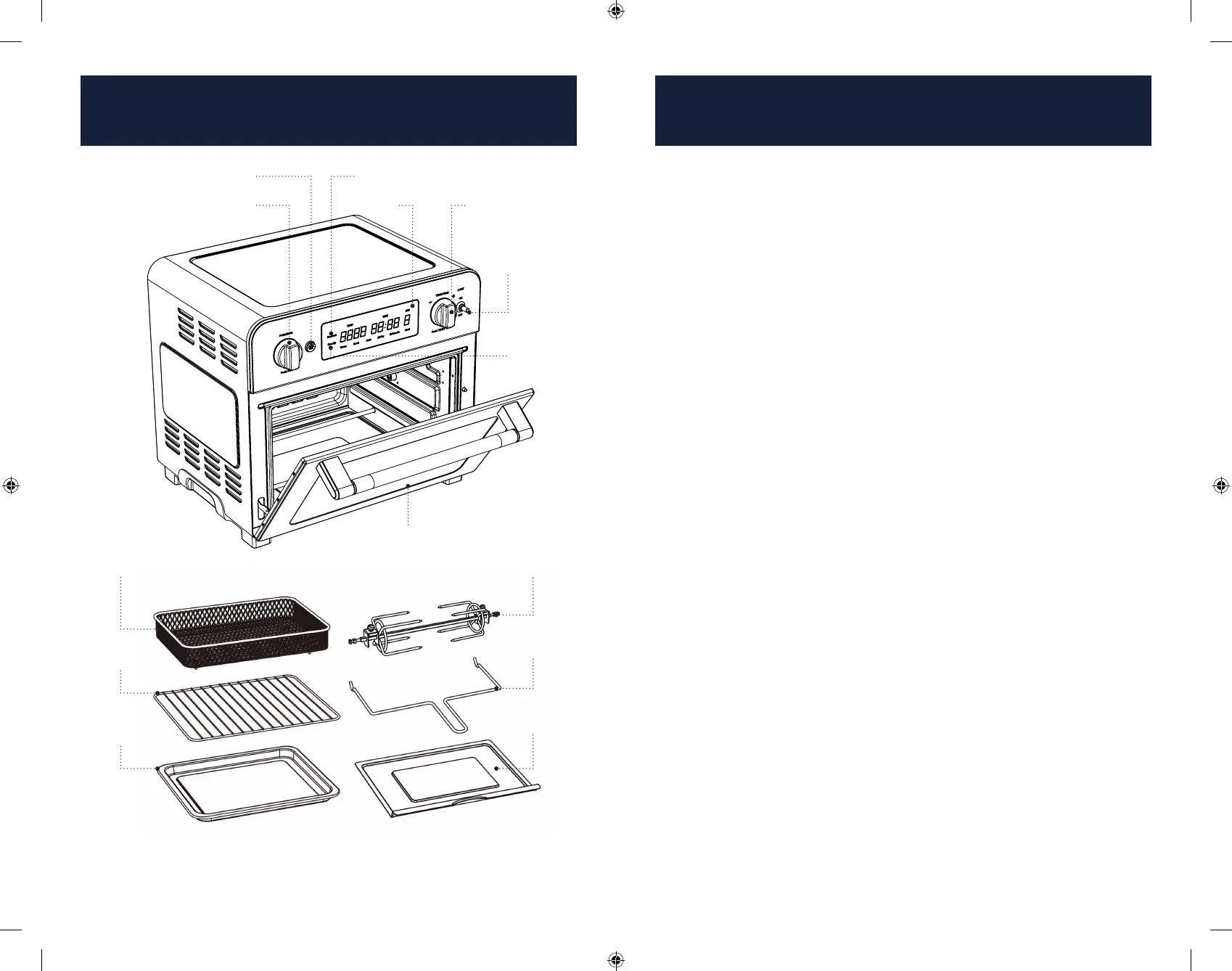
Function/Fan Knob
Oven Door
Removable
Crumb Tray
Start/Stop Button
Temp/Time Knob
Light
Switch
Ready
Indicator
Function/Fan Knob
To change the selected function or fan speed, press the Function/Fan Knob to
switch between the function or fan setting. The active setting will begin blinking.
Rotate the Function/Fan Knob left or right to change the selected setting. See
function.
simply press the Start/Stop Button, or rotate any knob. The Display will time out if no
Temp/Time Knob
Press the Temp/Time Knob to switch between the Temp or Time setting. The
active setting will begin blinking. Rotate the Temp/Time Knob left or right to
change the selected setting.
Light Switch
When the Oven Door is closed you can turn the Oven Light on by putting the Light
Switch in the ON position (up). Whenever the Oven Door is opened, the Oven Light
will come on even if the Light Switch is in the OFF position (down).
Start/Stop Button
heating process. For Warm and Bake settings, the Preheat Indicator will illuminate
and the temperature will begin counting up to the set temperature. When the set
temperature is reached, the oven will sound three short beeps and the
Ready Indicator will illuminate letting you know it is time to add your food.
Press the Start/Stop Button to begin the countdown timer. When the time has
elapsed, you will hear two beeps, the
the fan will change to
The Timer will continue
For Toast, Air Fry, Rotisserie and Broil, no pre-heat is necessary. The Timer will
begin counting down once you press the Start/Stop Button. When the time has
elapsed,
and
in use.
Oven Door
When you open the Oven Door during the cooking process, the Oven Light will
Removable Crumb Tray
The Removable Crumb Tray slides out from underneath the bottom heating
elements for easy cleaning. Always ensure that the Removable Crumb Tray is in
place prior to using your oven.
Removal Tool
Wire Rack
Baking/Drip
Pan
Air Fryer
Preheat Indicator
Get to Know Your Air Fryer
Toaster Oven Parts
Get to Know Your Air Fryer
Toaster Oven Parts (Cont.)
7 8


 To Next Page
 Loading...