4
Main Menu
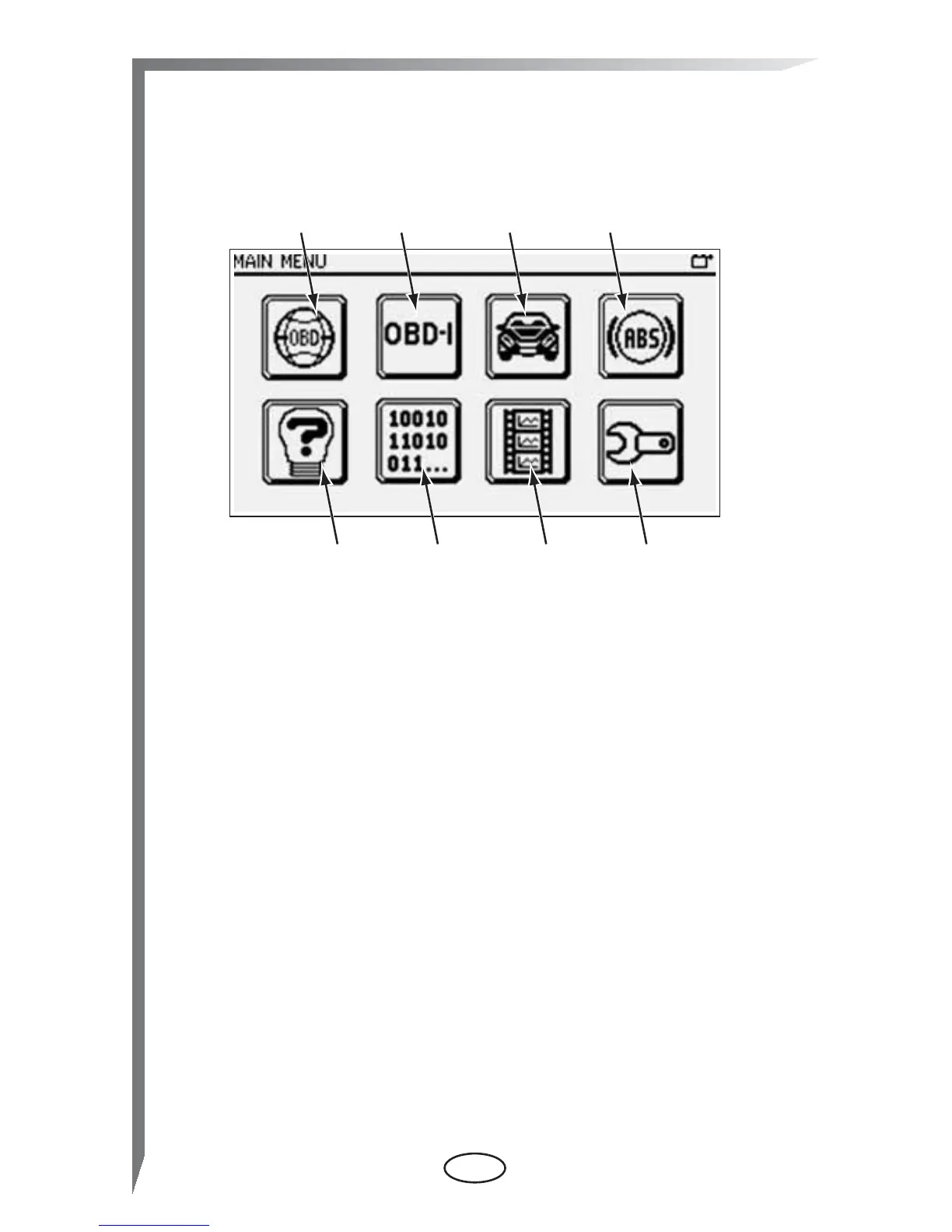
The Main menu is a series of touch-sensitive buttons that access
scan tool operations. Select a Main menu option to begin testing.
1— Global OBD-II—opens a sub-menu of operations.
2— OBD-I Codes—access the code report on older vehicles.
Optional accessories are needed to connect to these
vehicles, contact your Snap-on representative for details.
3— Enhanced Codes—opens a list of manufacturer specific
codes that are not included in the standard DTC list.
4— ABS Codes—displays codes for the antilock brake
system (ABS).
5— Global OBD Help—opens a file that explains certain tests
and procedures.
6— Select Protocol—allows you to choose which vehicle
communication protocol the scan tool uses.
7— Captured Movies—opens a list of previously recorded
data files.
8— Tools—opens a menu for configuring the scan tool
display characteristics.
Main menu buttons open either an additional sub-menu of options
or a test screen. Test screens typically include data or test results
along with a toolbar of buttons that allow you to navigate through
and manage the information presented. The toolbar displays
along the right-hand edge of the screen.


 To Next Page