5
Toolbar
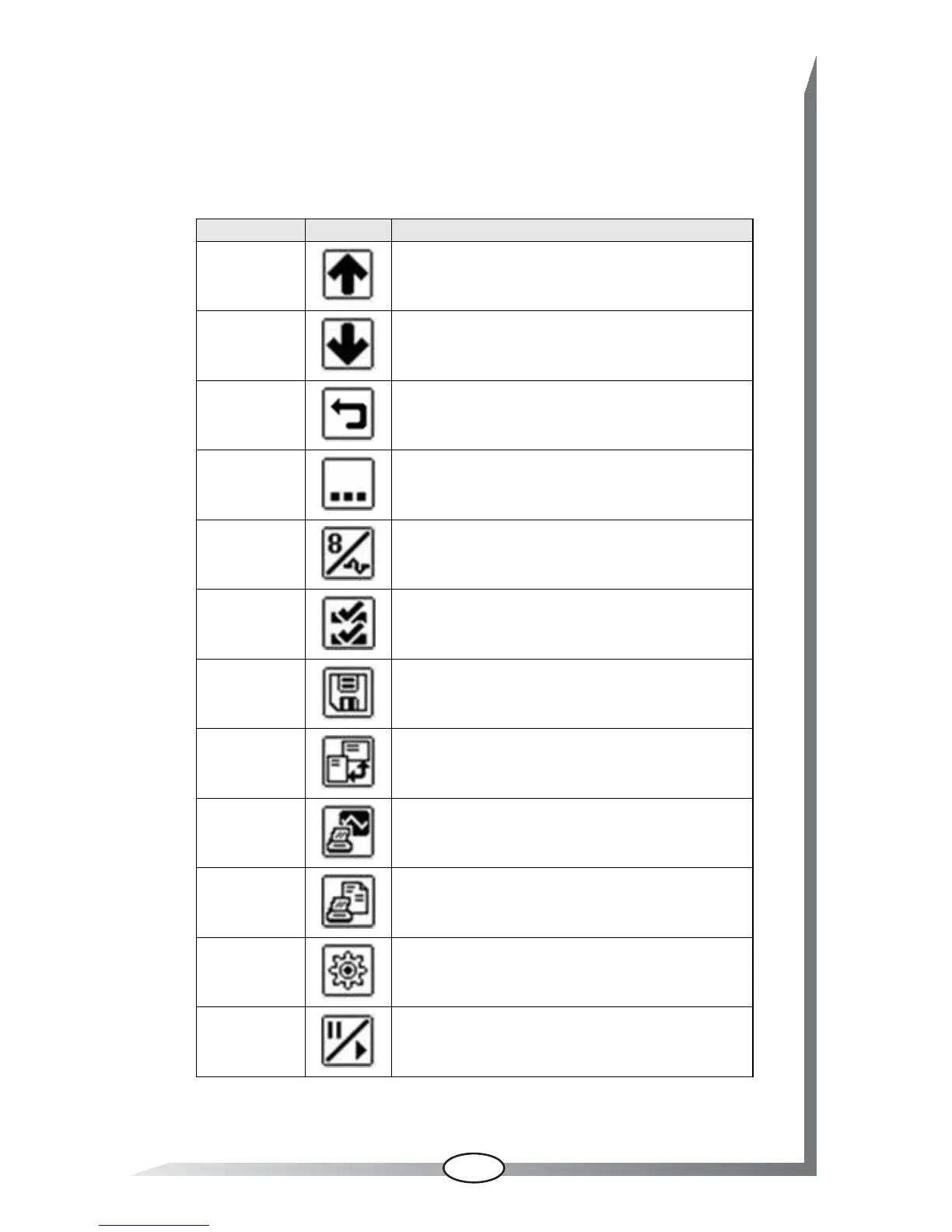
Buttons are for performing scan tool operations. Which buttons
display varies based on the function being performed.
Additional buttons, other than those shown above, appear on the
toolbar or in pop-up windows under certain conditions.
Name Button Description
Up
Scrolls the data toward the bottom of the screen
when there is additional information above what
is shown on the tool.
Down
Scrolls the data toward the top of the screen
when there is information below what is shown
on the tool.
Return Returns to the previously viewed screen.
More Opens the next set of toolbar buttons.
List/Graph
Switches the data between a list view and a
graph view.
Custom Data
List
Allows you to select which data parameters
display on the data list.
Save Movie
Saves a copy of the data recorded in the data
buffer.
Screen Mode
Switches screen configuration between
landscape and portrait view.
Save Screen
Saves an image of the currently displayed
screen.
Save Report
Saves one complete transmission of ECM serial
data.
Settings Opens a menu for configuring the display screen.
Play/Pause
Suspends data collection when viewing live data
to allow closer examination, and restarts data
collection when viewing paused data.


 To Next Page