EasyManua.ls Logo

BLUE SKY SOLAR BOOST 3000i MPPT - User Manual

BLUE SKY SOLAR BOOST 3000i MPPT
16 pages
Print Icon
To Next Page IconTo Next Page
Loading...
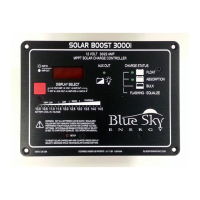
SB3000i
(SOLAR BOOST™ 3000i MPPT)
12 VOLT 30/22 AMP MAXIMUM POWER POINT TRACKING
PHOTOVOLTAIC CHARGE CONTROLLER
INSTALLATION AND OPERATION MANUAL
THIS MANUAL INCLUDES IMPORTANT SAFETY INSTRUCTIONS FOR MODEL SB3000i
SAVE THESE INSTRUCTIONS.
COVERED UNDER ONE OR MORE OF THE FOLLOWING US PATENTS
6,111,391 6,204,645
© Blue Sky Energy, Inc. 2017 430-0034 C
FCC CFR 47 Part 15 Subpart B
This device complies with part 15 of the FCC
rules. Operation is subject to the following two
conditions: 1) This device may not cause harmful
interference, and 2) This device must accept any
interference received, including interference that
may cause undesired operations.
CONFORMS TO:
EN 61000-6-2:2005
EN 61000-6-3:2007 + A1:2011
AS/NZS 60000-6-3:2012

Questions and Answers

  • R
    Robert HawkinsAug 14, 2025
    What to do if the BLUE SKY Controller is completely dead with a blank display?
    • D
      Devin AdkinsAug 14, 2025
      If your BLUE SKY Controller is completely dead and the display is blank, the issue is likely due to no battery power or the display mode being set to OFF. Check if the battery is disconnected, overly discharged, or connected with reverse polarity. Remember that the battery powers the controller, not the PV. The voltage present on the controller's battery terminals must match the actual battery voltage (within a few tenths) and be at least 9 volts. Also, press the Display Select button to choose a display mode other than OFF.
  • B
    Brandy AndersonAug 20, 2025
    What to do if the BLUE SKY Controller charge status indicator is ON but there is no output charge current?
    • E
      ebrownAug 21, 2025
      If the charge status indicator on your BLUE SKY Controller is ON but there's no output charge current, this could be normal operation. The output might be off because the battery voltage is higher than the present charge voltage setpoint, possibly due to other charging systems or immediately after switching to Float before the battery voltage has dropped. Ensure the battery voltage is at least 9 volts for the controller to operate, and that the voltage at the controller's battery terminals matches the actual battery voltage within a few tenths. Also, check the connections, fuse, and fuse holder. Ensure that the PV- and BAT- are separate; an external connection can interfere with the current measurement system.
  • M
    morrisangelaAug 25, 2025
    Why BLUE SKY SOLAR BOOST 3000i MPPT Controller charge turns OFF at high ambient temperature?
    • J
      Jonathan CarrAug 26, 2025
      The BLUE SKY Controller may temporarily shut down due to high internal temperature. This is normal operation. To mitigate this, improve ventilation around the controller or reduce the PV power input.
  • J
    Jesse WolfeAug 28, 2025
    How to fix all display segments & LED indicators stuck on BLUE SKY SOLAR BOOST 3000i MPPT?
    • D
      Denise Snow MDAug 28, 2025
      If all display segments and LED indicators on your BLUE SKY Controller are stuck on, it's likely due to the PV being connected with reverse polarity. Correct the polarity immediately. Ensure that PV- and BAT- are separate for proper operation, as an external connection prevents proper operation.
  • D
    Dr. Dominique RamosAug 30, 2025
    Why auxiliary battery not being charged by BLUE SKY Controller?
    • J
      Jill JohnsonAug 31, 2025
      If the auxiliary battery is not being charged by the BLUE SKY Controller, there could be several reasons: the controller might not be set for auxiliary battery charge, the primary battery might not be highly charged, the load on the auxiliary battery might be too high, or the auxiliary battery might not be connected. Confirm that the “out” setting is set to “ch9”. The auxiliary battery will only receive charge when the primary battery is in Absorption or Float. Note that the maximum auxiliary charge current is approximately 2 amps, so you may need to reduce the load. Also, verify that the auxiliary battery is properly connected.
  • L
    Lisa SmithSep 6, 2025
    Why networked BLUE SKY SOLAR BOOST 3000i MPPT units do not seem to coordinate action or slaves do not turn on?
    • T
      Thomas NealSep 7, 2025
      If networked BLUE SKY Controller units aren't coordinating or slaves aren't turning on, the IPN network address may be set incorrectly, there may be a network wiring problem, or there may be bad battery or PV power to the slave. Ensure one unit is set to IPN network address 0 to be the charge control Master, and all Slave units are set to different addresses 1 – 7. Confirm the wiring is correctly in place. Check charge control related items on the Slave. For troubleshooting, consider temporarily removing the Slave unit from the network and setting it to be a standalone Master.
  • B
    brandonbishopSep 10, 2025
    Why temperature compensation of charge voltage does do not work on BLUE SKY SOLAR BOOST 3000i MPPT Controller?
    • J
      Jason DelacruzSep 10, 2025
      If temperature compensation of charge voltage does not work on your BLUE SKY Controller, it could be due to a missing temperature sensor, the wrong temperature sensor being used, or the temperature sensor having failed or being installed with reverse polarity. Install the battery temperature sensor BSE p/n 930-0022-20. Use only the BSE battery temperature sensor p/n 930-0022-20. If the sensor is open, shorted, has reverse polarity, or is missing, the controller will operate as if the battery temperature is 25°C. A proper sensor voltage, when excited by the controller, will read approximately 2.98V at 25°C, changing at +10mV/°C.
  • T
    Timothy DiazNov 17, 2025
    Why BLUE SKY SOLAR BOOST 3000i MPPT unit will not switch to Charge ON state?
    • H
      harry11Nov 17, 2025
      If your BLUE SKY Controller won't switch to the Charge ON state, several factors could be at play. There might be no battery power, the PV could be disconnected or have low voltage, the PV polarity could be reversed, there could be a microprocessor lockup, or an over-temperature shutdown. Ensure the battery is properly connected, not overly discharged, and has the correct polarity. The voltage at the battery terminals should be within a few tenths of the actual battery voltage and at least 9 volts. The PV voltage must be at least 0.3V greater than the battery voltage for the controller to switch to Charge On. If the PV is connected with reverse polarity, it will heat the front panel and turn on all display segments and LEDs. Try momentarily removing all power (battery and PV) to reboot the...

Summary

Important Safety Instructions

Personal Precautions

Precautions for working near lead-acid batteries, including handling acid and explosion risks.

Charger Location & Installation

Guidelines for safe placement and installation of the charge controller to prevent hazards.

Operation

3-Stage Charge Control

Overview of the Bulk, Absorption, and Float charging stages for optimal battery charging.

Equalization

Details on the equalization process for lead-acid batteries and safety warnings.

Maximum Power Point Tracking (MPPT)

Explanation of MPPT technology's role in maximizing solar energy harvest.

Installation

Charge and Load Control Settings

Overview of factory default and adjustable settings for charge and load control.

Changing Charge and Load Control Settings

Step-by-step guide on how to view and modify charge and load control parameters.

Selecting PV Modules

Guidance on choosing appropriate PV modules and their specifications for the controller.

Battery & PV Power Connect; Disconnect Order

Crucial sequence for connecting and disconnecting battery and PV power to prevent damage.

Troubleshooting Guide

BLUE SKY SOLAR BOOST 3000i MPPT Specifications

General IconGeneral
Maximum Output Current30 A
DisplayLCD
Nominal Battery Voltage12 V / 24 V
Maximum Output Power400 W (12V), 800 W (24V)
Charging Algorithm3-stage: Bulk, Absorption, Float
Protection FeaturesReverse Polarity

Related product manuals