- 11 -
ground without inducing a ground loop. It should be noted that the maximum output level will drop by 6
dbm in the unbalanced mode, since half of the output voltage has been effectively eliminated. This is not
usually a problem, as most unbalanced audio devices have very sensitive inputs and do not require a large
drive voltage.
Where the unbalanced equipment has a connector for chassis grounding, the preferred method is to leave the
cable shield unconnected at the console, and connected to the shield terminal of the unbalanced device. The
chassis ground of the external unbalanced device is then returned to the studio ground via a separate
grounding conductor. This provides a dependable AC safety ground and an acceptable audio ground.
Unbalanced equipment usually has far more input sensitivity than required, and easily can be driven into
overload by normal console outputs. In these cases, it is advisable to install an attenuator network at the
console output, so that normal console operating levels are maintained
4.7 Headphone Outputs
Blue 5c incorporates two stereo headphone amplifiers with unbalanced outputs rated at 1 Vrms to 8 ohm
load. The headphone outputs can be used to directly drive 8 ohm or higher impedance headphones.
!! WARNING !!
Avoid mono headphones, as one channel of the headphone output will be
shorted to ground. While current limiting resistors are included in the output,
damage may still occur with prolonged use or high output levels.
The headphone output connections (1/4" stereo phone jacks) are located on the left and right front edge of the
unit. In the event that higher power levels are required, an external headphone amplifier may be used. Please
contact LPB Customer Service for details.
4.8 Monitor Outputs
Blue 5c is equipped with a stereo monitoring system. Any channel providing audio to the Program output
(ON) will also send the audio to the Monitor Outputs. This line level, active balanced stereo output is used to
drive an external monitor power amplifier or set of powered speakers.
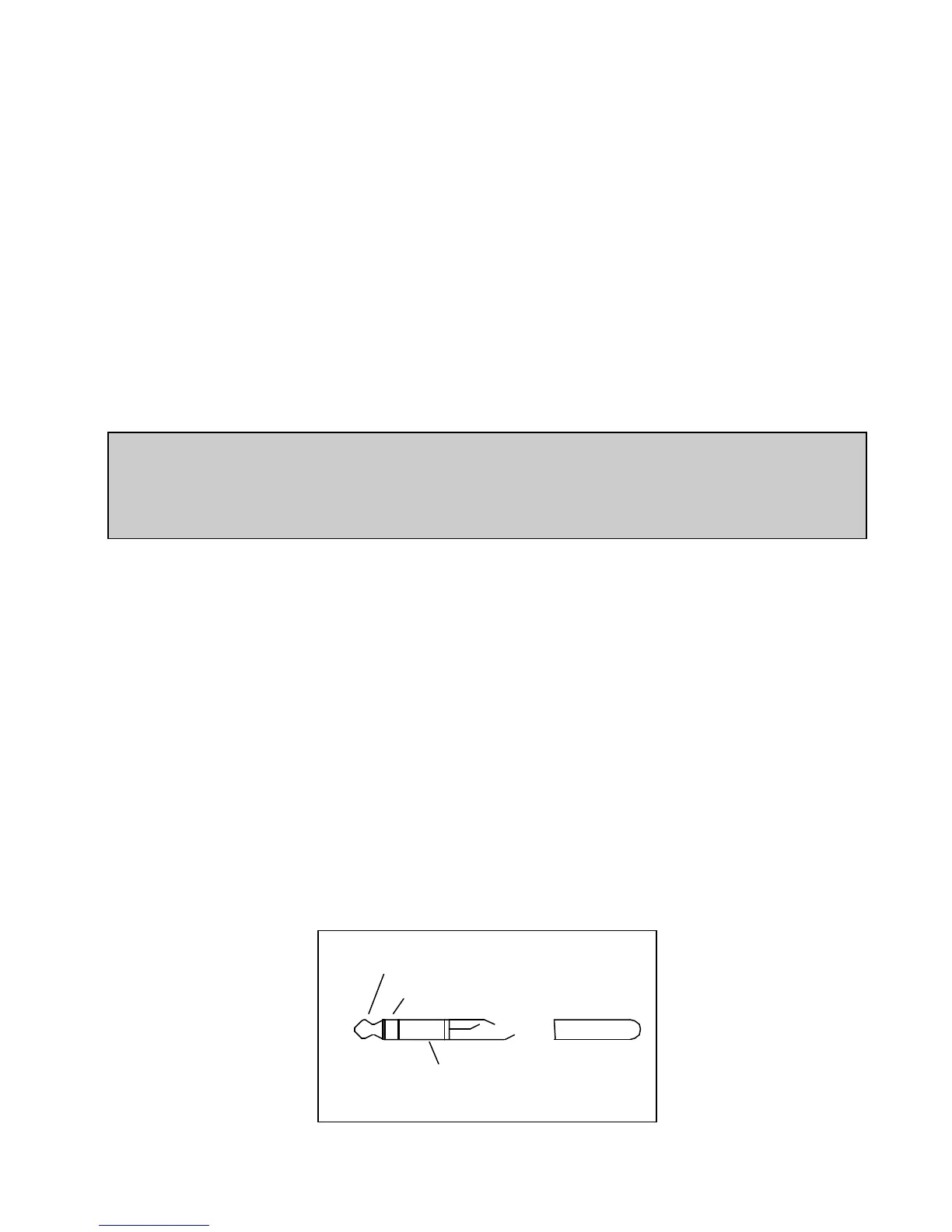
Monitor outputs are subject to muting under various operational conditions. Output connections appear on
¼“ phone jacks located on the rear of the unit. These outputs are balanced, with a nominal output level of
0 dbm and a nominal impedance of 600 ohm. To insure proper stereo phasing of your monitor signals, follow
the suggested wiring in figure 4.8. Important: Many monitor amplifiers and most powered speakers do not
have balanced inputs. If your amplifier’s inputs are unbalanced (RCA, mini jack or simply 2 wire connectors
per input), connect only the Tip (hot or +) and Sleeve (ground). DO NOT connect the Ring (-). Furthermore,
DO NOT use 2 circuit phone plugs (Tip and Sleeve only). These phone plugs will short a portion of the
driver amp to ground causing damage to the driver.
Tip = Plus (+)
Ring = Minus (-)
Sleeve = Shield
Fig. 4.8


 To Next Page
 Loading...