EasyManua.ls Logo

BlueCard BP-2002S - User Manual

BlueCard BP-2002S
12 pages
Print Icon
To Next Page IconTo Next Page
Loading...
English BlueCard
Inductive Guard Tour Reader Usage Manual
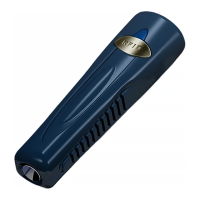
BP-2002S Guard Tour Reader
BP-2002F Guard Tour Reader
Main Features
BP-2002S serial Guard Tour Reader employs inductive data collection (RFID),
and single-chip manufacturing technologies. It conveniently operates without
needing a button, and automatically detects and reads radio-frequency ID cards.
The BP-2002S serial product is used to collect relevant patrol information at set
points such as route, guard, location, time, and events, and then upload them to
the PC for processing and verification.
The main different between BP-2002S and BP-2002S-V is the BP-2002S-V has
a LCD display window.
First-Time usage
Before reading signal cards, first connect with the PC and start the software to
calibrate the reader’s internal clock. Wait until it automatically shuts down
before performing readings. After calibrating, please initialize the reader to make
sure the reader does not have any useless records.
Question and Answer IconNeed help?

Do you have a question about the BlueCard BP-2002S and is the answer not in the manual?

Summary

Main Features

BP-2002 S Guard Tour Reader Functionality

Uses RFID and single-chip tech for data collection, reads cards automatically.

BP-2002 S vs BP-2002 S-V Difference

BP-2002S-V includes an LCD display window, unlike the BP-2002S.

First-Time Usage

Initial Calibration and Setup

Connect to PC, calibrate clock, wait for shutdown, then initialize.

Operation Instructions

BP-2002 S Turning On and Off

Reader turns on automatically for card reading and shuts off when complete.

BP-2002 S Reading Cards

Position card to head; 4 red flashes and 1 beep indicate successful reading.

BP-2002 F Turning On and Off

Reader turns on automatically for card reading and shuts off when complete.

BP-2002 F Reading Cards

Position card to head; 4 red flashes and 1 beep indicate success. Displays last 4 digits.

Status Indications

BP-2002 S: Successful Reading

Indicates a successful reading with 1 beep and 4 flashes.

BP-2002 S: Memory Full

Reading not successful; memory full, requires data upload.

BP-2002 S: Clock Calibration Required

Reading successful, but internal clock needs PC calibration.

BP-2002 S: Low Battery

Continuous LED flashes indicate low battery, needs changing.

BP-2002 S: Reader Error

Reader has an error; requires connection, upload, and initialization.

BP-2002 F: Current Time Display

The BP-2002F displays the current time.

BP-2002 F: Memory Full

Reader memory is full; requires data upload before more readings.

BP-2002 F: Clock Calibration Needed

Internal clock needs calibration after reader is turned on.

BP-2002 F: Low Battery

Battery is low and needs a new battery.

BP-2002 F: Reader Error

Reader has an error; requires connection, upload, and initialization.

Data Upload

Uploading Data via Communication Station

Readers upload data via stations like BS-1000, BS-2000, etc.

Connecting and Uploading with BS1000

Connect BS-1000 to PC, place reader, start software for automatic upload.

Miscellaneous

BP-2002 S Post-Communication Readiness

BP-2002S reads cards 5 seconds after PC communication.

Signal Card Reading Interval

Maintain an interval longer than 5 seconds between signal card readings.

Working As Card Reader

BP-2002 S as Standard Card Reader

BP-2002S can function as a standard signal card reader for various applications.

Troubleshooting

BP-2002 S: Reading Success, Clock Calibration Needed

Reading successful, but internal clock requires PC calibration.

BP-2002 S: Reading Unsuccessful, Memory Full

Reading failed; memory full, requires data upload.

BP-2002 S: Error: 1 Beep, 4 Flashes, then 8 Beeps

Reader error requires connection, upload, and initialization.

BP-2002 S: Low Battery Indication

Continuous LED flashes indicate low battery, needs charging/change.

BP-2002 S: Failed Upload, 8 Beeps

Upload error requires initialization; all data will be removed.

BP-2002 S: Hardware Error: 1 Beep, 1 Flash

Hardware error requires returning the reader to the manufacturer.

BP-2002 S: Failed to Scan Signal Card

Wait 5 seconds after PC communication before scanning again.

BP-2002 S: Failed Scan Solutions 2-4

Check interval, memory, battery; contact support if issues persist.

BP-2002 S: Failed PC Communication Solutions

Check software, station connection, and reader placement on BS-1000.

BP-2002 S: Failed Scan & Communication

Reader may have low battery; check battery and contact support.

Data Uploaded, No Report Data

Check 'Basic Report', use 'Reprocess' if data is present but not in reports.

Failed to Calibrate Reader Clock

Initialize reader and calibrate clock; initialization removes all records.

Data Sheet

BP-2002 S Data Sheet

Specifications for BP-2002S including card reading, power, memory, dimensions.

BP-2002 F Data Sheet

Specifications for BP-2002F including card reading, power, memory, dimensions.

Battery Usage Guidelines

General Battery Handling Instructions

Follow manufacturer directions; do not disassemble, recharge, or expose to heat.

Consequences of Low Battery

Low battery can cause reader shutdown and stop checkpoint readings.

Battery Safety Dangers

Dangers include explosion risk, high temperatures, disassembly, and impact.

Changing the Battery on the BP-2002 S Reader

Battery Type and Availability

Uses CR123A battery, available in convenience stores.

Step 1: Lift Battery Cover Label

Lift the label from the battery cover to begin the replacement process.

Step 2: Identify Depressions

Two round depressions are revealed beneath the battery cover label.

Step 3: Turn Battery Cover Counter-Clockwise

Use needle-nosed pliers to hold depressions and turn cover counter-clockwise.

Battery Replacement Steps

Step 4: Open Cover & Note Ring

Open cover, note silicone ring; replace if damaged. Cathode faces outwards.

Step 5: Remove Battery Cap and Battery

Open battery cap and remove battery, exposing the battery compartment.

Step 6: Remove Shock-Absorption Pad

Remove the silicone shock-absorption pad from the compartment wall.

Final Battery Installation Steps

Step 7: Create Circuit (2-5 seconds)

Create a circuit between compartment bottom and wall for 2-5 seconds.

Step 8: Replace Components & Test

Replace pad, battery, cap. Check for reset beeps and calibrate time.

Step 9: Install Battery Cover

Use pliers to install battery cover, noting the notch for proper fit.

BP-2002 S-V Battery Replacement Note

BP-2002S-V uses the same battery replacement procedure.

Overview

The BlueCard Inductive Guard Tour Reader is a device designed for collecting patrol information at set points and uploading it to a PC for processing and verification. It utilizes inductive data collection (RFID) and single-chip manufacturing technologies, offering convenient operation without the need for buttons, as it automatically detects and reads radio-frequency ID cards.

Function Description:

The primary function of the BlueCard Guard Tour Reader (BP-2002S and BP-2002F models) is to collect patrol information, including route, guard, location, time, and events, from designated checkpoints. This data is then uploaded to a PC for further processing and verification, enabling efficient management and monitoring of security patrols. The BP-2002S operates by automatically turning on to read a card when it is within range and then shutting off once the reading is complete. The BP-2002F model offers the same core functionality but includes an LCD display window, which shows the last four digits of the signal card's hexadecimal ID number after a successful read, a feature useful for status inquiry. Both models indicate a successful reading with four flashes of a red indicator light and a single "beep" sound.

The device can also function as a standard signal card reader for various applications.

Important Technical Specifications (BP-2002S / BP-2002F):

  • Card-Reading Format: Inductive / Non-Contact, 125 Khz EMID.
  • Maximum Reading Range (BlueCard Tags):
    • BLC-02 (86mm×54mm): 6.0cm
    • BLC-40 (Φ40mm): 4.0cm
    • BLC-30 (Φ30mm): 3.5cm
    • BLC-22 (Φ22mm): 3.5cm
    • BLC-6-28 (Φ6.5mm×27mm): 3cm
  • Power Capacity: >330,000 Readings.
  • Battery Type: CR123A 3v Single-Use Lithium.
  • Display:
    • BP-2002S: LED Status light.
    • BP-2002F: LCD display, LED Status light.
  • Shock Absorbency: External: metal tubing, rubber shell. Internal: silicone gel padding, epoxy resin. Tested to withstand drops from 2 m (cement floor).
  • Waterproofing: Completely Sealed.
  • Memory: 30,719 Records.
  • Data Reliability: Flash Memory, Stores Data Without Electricity.
  • PC Connection: Wireless Comm Station.
  • Working Temperature:
    • BP-2002S: -40°C to 70°C.
    • BP-2002F: -20°C to 70°C.
  • Working Humidity: 0 to 95%.
  • Dimensions:
    • BP-2002S: 120mm×35mm×26mm.
    • BP-2002F: 140mm×42mm×30mm.
  • Weight:
    • BP-2002S: 142g±5g.
    • BP-2002F: 172g±5g.

Usage Features:

  • First-Time Usage: Before initial use, the reader must be connected to a PC, and the software must be started to calibrate the reader's internal clock. It is recommended to wait for automatic shutdown after calibration, then initialize the reader to clear any useless records.
  • Turning On and Off: The system automatically turns on when a valid signal card is in range for reading and automatically turns off once the reading is complete.
  • Reading Cards: To read a card, position it in front of the blue reading head. A successful read is indicated by four red indicator light flashes and a "beep" sound. The BP-2002F model will additionally display the last four digits of the card's hexadecimal ID.
  • Data Upload: Data can be uploaded via various communication stations (BS-1000, BS-2000, BS-3000, BS-4000/BS-4000m, BS-6000). For example, with the BS-1000, the reader is placed in its indentation, ensuring the reading head is between the status lights and its top is flush against the inside edge. The "Connect" window in the PC software initiates the automatic upload process.
  • Signal Card Reading Interval: The interval between signal card readings should be longer than 5 seconds.
  • Post-Communication Readiness: After communicating with the PC, the BP-2002S becomes capable of reading signal cards after 5 seconds.

Status Indications (BP-2002S / BP-2002F):

  • 1 Beep With 4 Flashes: Reading successful.
  • After Reading a Card, 4 Beeps With 4 Flashes: Reading unsuccessful, memory full. Data needs to be uploaded.
  • After Reading a Card, 1 Beep With 4 Flashes, Followed By 4 Beeps With 4 Flashes: Reading successful, but internal clock needs calibration with PC.
  • After Reading a Signal Card, The LED Light Flashes Continuously: Low battery, needs changing.
  • After Reading a Signal Card, 1 Beep with 4 Flashes Followed by 8 "Beep" Sounds With 8 Flashes of the LED: Reader error. Connect to PC, upload data, then initialize.
  • BP-2002F Display: Current Time: A display of the current time.
  • BP-2002F Display: "FULL" (with 4 beeps and 4 flashes): Memory full. Data needs to be uploaded.
  • BP-2002F Display: "E-00" (with 4 beeps and 4 flashes on startup): Internal clock needs calibration.
  • BP-2002F Display: LED Light Flashes Continuously: Low battery, needs changing.

Troubleshooting:

  • Failed to Scan Signal Card:
    • Wait 5 seconds after PC communication before scanning.
    • Ensure the card was not read within 5 seconds of the previous reading.
    • Reader memory may be full; upload data.
    • Battery may be low; change battery.
  • Failed to Communicate with PC:
    • Check if PC software is open and configured for BP-2002S communication.
    • Ensure the BS-1000 wireless communication station is properly connected and found by the software.
    • Verify the BP-2002S is correctly placed on the BS-1000.
  • Data Uploaded, but No Data in Shift Report/Patrol Details:
    • Data upload indicates proper reader function. Check "Basic Report" for data. Use "Reprocess" function to populate Shift Report and Patrol Details.
  • Failed to Calibrate Reader Clock:
    • Initialize the reader, then calibrate the clock. Important: Initialization removes all saved records.
  • Hardware Error (1 beep and 1 flash during PC communication):
    • Return the reader to the manufacturer.

Maintenance Features:

  • Battery Replacement (CR123A):
    1. Lift the label from the battery cover.
    2. Two round depressions will be revealed.
    3. Use needle-nosed pliers to hold the depressions and turn the battery cover counter-clockwise.
    4. Once opened, note the silicone-waterproofing ring's location. Replace if damaged. Ensure the battery's cathode (negative end) faces outwards.
    5. Remove the battery and the silicone shock-absorption pad from the compartment wall.
    6. Create a circuit between the round metallic contact at the bottom of the compartment and the compartment wall for 2-5 seconds.
    7. Replace the silicone shock-absorption pad, the new battery, and the battery cap. If the reader beeps continuously with LED flashing, it's resetting. Wait one minute, then test. Calibrate time using software before further use.
    8. Use pliers to install the battery cover, ensuring the notch aligns with the inside tubing and the cover is flush with or below the notch.
    • Note: BP-2002S-V uses the same battery replacement procedure.
  • Battery Usage Guidelines:
    • Always follow the battery manufacturer's directions.
    • Do not disassemble, recharge, short circuit, or expose to high temperatures or fire.
    • Refer to the equipment manual for battery pack information.
    • Low battery can cause the reader to shut down and stop reading checkpoint cards.
    • Battery life varies with age, usage, type, and brand.
    • DANGER: Keep battery pack away from fire, do not expose to temperatures >60°C (140°F), do not leave near a heater or in a hot car, do not disassemble or modify, and do not drop or knock it.

BlueCard BP-2002S Specifications

General IconGeneral
BrandBlueCard
ModelBP-2002S
CategoryCard Reader
LanguageEnglish

Related product manuals