EasyManua.ls Logo

Bluedio CS4 - Important Safety Information; Speaker Overview

Bluedio CS4
14 pages
Print Icon
To Next Page IconTo Next Page
To Previous Page IconTo Previous Page
Loading...
Weicome
to
your
new
Bluedio
speaker
We
appreciate your
choice
of
Bluedio speaker. Before use,
please
read this user manual carefully
and
keep
for
future
référence.
alionl
„„,,_,
1
.DONT
use
thé
speaker
at a
high
volume
for any
extended
period
to
prevent hearing damage.
2.DONT
use
thé
speaker
while
driving
or in any
environment
requiring your
full
attention.
3.Keep
thé
speaker, accessories
and
packaging parts
out of
reach
of
children
to
prevent accidents
and
choking
hazards.
4.DONT
expose
thé
speaker
to
either
extremely high
or
low
températures
(idéal:
10°C
to
35°C).
S.Removal
of
thé
chargeable
battery
in
thé
speaker
shall
be
conducted
only
by a
qualified professional. DONT
try
to
replace
thé
battery
on
your own.
6.lf
thé
speaker
has
incompatible issues
with
your laptop
or
desktop, please
use
thé
included audio cable
to
connect;
or
buy a
CSR4.0
and
above Bluetooth adapter.
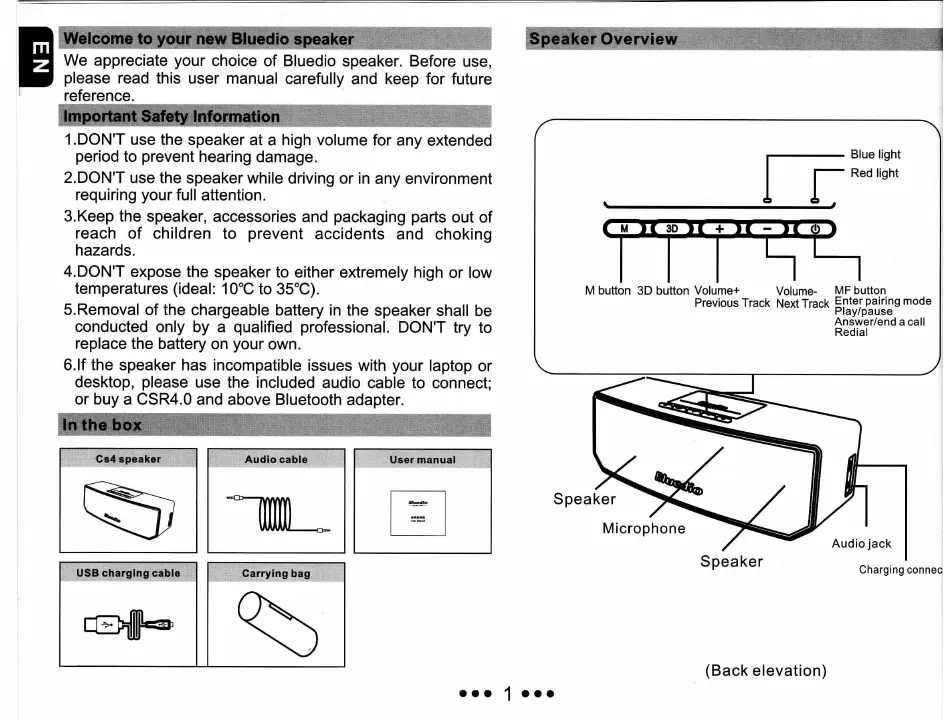
Cs4
speaker
USB
charging
cable
Carrying
bag
sker
Overview
rr
Blue
light
Red
light
M
button
3D
button
Volume+
Volume-
MF
button
Previous
Track
Next Track
Enter
pairing
mode
Play/pause
Answer/end
a
call
Redial
Speaker
Microphone
Speaker
(Back
élévation)
1