EasyManua.ls Logo

Bluedio CS4 - 3 D Sound Effect Control; Bluetooth Device Pairing

Bluedio CS4
14 pages
Print Icon
To Next Page IconTo Next Page
To Previous Page IconTo Previous Page
Loading...
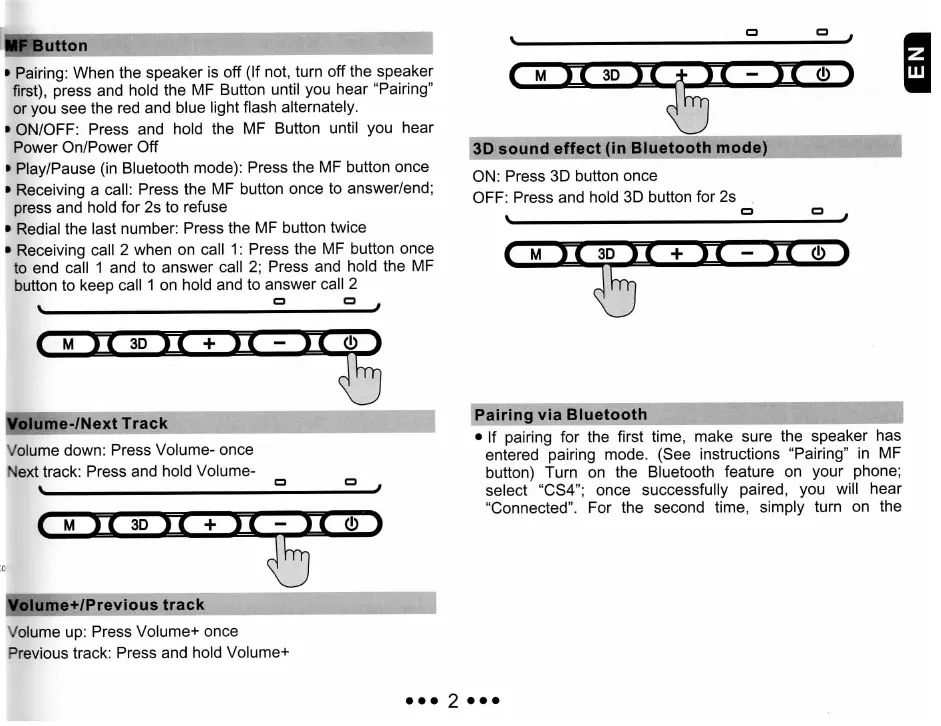
MF
Button
»
Pairing: When
thé
speaker
is
off
(If
not, turn
off
thé
speaker
first), press
and
hold
thé
MF
Button until
you
hear "Pairing"
or
you see
thé
red and
blue
light
flash alternately.
»
ON/OFF: Press
and
hold
thé
MF
Button
until
you
hear
Power
On/Power
Off
Play/Pause
(in
Bluetooth mode): Press
thé
MF
button once
Receiving
a
call:
Press
thé
MF
button once
to
answer/end;
press
and
hold
for 2s to
refuse
Redial
thé
last
number: Press
thé
MF
button twice
Receiving call
2
when
on
call
1:
Press
thé
MF
button once
to
end
call
1 and to
answer
call
2;
Press
and
hold
thé
MF
button
to
keep call
1 on
hold
and to
answer call
2
ie-/Next
Track
Volume down: Press Volume-
once
Next
track: Press
and
hold Volume-
i
M
ic
3D
ic
+
ic
-
e+/Previous
track
Volume
up:
Press Volume+ once
Previous
track:
Press
and
hold Volume+
3D
sound
effect
(in
Bluetooth
mode)
ON:
Press
3D
button once
OFF: Press
and
hold
3D
button
for 2s
s
° °
;
I
M 1C
3D
H
+
1C
-
JÇ
0 1
PairingviaBluetooth
If
pairing
for
thé
first
time,
make sure
thé
speaker
has
entered pairing mode. (See instructions "Pairing"
in MF
button) Turn
on
thé
Bluetooth feature
on
your phone;
sélect
"CS4";
once successfully paired,
you
will
hear
"Connected".
For
thé
second time, simply turn
on
thé