8
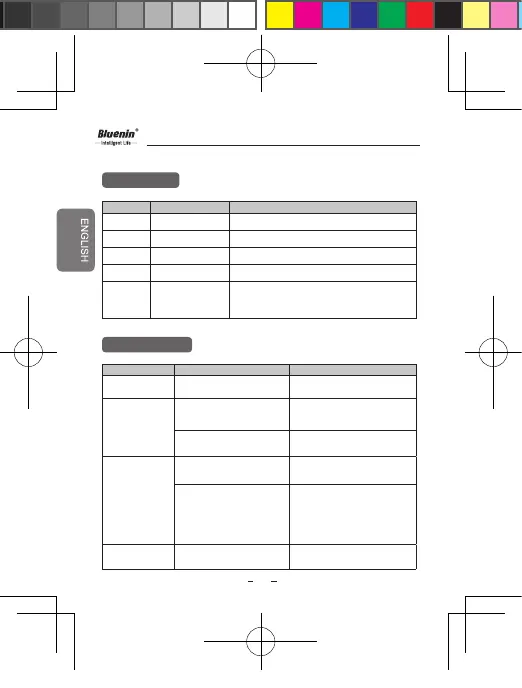
LED Indicator
Troubleshooting
Function BBH-939 Status Action
Power on Blinking blue light
Power o Blinking blue light then fade out
Pairing mode Blinking red and blue light
Device connected The Blue LED light ickers 1 time every 5 seconds
Charging Charging complete
The red LED light stays on and changes to violet
when charged 80% and above.The blue LED light
stays on when full charged.
Issue Possible problem Resolution
Does not turn on
Check whether the battery of
The BBH-939 is fully charged.
Charge the battery
Unable to operate
on BBH-939
Speaker when
connected
Check if your device support
wireless operation
Determines by the device
you connected support it or not.
Check whether the battery
of The BBH-939 is low.
Charge the battery
Unable to pair The
BBH-939 With
the Wireless
Device
Check and make sure the
speaker is on.
Press the Power button to
turn on the Speaker.
Check and make sure the
speaker is placed in
pairing mode
With the power o, long press the
Power button to the ON position
at the same time for 1 second to
place the Speaker in Manual
Pairing mode
Low sound
(speaker)
Check the speaker volume Increase the volume level.
BBH-939
BBH-939-B标-说明书-9-19.indd 8 2020/4/17 18:11:32



 To Next Page