03
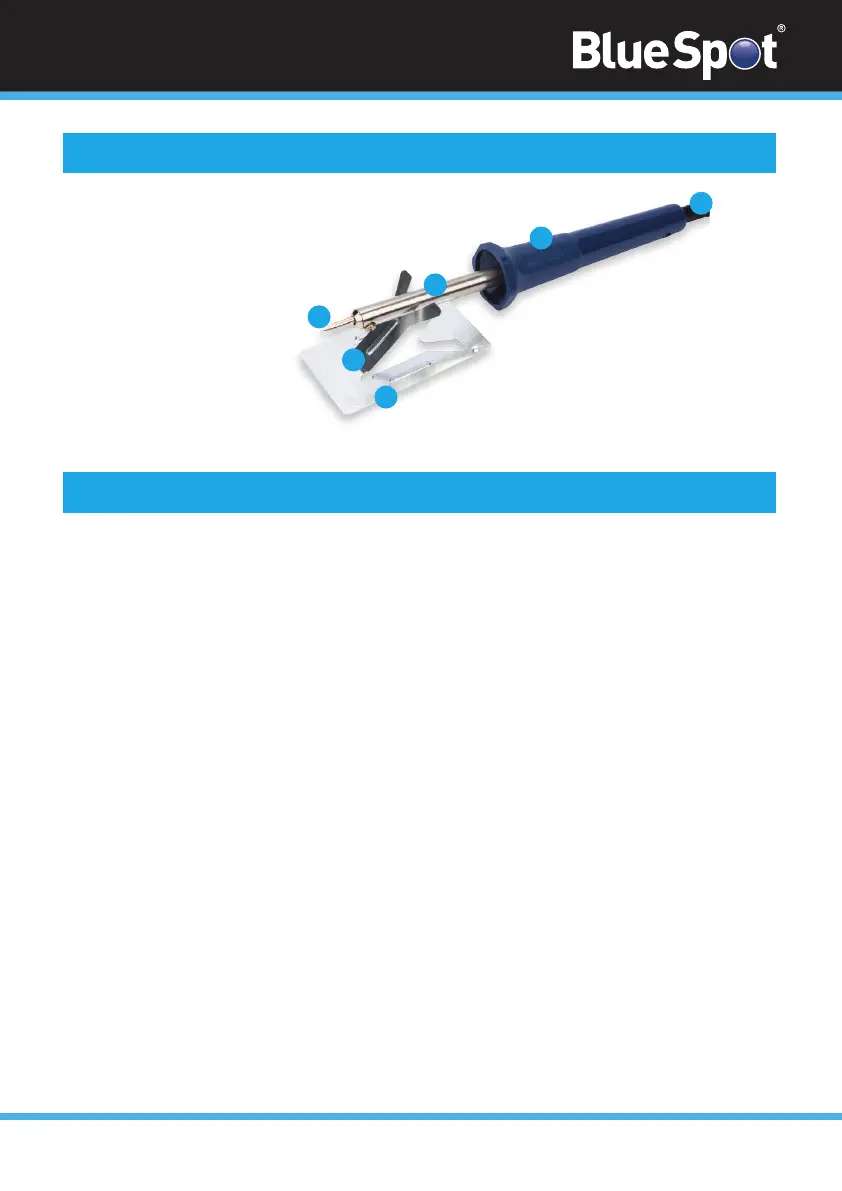
1. Soldering Iron
2. Soldering Tip
3. Fixing Screw for tip
4. Handle
5. Cable with plug
6. Stand
1
2
3
4
5
6
Technical Specifications (continued)
• The soldering iron is switched on and begins heating up as soon as the plug is connected to
the mains. To turn the soldering iron off, disconnect the plug from the mains.
• Make sure the soldering tip is correctly fitted before switching the soldering iron on.
• Objects to be soldered must be clean. Conductors should be cleaned with steel wool or fine
sand paper.
• Be sure tips are tinned before soldering, occasional retinning will ensure good solder
connections.
• Place the tip on the work and then use the solder at the tip of the iron to create a good
connection.
• Molten solder must cool undisturbed however blowing air onto the solder decreases
drying time.
• DO NOT use more solder than necessary, use just enough to make a good connection.
• Use rosin core solder for radio and electrical connections.
User Tips


 To Next Page