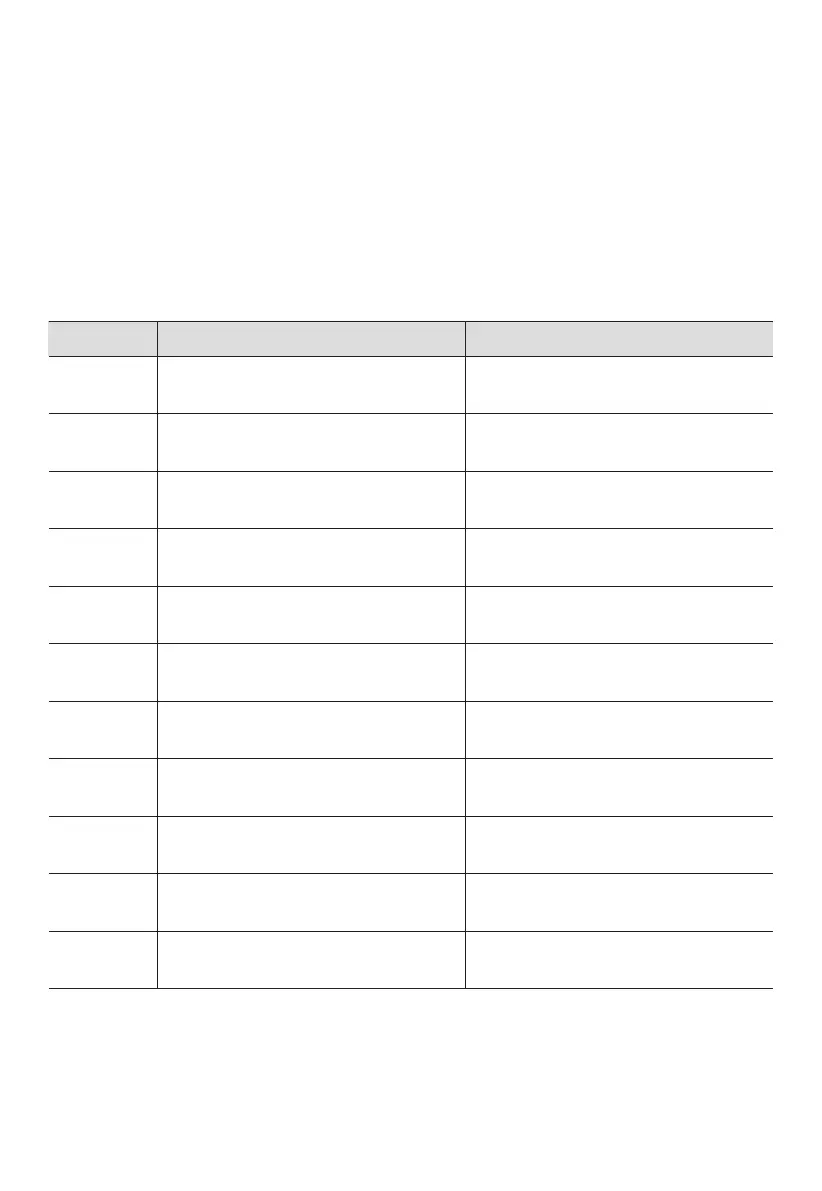
5.2 Troubleshooting
Error Code Error Description
Inverter overload
Inverter short circuit
Cigarette lighter overtemperature
Charging temperature too high
Charging temperature too low
Discharging temperature too high
Discharging temperature too low
PV Input overvoltage
B80 PV Input overvoltage
E001
E003
E065
E068
E085
E086
E087
E088
E033
E034、E035
Others
Troubleshooting
Check if the power of connected
devices is too high.
Check if the connected devices are
damaged.
Check if the power of connected
devices is too high.
Wait for the battery to cool down
before charging.
Recommended charging
temperature: 0℃~40℃.
Wait for the battery to cool down
before discharging.
Recommended discharging
temperature: -20℃~40℃.
Ensure the PV input voltage is in
the range of 12V~28VDC.
Ensure the PV input voltage is in
the range of 12V~28VDC.
Contact BLUETTI technical support.
Wait a few minutes and try again.
Cigarette lighter output
short circuit
When should I use the Grid Enhancement mode?
This mode is handy when charging the AC60P via an unstable AC source, such as an
unreliable grid or generator.
E.g. If you change the generator's output while charging the AC60P, the voltage dip
will also cause the charge to fail.
Q7:
A:
JUST POWER ON20



 To Next Page