8. Troubleshooting
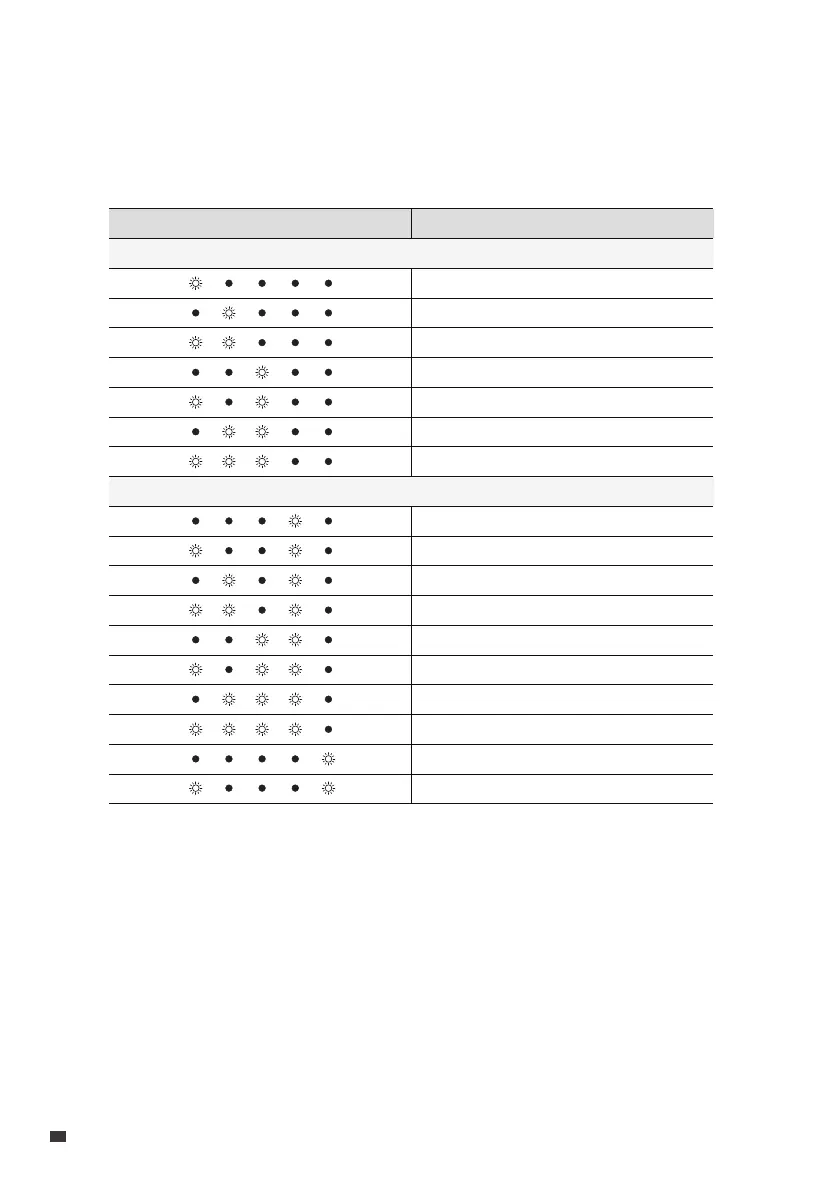
When the B300K malfunctions, the LEDs may flash or turn off in various combinations.
For soft errors, restart the unit. For hardware issues, contact BLUETTI support for repair
or replacement. See the table below for details.
Low voltage
High/low temperature
Pre-charge failure
Short circuit
Address allocation mix-up
Charging/discharging overcurrent
Overdischarging protection
Soft Errors
DescriptionIndicators Status
NTC fault
Cell fault
Voltage reference fault (3.3V)
AFE fault
Current zero point error
Battery cell disconnect
Charging MOS fault
Discharging MOS fault
Cell voltage difference fault
Current detection error
Hardware Failures
EN
JUST POWER ON
16



 To Next Page