P-10
Locate the external handle (A), and hold it up to the external side of the door. Check that the handle
opens in the right direction. If it doesn't you will need to change the handle direction. If this needs
changing, it's likely that the internal one will too. Please follow the below instructions or watch the
video on our YouTube channel.
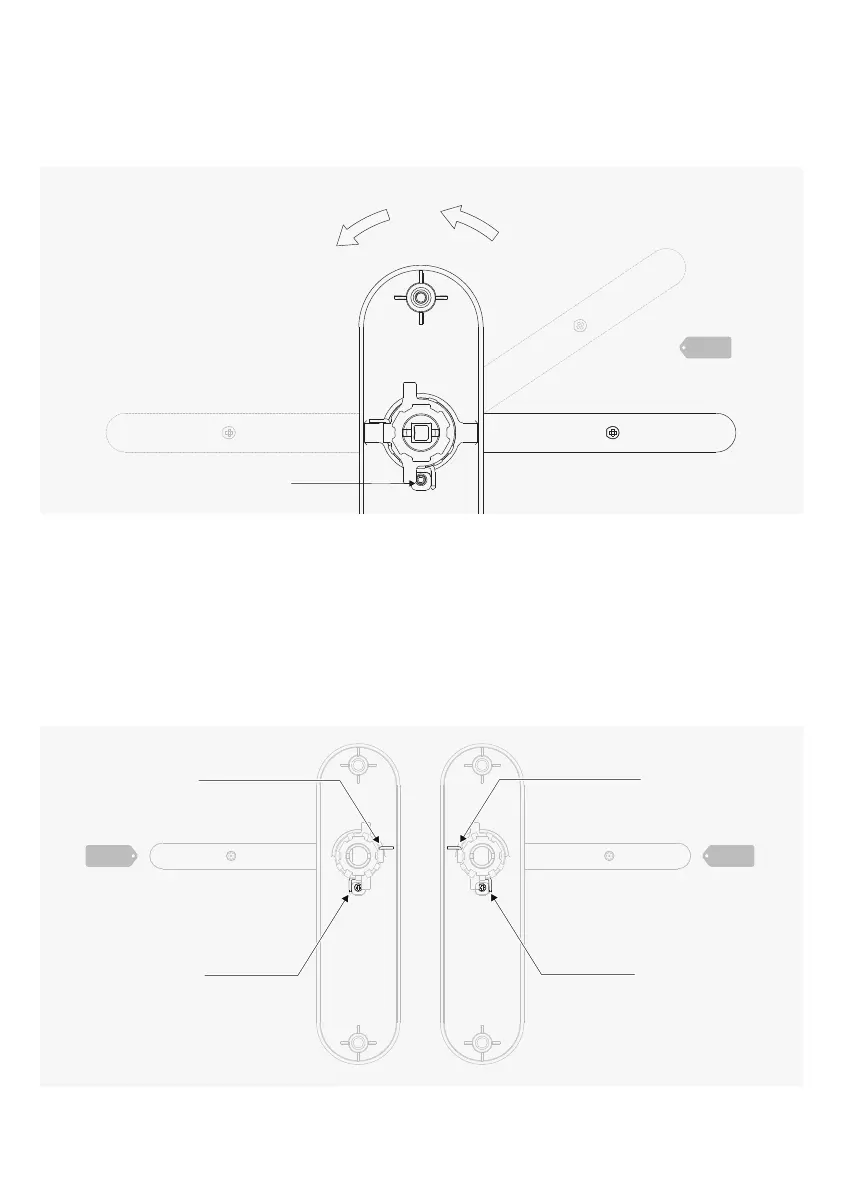
Changing the Handle Direction
Fig 2 Fig 3
Spring end
Spring end
Spring end
Spring end
Look at the inside face of the handle, you will see a small location screw see Fig. 1. Push the
handle down slightly to relieve pressure and remove this location screw.
Rotate the handle 180 degrees so that it's pointing the otherway. Ensure the spring arm doesn't
jump over the pillar that holds the location screw (see the red lines in Fig. 2 and 3).
Pull the handle down slightly in it's new position to relieve pressure and replace the location screw
back into it's posion.(You should start with either Fig. 2 or 3, then end up with the other one).
Repeat on the other handle.
Check that both handles now work in the correct direction for your door.
a
b
c
d
e
Fig 1
Location screw1-A


 To Next Page
 Loading...