The handle also comes with 2 mechanical keys. You can use the key
to unlock the door at any point, also when the handle has no power
and it is in lock down.
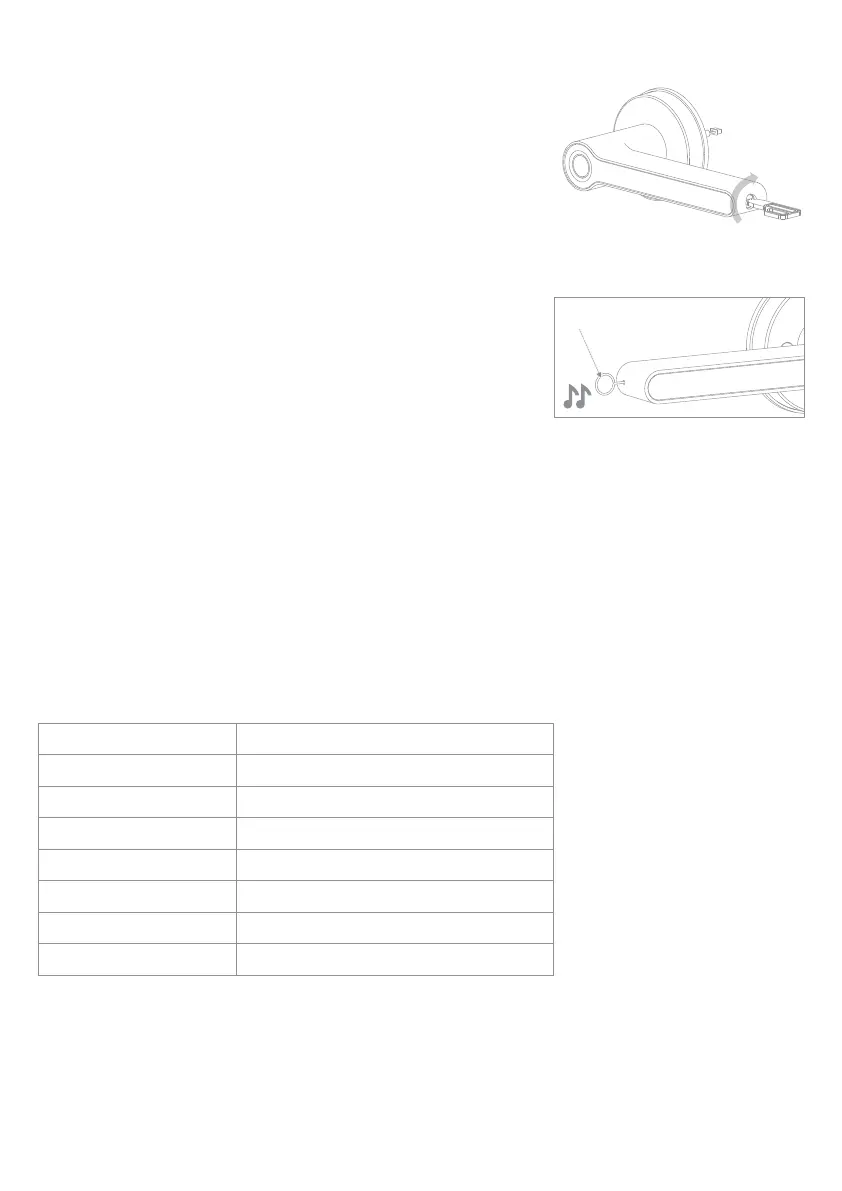
Insert the key into the end of the external handle and turn (see
diagram). Push the handle down and open the door.
If you would like to leave the door unlocked and ensure it doesn't
lock upon every close, simply leave the key turned in the handle. The
handle will now operate like any other door handle.
Unlock the Handle with the Key
Deleting All Fingerprints (Reset)
Using the setting needle provided, press and hold the set button
for 8 seconds (located in the end of the internal handle), until
you hear a double beep.
Release the set button, you will hear 1 long beep. All fingerprint
data has been deleted and the handle has been reset.
When the handle has been reset and there is no data saved, any
fingerprint can be used to unlock the handle.
4a
4b
4c
Setting button 8 seconds
5 invalid attempts within 5 minutes will cause a system lock down for 90 seconds. The handle will not
respond during system lockdown. The lock down can be cleared by pressing the set button and giving
ADMIN validation or overridden by using the key.
When adding fingerprints, if no further operation is detected within 12 seconds after each previous
operation, the system will automatically log out.
When registering fingerprints, it is recommend that you press your finger on the sensor in different
positions so that the fingerprint data is fully collected.
Notes
P-16
Power
4 x AAA Batteries
508dpi
50 fingerprints (3 x admins + 47 x users)
2 keys
IP65
-10℃~60℃
20% ~ 93%RH
Battery Life
Spatial Resolution
Fingerprint Capacity
Mechanical Key
IP Rating
Operating Temperature
Humidity
Up to 200 days
Product Specification


 To Next Page
 Loading...