P-15
Add USER Fingerprints
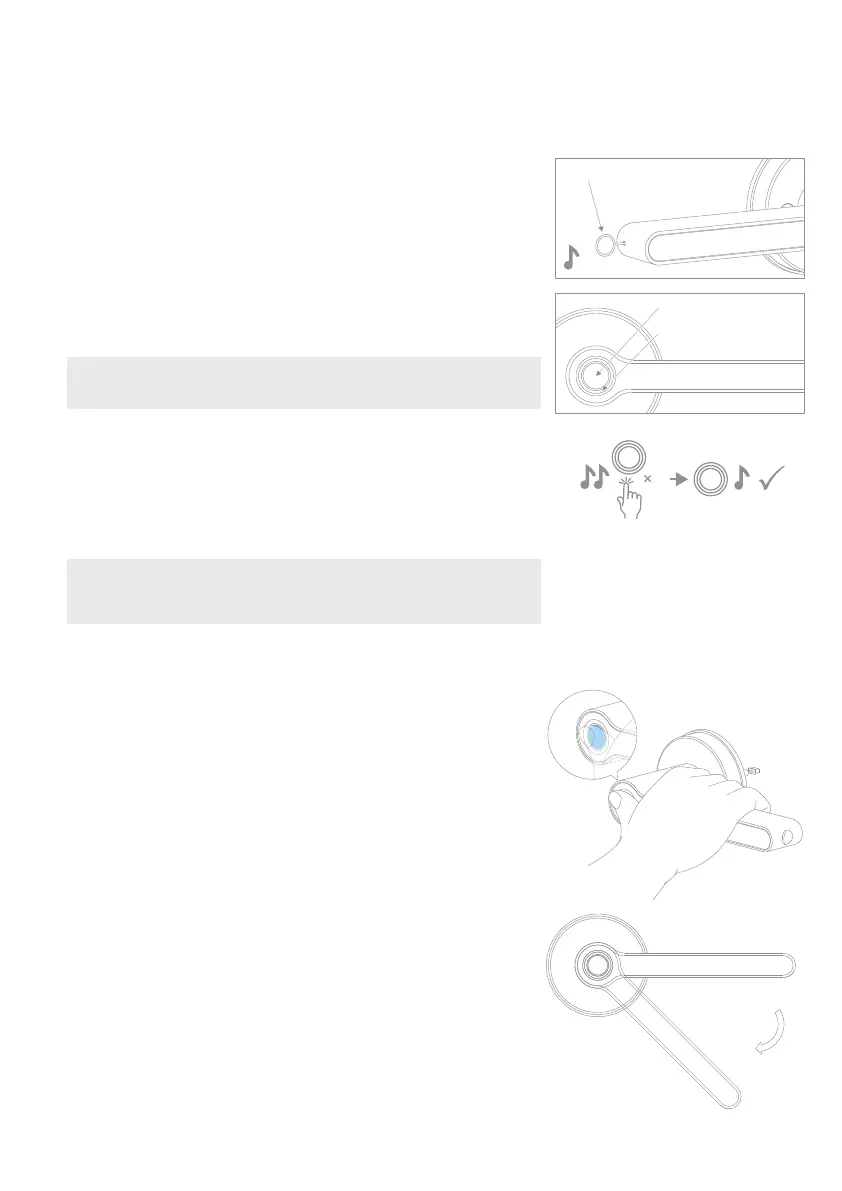
Press and hold your registered finger/thumb on the fingerprint
sensor. You only need to press your finger lightly and do not need
to push hard. Remember to press your finger in the position you
register it in.
If a beep sounds and the LED lights up GREEN, the fingerprint is
valid. Wait until the mechanism turns, push the handle down and
open.
If a triple beep sounds and the LED lights up RED, validation has
failed. Press the fingerprint again with a registered fingerprint. If
you have registered multiple fingers as suggested, try another
finger.
5 invalid attempts within 5 minutes will cause a system lock down
for 90 seconds. The handle will not respond during system lock
down. The lock down can be cleared by pressing the set button and
giving ADMIN validation or overridden by using the key.
Unlock the Handle with the Fingerprint
Note that an ADMIN fingerprint will be required to authorise the
registration of new fingerprints on the handle.
We recommend that all users register at least 3 fingerprints to
ensure that they have a backup if one doesn‘t recognise.
3. How to set up USER Fingerprints
Use the setting needle (K) to press the set button. The set
button is located in the end of the internal handle (see diagram).
Press the button once, 1 beep will sound and the LED lights up
BLUE.
3a
Press the fingerprint sensor with a registered ADMIN fingerprint,
you will hear a long beep and the LED will flicker GREEN, then
turn BLUE. USER registration is now ready.
3b
Note: if 1 triple beep sounds and the LED turns off, the authorisation
was unsuccessful. Repeat step 3a.
Note: A total of 3 ADMIN and 47 USER fingerprints can be registered.
Once all fingerprints are registered, 1 triple beep will sound and the
LED will turn off signifying USER capacity is full.
To add your desired USER fingerprint, briefly place your
finger/thumb on the sensor and then REMOVE it when you hear
a double beep (touch and remove), repeat this 3 more times
until the LED turns GREEN. (When adding fingerprints, it is
recommended that you press your finger/thumb in different
positions so that the fingerprint data is fully collected).
Your USER fingerprint is now registered.
3c
4
Setting button once
Fingerprint Sensor
Circular LED


 To Next Page
 Loading...