USER’S MANUAL
12
1.2.3. Remote Control
BASIC OPERATIONS
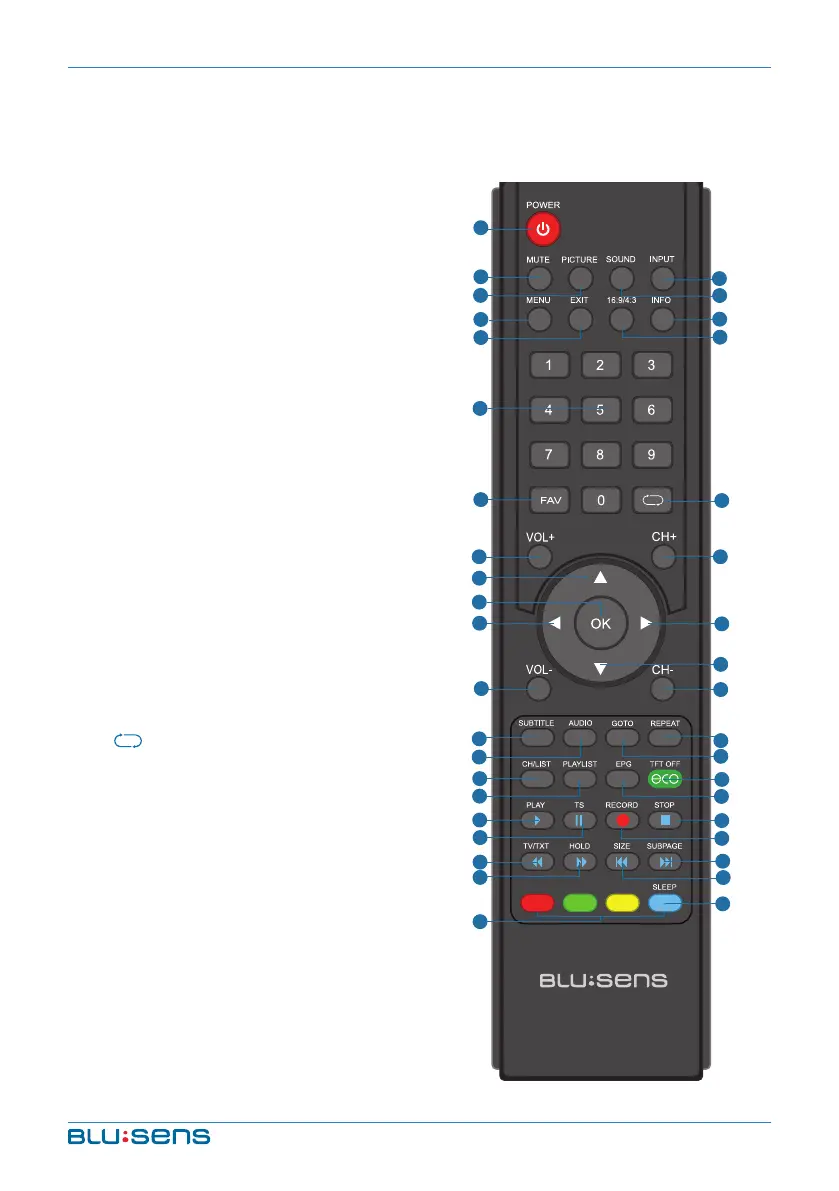
1. POWER: Turn on the TV/Standby
2. MUTE: Mute the device
3. PICTURE: Output image mode
selection
4. SOUND: Setting audio options
5. INPUT: AV input source selection
6. MENU: Show Menu
7. EXIT: Exit the Menu
8. 16:9/4:3: Aspect ratio selection
button
9. INFO: Show information about the
current programme
10. NUMBER KEYS: Change the
channel directly
11. FAV: Show the list of favorite
channels
12. : Return to the previous channel
tuned
13. VOL+: Increase volume
14. CH+: Next Channel
15. UP: Up
16. OK: Confirm
17. LEFT: Left
18. RIGHT: Right
19. DOWN: Down
20. VOL-: Decrease volume
21. CH-: Previous Channel
1
4
6
7
3
5
9
8
10
12
14
18
19
21
25
24
28
32
29
33
37
11
13
15
16
17
20
22
36
38
2
23
27
31
35
26
30
34
39


 To Next Page