USER’S MANUAL
28
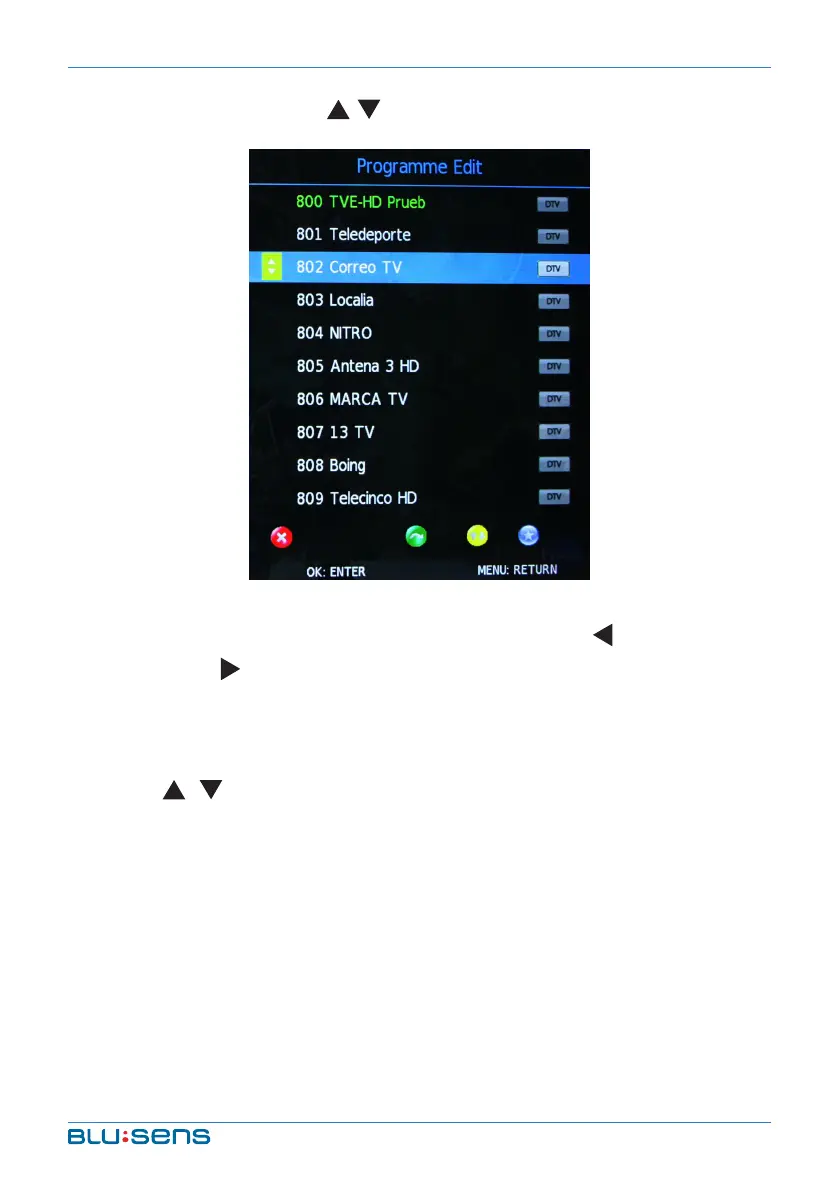
Programme Edit: Press / key to select the channel you´d like to edit.
DELETE: When you select a channel, a dialog box of “Are you sure?” will
appear on the screen after pressing the RED key. Press key to delete the
channel and key to cancel operation.
MOVE: After selecting channel press GREEN key. MOVE icon appears
behind the channel which you select. Press GREEN again to cancel it.
Press / key to select the channel position that you´d like to move and
press OK key to confirm. Press MENU key to return main menu.
SKIP: After selecting channel press BLUE key. SKIP icon appears behind
the channel which you select. Press BLUE key again to cancel it. Press
MENU key to return main menu.
FAVOURITE: After choosing channel press YELLOW key. FAVOURITE icon
appears behind the channel which you select. Press YELLOW key again to
cancel. Press MENU key to return main menu.


 To Next Page