8
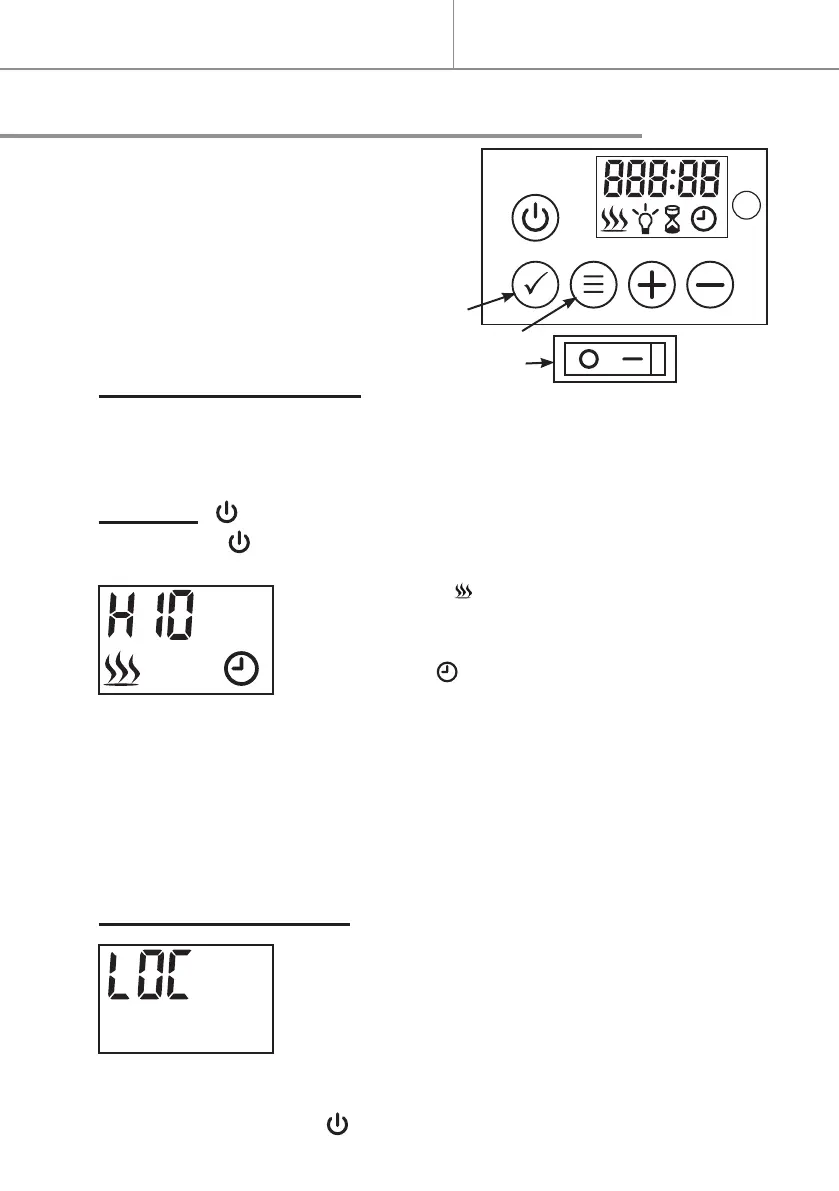
The controls
Quick start
OK
MENU
A
MASTER POWER SWITCH (A)
- Open the cover and push button A down (I) to “ON” position or push but-
ton A down (O) to “OFF” position.
STANDBY ( )
- Press button to start or stop the ame eect.
Default interface displays as following :
- The heating icon will display and start heating
when the room temperature is less than the default
setting (10°C), on the contrary it will not display and
heat.
- The clock icon
will be ashing because the
time is not set yet. Please follow the steps in “Time
Setting” to set the time.
.Two short beeps that increase in pitch sound when switched on and
three beeps that decrease in pitch sound when switched o.
.When switches on, the heating level, set temperature and clock icon
are displayed. The display will be disappeared after 60 second without
any operation. Press any button to display again.
LOCKING THE BUTTONS (
)
- Press and hold button
for more than 6 sec-
onds to lock or unlock the buttons, “LOC” is
displayed and indicated that the buttons are
locked. Once it’s locked “LOC” will be ashing for 6
seconds then disappear, press any button “LOC”
will ash again.
- Long press button for 6 seconds to unlock the buttons.
.Please note the button is never locked.


 To Next Page