11EN
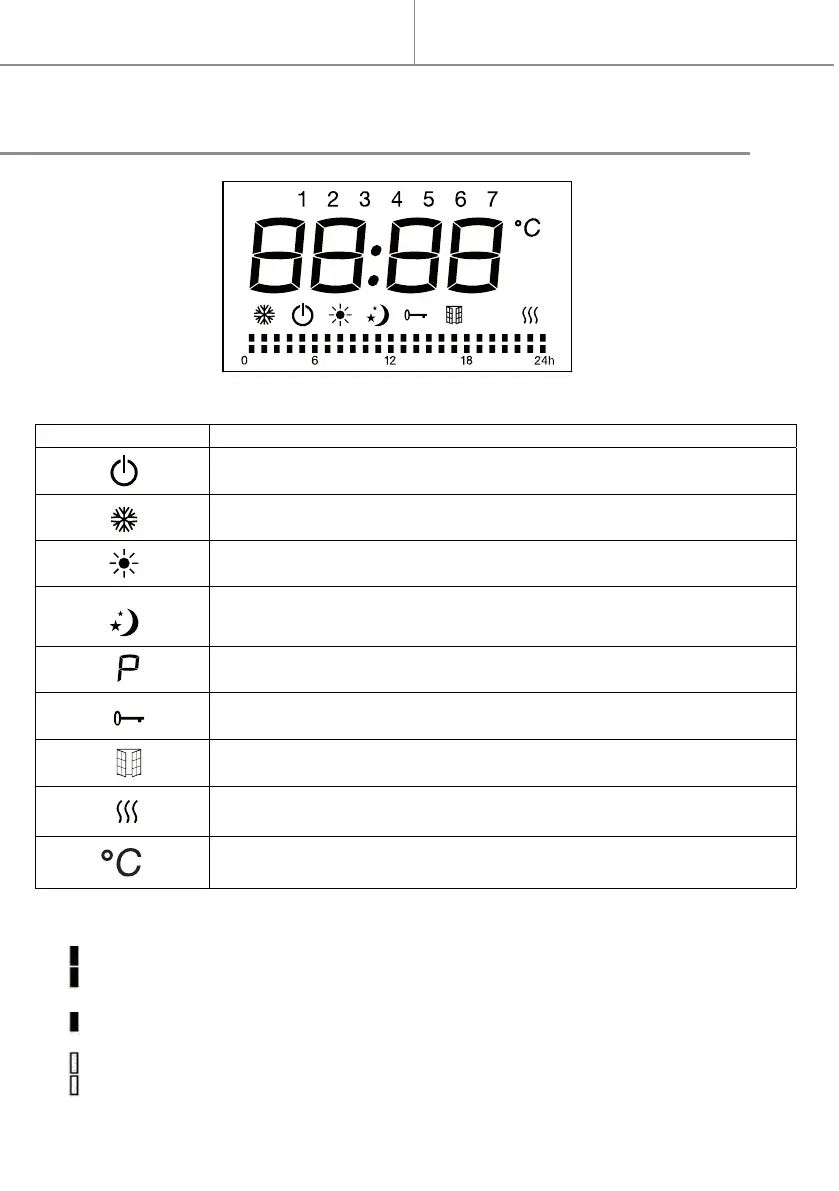
Functions of the icons on the LCD:
LCD display:
Quick start
Symbol Function
Mode Standby (the appliance doesn’t work but with power on)
Mode Anti-freeze (the appliance maintains the temperature around 7°C)
Mode Comfort (set the desired temperature)
Mode ECO (ECO maintains the temperature that is 3.5 ° C lower to comfort temperature.
This mode reduces the temperature without disturbing the desired temperature in comfort
mode)
Temperature (centigrade)
Weekly personalized modes:
Mode Comfort active
Mode ECO active
Standby
keyboard lock
Mode P (Under mode P , the appliance will work at comfort mode as default (except for
France)
Window detector function
Heating indicator (When appliance is heating up, this icon will show on the screen.
The icon will disappear when detected temperature reach the set temperature.)


 To Next Page