12EN
2. Press M button to toggle among the modes: Comfort mode , Economic mode
Antifreeze mode , P1/P2/P3/P.
Under mode P , the appliance will work at comfort
mode as default (except for France).
I. Mode setting
HOW TO USE
Quick start
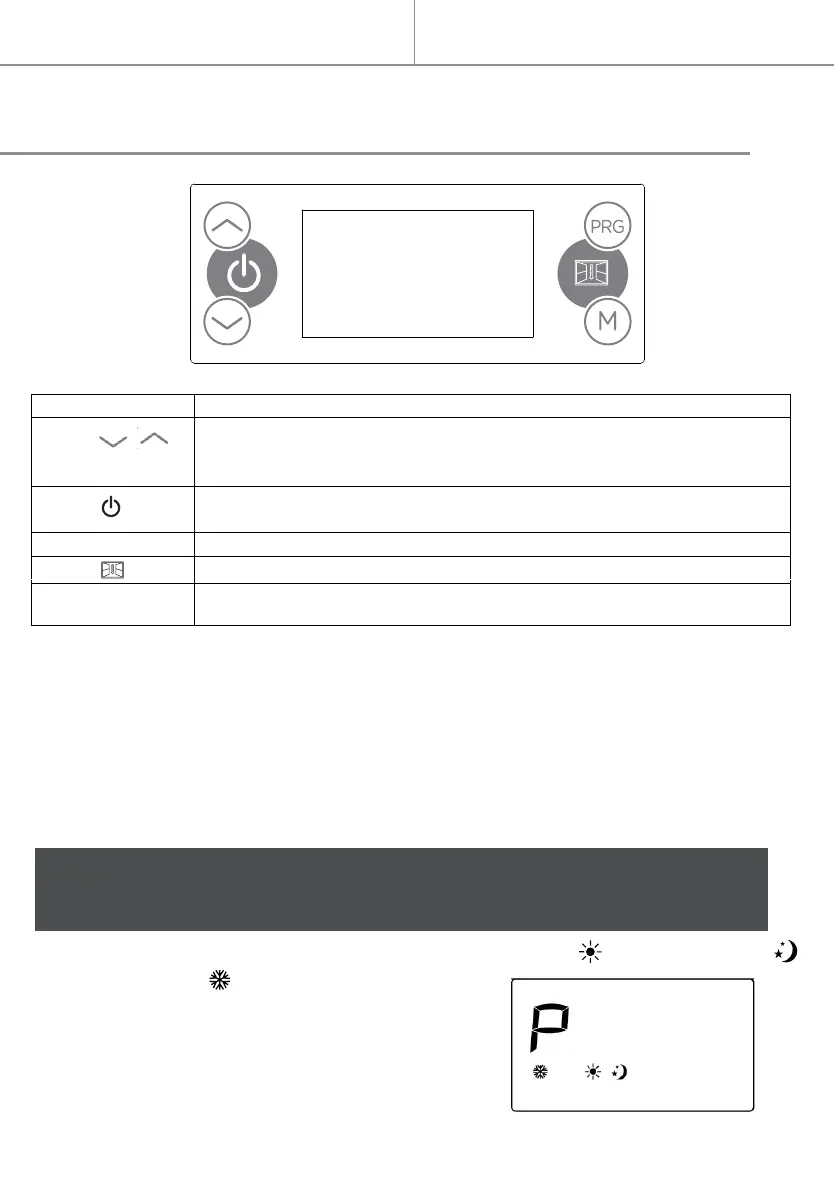
CONTROL PANEL
1. For the first time you use the device, after you connect to the power supply and
after that the clock is set, the device will be in standby mode, and you can press
the standby button to go to comfort mode.
Notes: In case of power failure, the unit keep in memory only the parameters, temperature
and operating mode. When power is restored, the clock should be adjusted again to
operate the various programs properly P1/ P2/ P3/ personalized.
Symbol Function
Touch
Touch
Touch
Touch
Touch
/
Set the time, day of the week, the temperature; or under weekly
personalized programs, to choose between comfort mode, eco mode or
standby mode.
Standby
PRG To choose the weekly personalized program
To select Window detector function
M
To select the working mode
comfort / eco / anti-freeze / P1 / P2 / P3 / P
When first use the machine, there will be some smell. The smell will disappear after
heater working for an hour.


 To Next Page