13EN
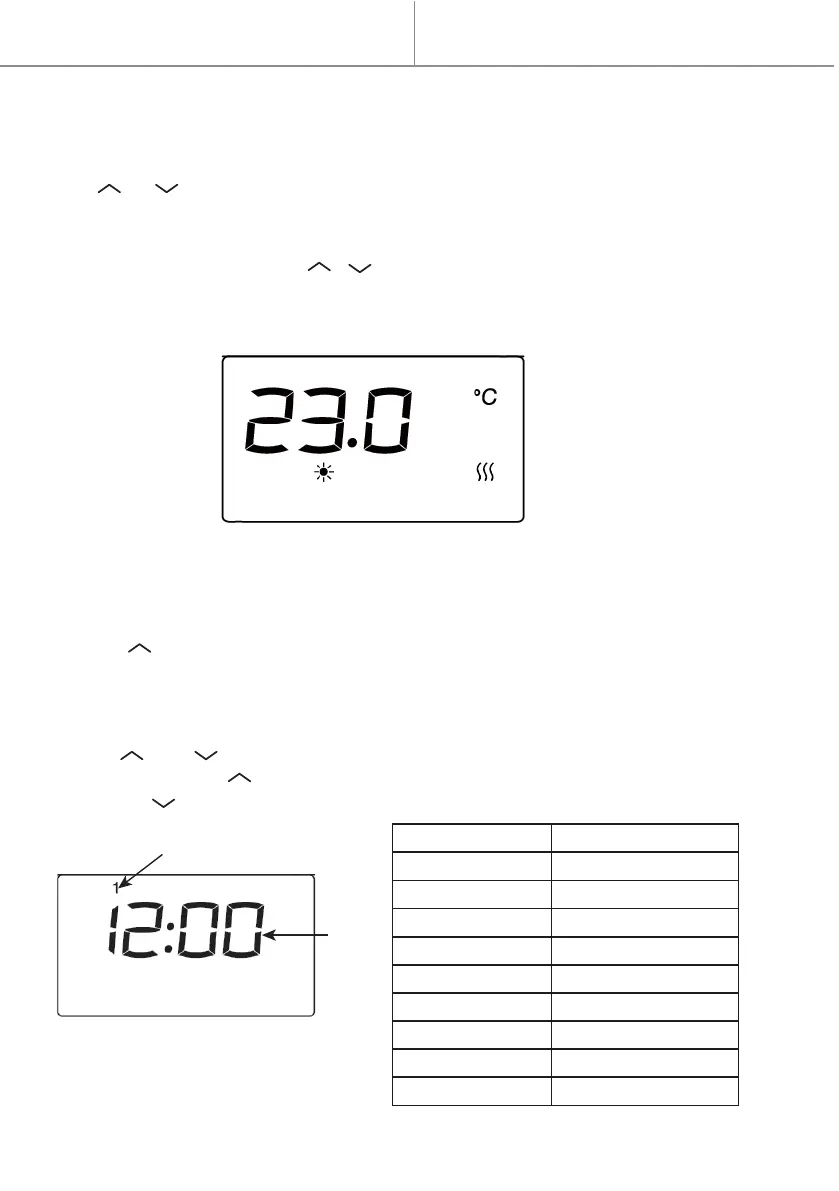
1. Under the mode of comfort mode or Eco mode (excluding anti-freezing mode),
press or to choose the desired temperature. The temperature difference
between mode ECO and mode comfort is 3.5°C, so the temperature of mode ECO is
between 1.5°C and 25.5°C.
2. Press other buttons except / to finish the setting, or after 5 seconds it will
automatically save.
When the room temperature is higher than the selected temperature, the heater will
stop heating.
Note:
Press the to set the hour/minute/week.
The time and day of the week remain valid as long as the power supply is not cut off.
The setting "day of the week" and "Time" applies to all programs (see Section IV, P1 /
P2 / P3 / Personalized).
1. Press and at the same time to start the time setting.
2. Continue to press to toggle among hour/minute/week.
3. Press the to set the hour/minute/week.
II. Temperature setting
III. Time setting
Quick start
Day of the week
Time
Selection Displayed icon
Monday
Tuesday
Wednesday
Thursday
Friday
Saturday
Sunday
Hour
Minute
1
2
3
4
5
6
7
00-23
0-59
0


 To Next Page