14EN
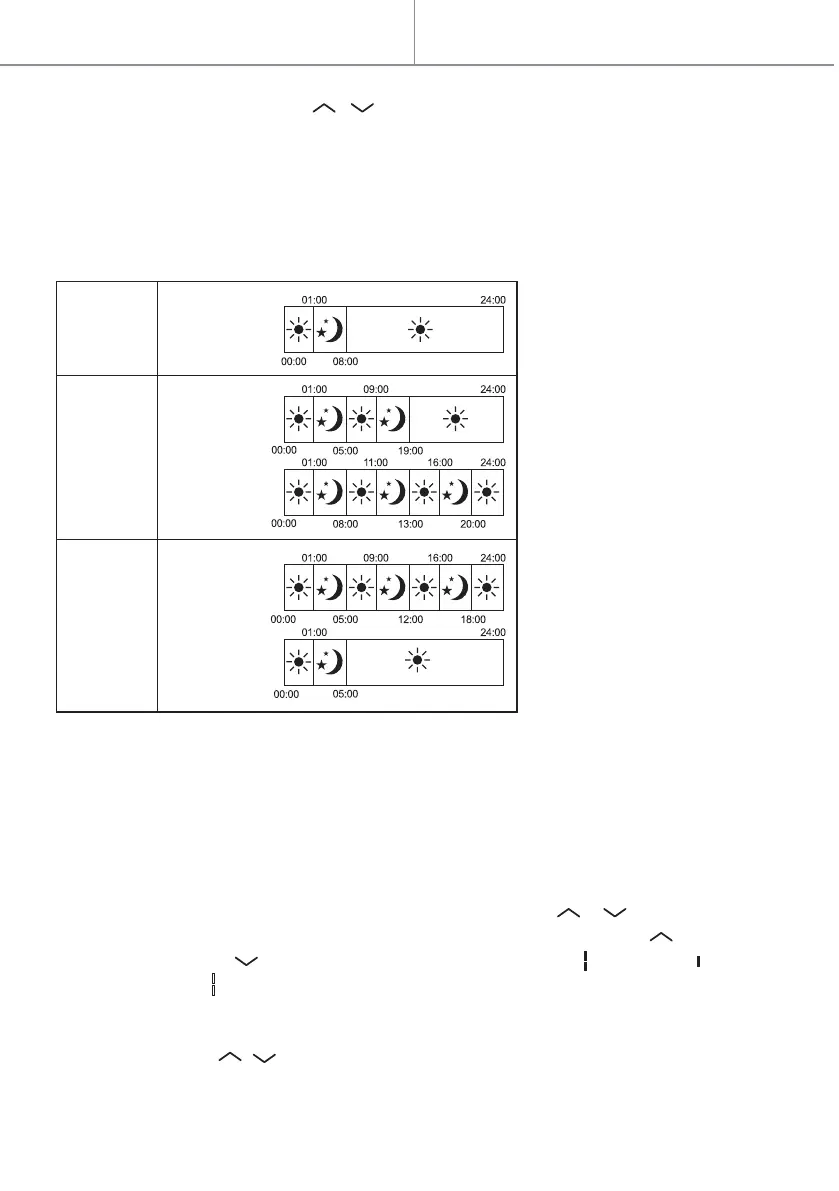
1. Pre-installed programs P1/P2/P3
2. Setting the personalized program
For example: to select the day 1, temperature of 23℃, comfort mode for 24 hours:
1. Press PRG, then / to choose day 1.
Press PRG button to select between “day (1-7)” and “heating mode of different
periods (00:00-24:00)”.
Select the desired day(1-7) or heating mode by pressing / buttons.
When setting “heating mode of different period(00:00-24:00)”, press button
to choose hours, and to choose among function: comfort , economic ,
and standby mode . after30 seconds it will automatically finish.
P1 / P2 / P3 programs are pre-installed programs. After confirming the program,
the program icon and the set temperature will be shown on the screen.
IV. Program setting
Quick start
4. Press other buttons except / to finish the setting, or after 10 Seconds it will
automatically save.
P1
P2
P3
Mon-Sun
day workables
weekends
weekends
day workables


 To Next Page