NavigationEntertainment Driving tips
147
Reference At a glanceControlsCommunicationsMobility
Radio
Your radio is designed for reception of the fol-
lowing stations:
> FM and AM
> HD Radio
*
> Satellite radio*
Selecting a station
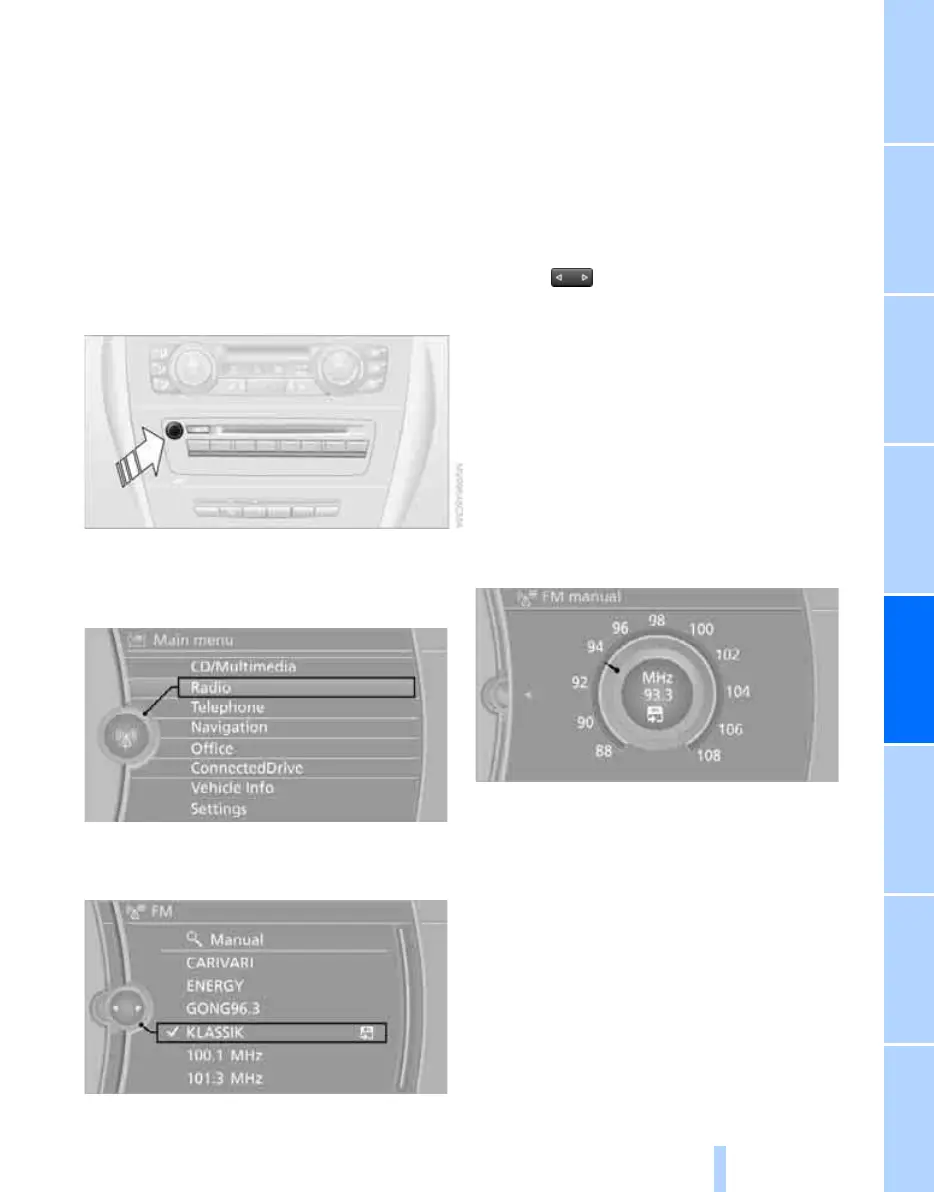
Press the knob if the sound output is switched
off.
1. "Radio"
2. "FM" or "AM"
3. Select the desired station.
The selected station is stored for the remote
control currently in use.
Changing stations
Turn the controller and press it
or
press the button for the corresponding
direction
or
press the buttons on the steering wheel, refer to
page 10.
Selecting a station manually
Station selection using the frequency.
1. "Radio"
2. "FM" or "AM"
3. "Manual"
4. Select the frequency: turn the controller.
To store the station: press the controller for an
extended period.
Storing stations
Via iDrive
1. "Radio"
2. "FM" or "AM"
3. Select the desired station.
Online Edition for Part no. 01 40 2 606 818 - © 03/11 BMW AGOnline Edition for Part no. 01 40 2 606 818 - © 03/11 BMW AG


 To Next Page