189
EntertainmentReference At a glanceControlsDriving tipsCommunications NavigationMobility
The BMW Assist Response Center will connect
you to the Roadside Assistance of the
BMW Group.
TeleService
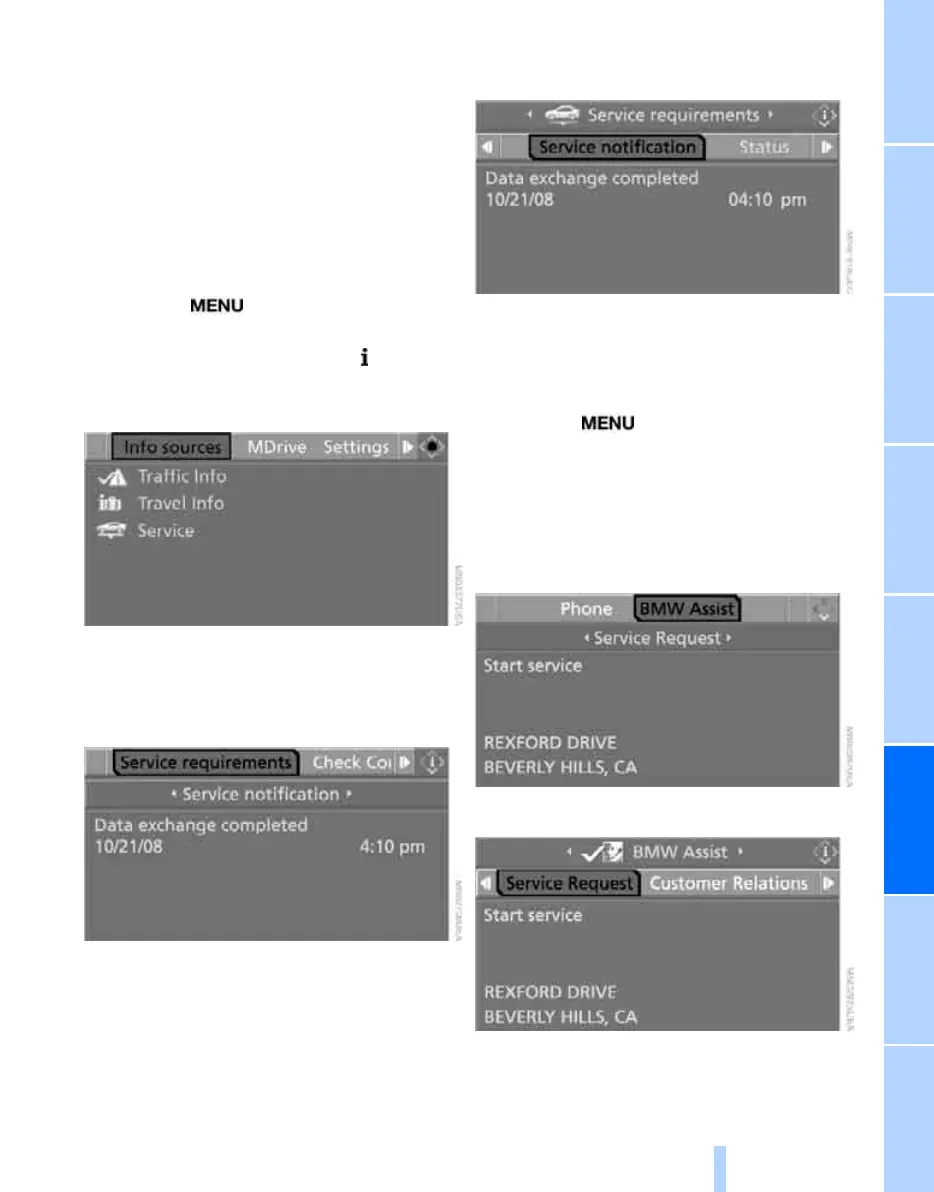
Automatic service notification*
The data on the service status of your vehicle or
on necessary inspections are transmitted auto-
matically prior to the due date. You can check
when the BMW center was notified.
1. Press the button.
This opens the start menu.
2. Press the controller to open the menu.
3. Select "Info sources" and press the control-
ler.
4. Select "Service" and press the controller.
5. Change to upper field if necessary. Turn the
controller until "Service requirements" is
selected and press the controller.
6. Select "Service notification" and press the
controller.
Manual service notification
You can transmit data on the maintenance state
of your vehicle to your BMW center if you want
to make an appointment for service.
1. Press the button.
This opens the start menu.
2. Move the controller forward to select
"Communication".
3. Change to upper field if necessary. Turn the
controller until "BMW Assist" is selected
and press the controller.
4. Select "Service Request".
5. Press the controller.
6. Select "Start service" and press the con-
troller.
ba8_m5us.book Seite 189 Montag, 5. Februar 2007 12:03 12
Online Edition for Part no. 01 41 0 013 310 - © 02/07 BMW AG



 To Next Page