Technology for comfort, convenience and safety
88
Head-Up Display*
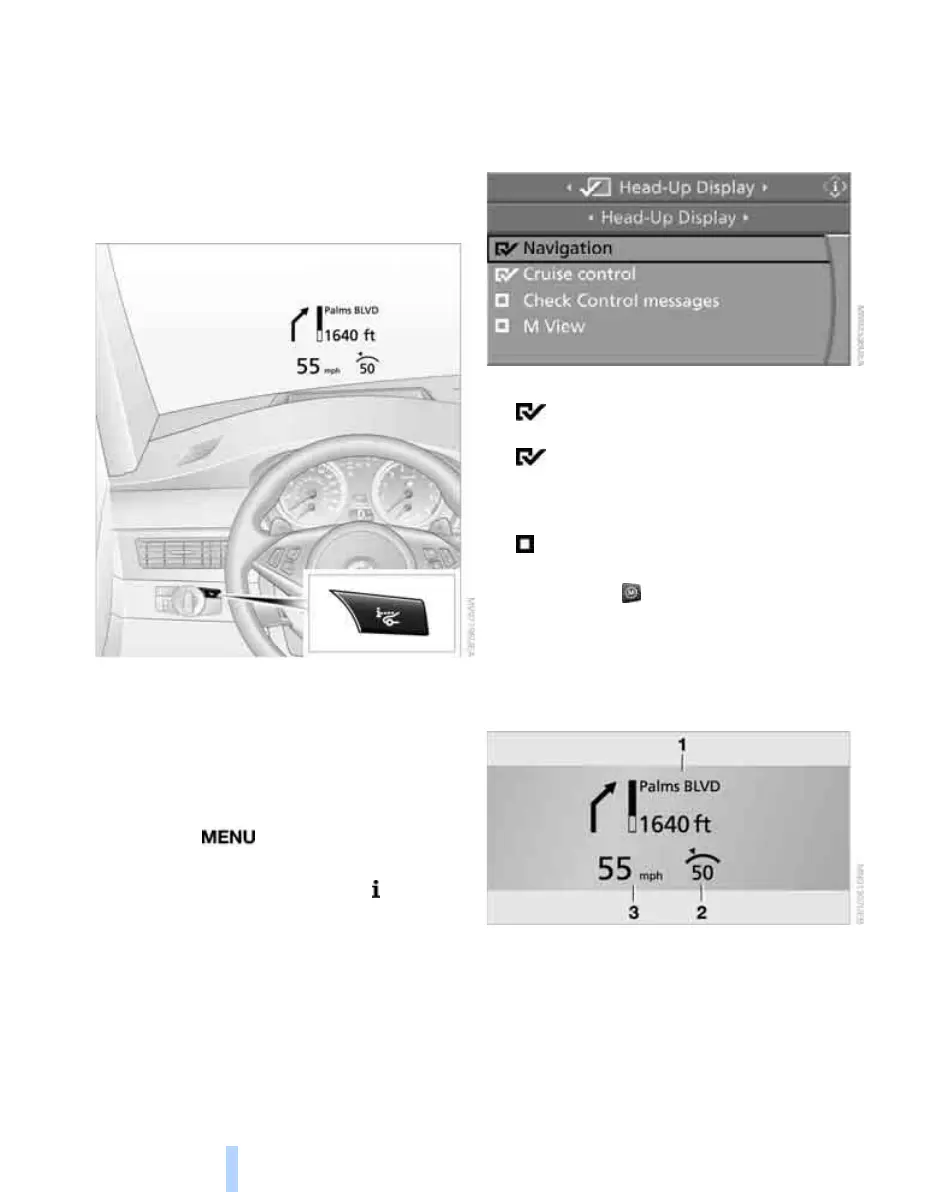
The concept
With the Head-Up Display important informa-
tion is projected into the driver's field of view,
e.g. navigation instructions. This enables you to
take in this information without looking away
from the road.
Switching on/off
Press the button.
Selecting displays
iDrive, for explanation of principle, refer to
page 16.
1. Press the button.
This opens the start menu.
2. Press the controller to open the menu.
3. Select "Settings" and press the controller.
4. Select "Display settings" and press the
controller.
5. Change to upper field if necessary. Turn the
controller until "Head-Up Display" is
selected and press the controller.
6. Change into the second field from the top.
Turn the controller until "Head-Up Display"
is selected and press the controller.
7. Select desired information of Head-Up Dis-
play.
8. Press the controller.
The information is shown on the Head-
Up Display.
"M View": the M view is shown in the
Head-Up Display. Information unavailable in
the M view appears on the Control Display
in gray and cannot be selected.
"M View": the default view is displayed.
The M view for the Head-Up Display can also be
selected with the button on the steering
wheel, refer to MDrive on page 50.
The settings are stored for the remote control
currently in use.
Default view
1 Navigation instructions
2 Stored desired speed of cruise control
3 Speed
ba8_m5us.book Seite 88 Montag, 5. Februar 2007 12:03 12
Online Edition for Part no. 01 41 0 013 310 - © 02/07 BMW AG



 To Next Page