4. "Instrument cluster"
5. "Configure widgets"
6. Select the desired setting.
The setting is saved for the current driver profile.
Information in detail
Distance travelled
Depending on the setting for displaying journey
data, the total distance driven and the route cov‐
ered are shown in the widget for the distance
travelled.
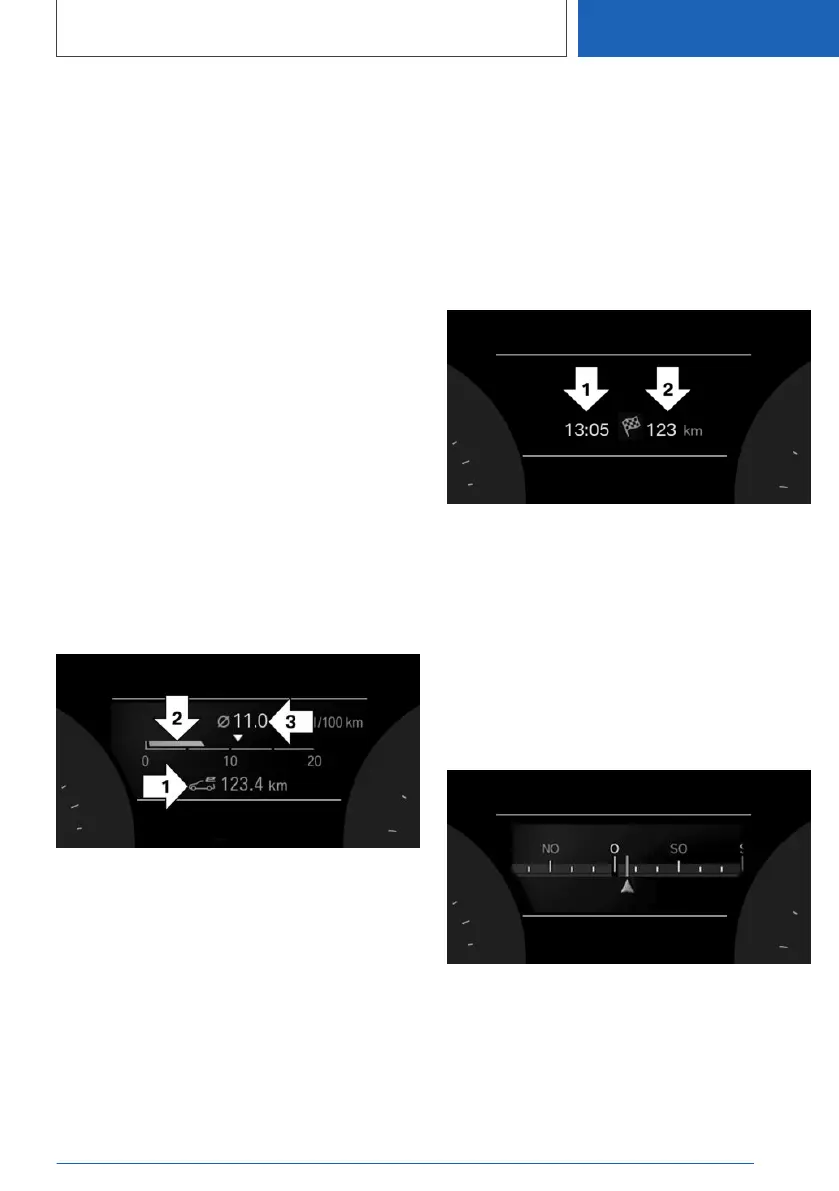
Consumption display
General
The average consumption values can be shown
on the on-board computer in the form of a bar
display.
In ELECTRIC, the electric consumption figures
are displayed.
Display
▷ Odometer for a electric driving, arrow 1.
▷ Current consumption, arrow 2.
▷ Average consumption, arrow 3.
Current consumption and average
consumption
Depending on the setting for displaying journey
data, the current consumption and average con‐
sumption are shown in the widget.
Navigation data
General
The expected arrival time and remaining distance
to the destination are displayed if a destination
was entered in the navigation system before
starting the journey.
Display
▷ Arrival time, arrow 1.
▷ Distance to destination, arrow 2.
Compass
General
The compass shows the direction in which the
vehicle is currently driving.
Display
Seite 175
Displays
CONTROLS
175
Online Edition for Part no. 01405A1EA53 - X/20



 To Next Page